BectricalShockHazard
Unplugpower cord from electrical out-
let. Do not operate the deanar without
the primaryor exhaust filters. Be sure
the filters are properlyinstalledto pre-
vent motor failure and/or electrical
shock.
PRIMARY FILTER
Check primary filter frequentlyand clean
when dirty.
TO REMOVE PRIMARY FILTER
Remove the dust bin and dust bin lid
assemblyas outlined in the DUST BIN
CLEANING section.
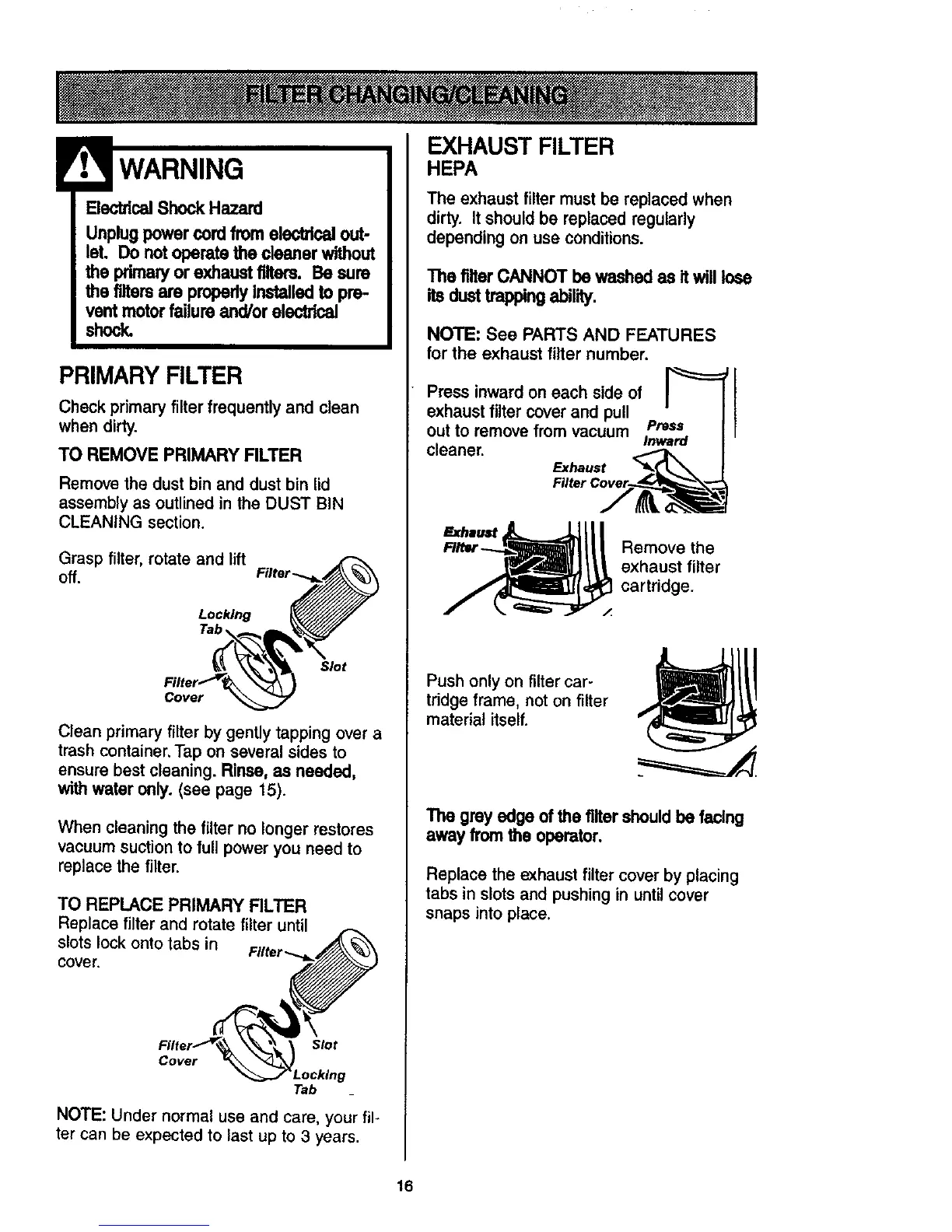
Grasp filter, rotate and lift
off.
Locking
\
Slot
Cover
Clean primary filter by gently tapping over a
trash container. Tap on several sides to
ensure best cleaning. Rinse, as needed,
with water only. (see page 15).
When cleaning the filter no longer restores
vacuumsuction to full poweryou need to
replace the filter.
TO REPLACE PRIMARY FILTER
Replace filter and rotate filter until
slots lock onto tabs in
cover,
Slot
Cover
Tab
NOTE: Under normal use and care, your fil-
ter can be expected to last up to 3 years.
EXHAUST FILTER
HEPA
The exhaust filter must be replaced when
dirty. It should be replaced regularly
depending on use conditions.
ThefilterCANNOTbewashedasitwilllose
itsdusttrappingability.
NOTE: See PARTS AND FEATURES
for the exhaust filter number.
Press inward on each side of
exhaust filter cover and pull
out to remove from vacuum Press
cleaner. Inward
Exhaust
Remove the
exhaust filter
cartridge.
Push only on filter car-
tridge frame, not on filter
material itself.
The grey edge of the filtershould be facing
away from the operator.
Replace the exhaust filter cover by placing
tabs in slots and pushing in until cover
snaps into place.
16




 To Next Page