- 14 -
CLEANING & REPLACING THE FILTER
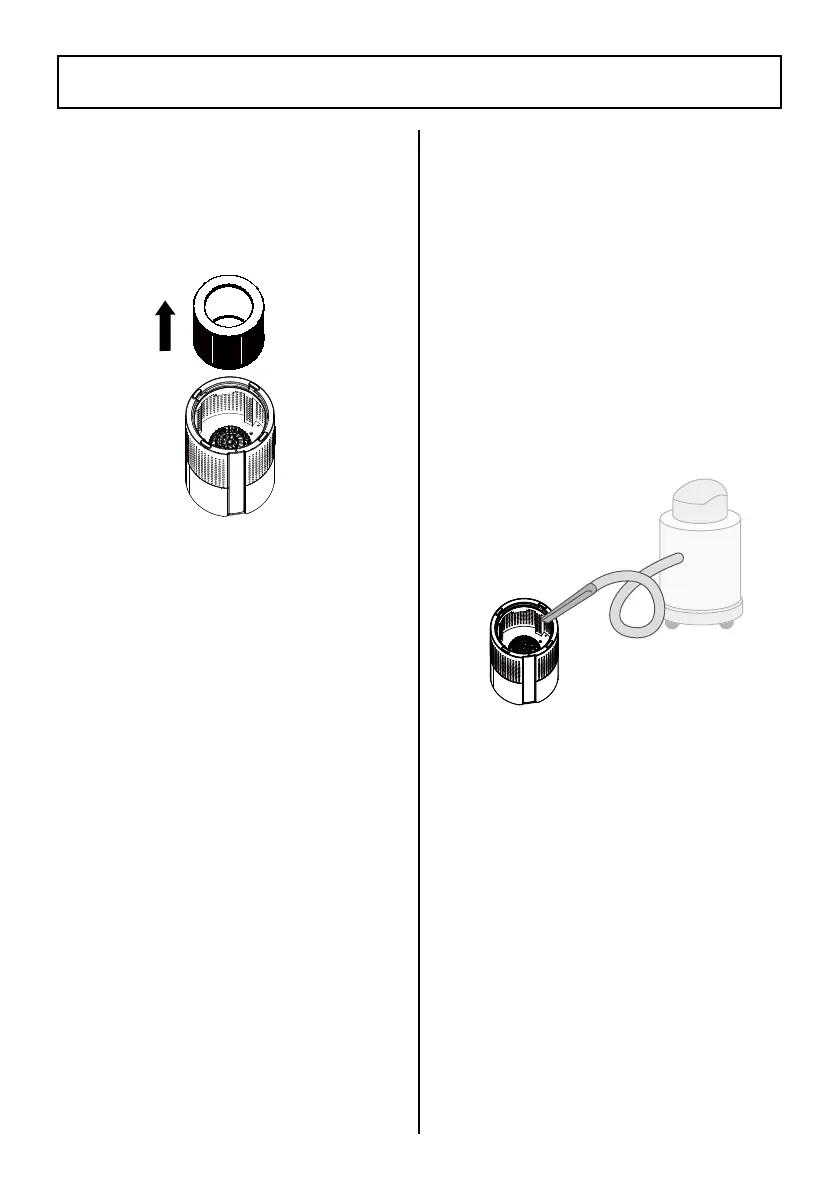
1. Unplug the air purier. Flip
the unit over and remove the
lter cover (see ASSEMBLY
INSTRUCTIONS).
2. Remove the lter from the air
purier.
3. The outer surface of the lter
should be cleaned every
2–4 weeks to increase the
efciency and extend the life
of the lter. Clean the outer
surface of the lter using a soft
cloth to remove hair, dust, and
large particles.
NOTE:
Do not clean the lter
with water or other liquids.
4. Clean out any remaining dust
or hair inside the air purier
using a vacuum hose. Do not
use water or liquids to clean
the air purier.
5. If required, replace with a new
lter. Unwrap the new lter
from the packaging. See page
7 for instructions on how to
order a new lter.
6. Replace the cleaned or new
lter into the air purier (see
ASSEMBLY INSTRUCTIONS).
7. Replace the lter cover.
8. Plug in the air purier. Reset
the lter reset button (see
Filter Reset Button section).




 To Next Page