16
Minimum & Maximum Control Pad Settings
All of the features listed have
minimum and maximum time or
temperature settings that may be
entered into the control. An ENTRY
acceptance beep will sound each
time a control pad is touched (the
Oven Lockout pad is delayed by 3
seconds).
An ENTRY ERROR tone (3 short
beeps) will sound if the entry of the
temperature or time is below the
minimum or above the maximum
settings for the feature.
FEATURE
PREHEAT TEMP.
BAKE TEMP.
BROIL TEMP.
TIMER
CLOCK TIME
COOK TIME
START TIME
CLEAN TIME
CONV BAKE/ROAST
MIN. TEMP. /TIME
170°F / 77°C
170°F / 77°C
400°F / 205°C
0:01 Min.
0:01 Min.
1:00 Hr./ Min.
0:00 Hr./ Min.
0:01 Min.
0:01 Min.
1:00 Hr./ Min.
0:00 Hr./ Min.
2 hours
170°F / 77°C
MAX. TEMP. /TIME
550°F / 288°C
550°F / 288°C
550°F / 288°C
11:59 Hr./ Min.
11:59 Hr./ Min.
12:59 Hr./ Min.
23:59 Hr./ Min.
11:59 Hr./ Min.
23:59 Hr./ Min.
12:59 Hr./ Min.
23:59 Hr./ Min.
4 hours
550°F / 288°C
12 Hr.
24 Hr.
12 Hr.
24 Hr.
12 Hr.
24 Hr.
12 Hr.
24 Hr.
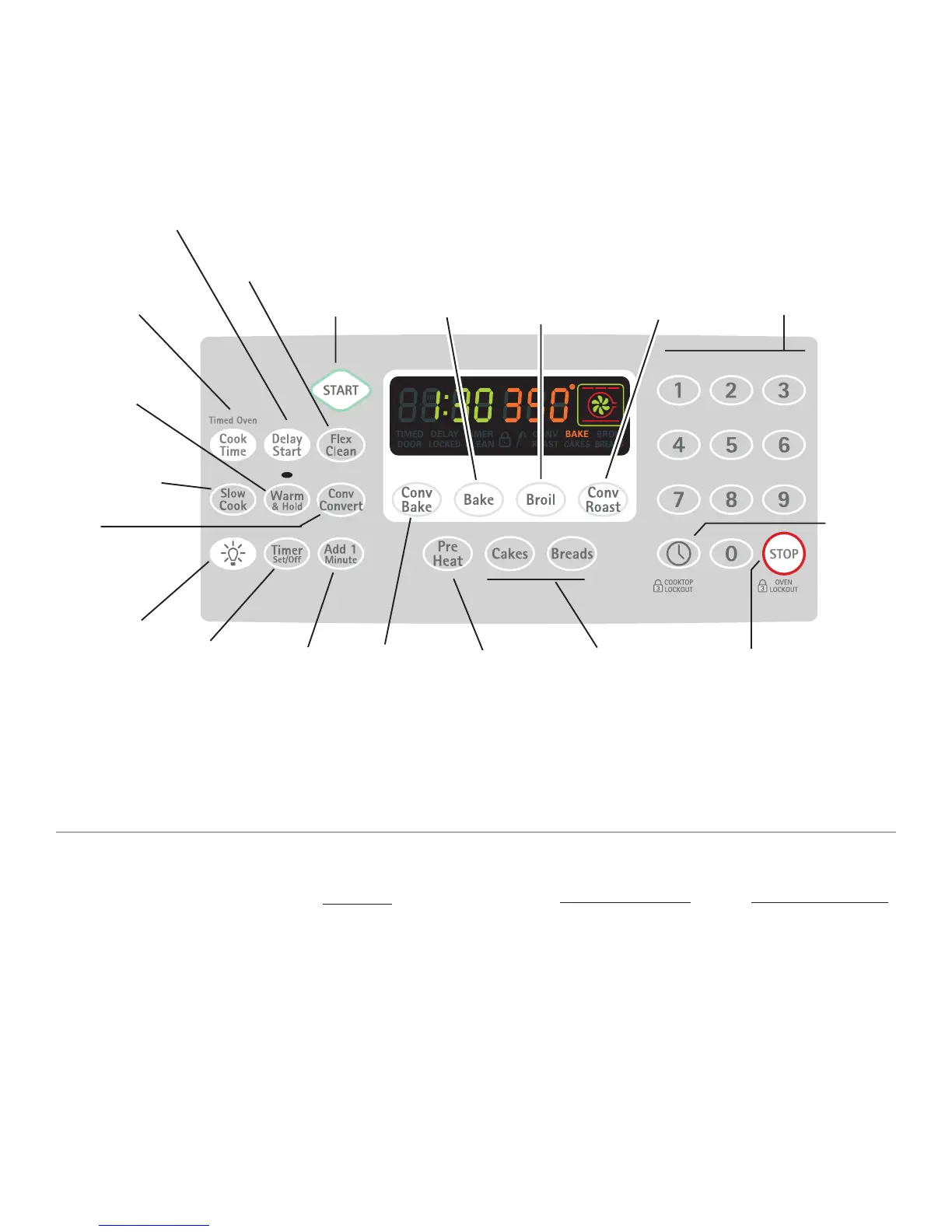
Electronic Oven Control Pad Features
READ THE INSTRUCTIONS CAREFULLY BEFORE USING THE OVEN. For
satisfactory use of your oven, become familiar with the various features and
functions of the oven as described below. Detailed instructions for each feature
and function follow later in this Use & Care Guide.
0 THRU 9
NUMBER PADS —
Use to enter
temperature and
times.
CONV BAKE—
Use to select
the Convection
Bake feature
(See page 27).
BAKE—Use to
enter the
normal Bake
feature.
(See page 22).
DELAY START— Use
with
BAKE, COOK
TIME
, and
CLEAN
to
program a Delayed
Timed Bake or Delay
Self-Cleaning cycle
start time.
CLOCK —
Use to
set the
time of
day (See
page 17).
START —
Use to start
all oven
features
(not used
with Oven
Light).
OVEN LIGHT—
Use to turn the
oven light ON
and OFF (See
page 40).
PREHEAT—
Use to pre-
condition the
oven
temperature
(See page
21).
CAKES or
BREADS— Use to
select the cakes or
breads from a
variety of food
catagories. (See
page 26).
TIMER ON/
OFF— Use to
set or cancel
the Timer. The
Timer does not
start or stop the
cooking
process (See
page 18).
BROIL— Use to
select variable
Broil feature (See
page 25).
FLEX
CLEAN— Use
to select the
Self-Cleaning
feature (See
page 33).
STOP — Use to cancel
any oven mode
previously entered
except the time of day
and minute timer.
Press STOP to stop
cooking. STOP also
controls the Oven
Lockout feature (See
page 19).
COOK TIME— Use
to enter the length
of the baking time.
WARM & HOLD
— Use to select
the Warm & Hold
feature (See
page 31).
CONV
CONVERT— Use
to select the
Convection
Convert feature
(See page 28).
ADD 1
MINUTE —
Use to
select Add 1
Minute
feature (See
page 28).
SLOW COOK—
Use to select the
Slow Cook feature
(See page 29).
CONV ROAST—
Use to select the
Convection Roast
for meats from a
variety of food
catagories. (See
page 26).



 To Next Page