Setting Oven Controls
• Setting Convection Convert Feature
• Setting Add 1 Minute Feature
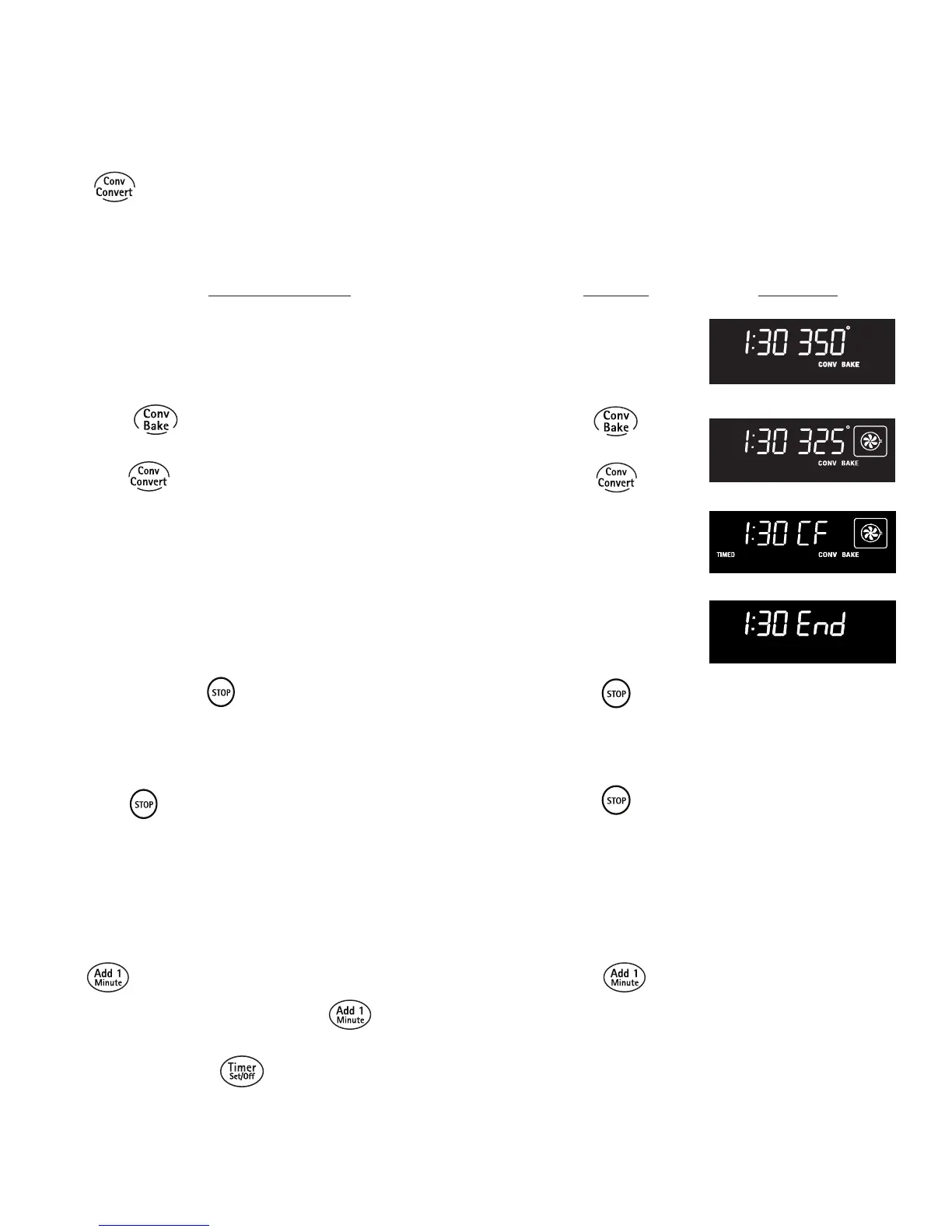
INSTRUCTIONS PRESS DISPLAY
Using Convection Convert feature to adjust oven
temperature from a Bake recipe (example below
when setting oven for 350°F):
1. Arrange interior oven racks and place food in oven.
2. Press , (See Fig. 1). If a Cook Time or a Delay Start
is desired, enter the times now.
3. Press . "CONV BAKE" and the oven set temperature
adjustment will appear in the display (for this example it is
325°F). A beep will sound once the adjusted oven set
temperature is reached. (See Fig. 2).
Fig. 1
Fig. 2
Fig. 3
Fig. 4
To set the Convection Convert feature
The CONV CONVERT pad is used to automatically convert a standard Baking recipe for convection baking. When
set properly, this feature is designed to display the oven set converted (reduced) temperature in the display.
Convection Convert MUST be used with a Convection Bake keypad. Cook Time or Delay Start functions may be added.
Note: The minimum amount of cook time using the Convection
Convert feature with a Cook Time or a Delay Start function is
20 minutes.
Notes: When used with a Cook Time or a Delay Start setting,
the Convection Convert feature will display a "CF" for check food
when the bake time is 75% complete (See Fig. 3). At this time the
oven control will sound 3 long beeps at regular intervals until baking
has finished. When the bake time has completely finished the
control will display "End" and will sound 3 long beeps every 30
seconds until the pad is pressed (See Fig. 4).
The oven icon will show a rotating fan within the square. This
rotating fan icon indicates when the Convection Fan is operating
(See Figs 2 or 3)
Press to cancel Convection feature at any time.
To Set Add 1 Minute Feature
The keypad is used to set additional minutes to the Timer. Each time the pad is pressed, another minute is
added. If the Timer is not active and the key pad is pressed, the Timer feature will become active and will begin
counting down from 1 minute. When the Timer reaches the end of the set time, “End” will display and signal 3 long beeps
at regular intervals until is pressed again.
31
ENGLISH



 To Next Page