Operation
Operation
22 23
10.6 Language Setup
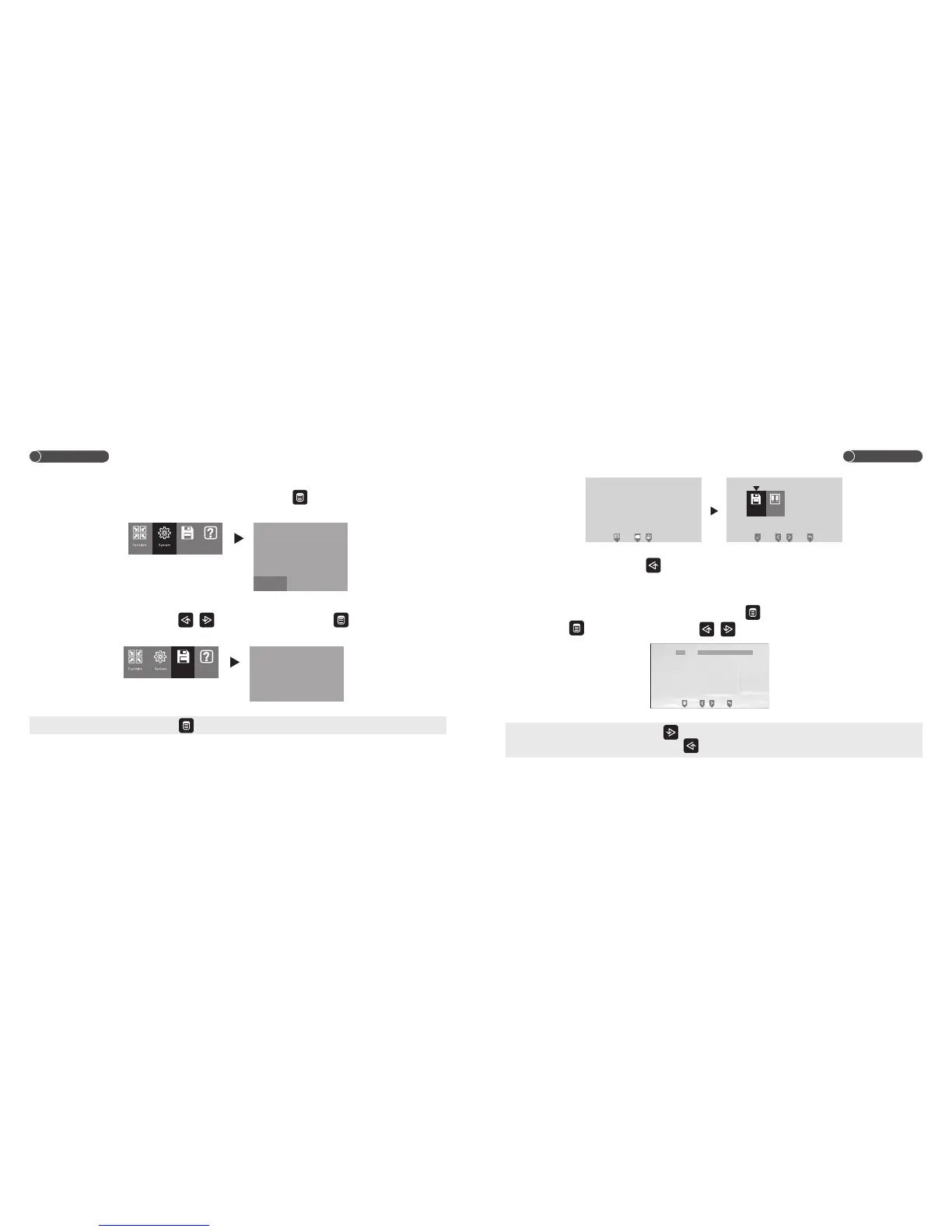
Under system setup interface, choose LANGUAGE ,and touch to confirm, then you can choose
the language between ENGLISH POLSKI and РУССКИЙ.
11.Image Memory Interface (Only available for W100)
Under main menu interface, touch / to choose STORAGE, touch to confirm, the unit will
enter into image memory interface.
Note: Under monitor/talk mode, touch to choose STORGE, the unit will enter into image memory interface.
Storage
CH1 20XX/XX/XX 12:00
Image
11.1 Take Photo
Under monitor/talk mode, touch to take one photo.
11.2 Review Picture
Under image memory interface, choose VIEW, and touch to confirm, the unit will enter into review
mode. Touch to delete one picture, touch / to review pictures.
Note: 1. Under monitor/talk mode, touch to enter into review mode.
2. Under standby mode, touch and hold to enter into review mode.
20 XX / 0 1 / 01 1 1 : 25
CH 1
VIEW
DEL ALL
Storage Help
Storage Help
2ND / PEDAL CTRL
ROOM NO. SET
MUSIC SET
TIME 20XX/01/01 01:00
RESET
LANGUAGE ENGLISH
2ND
1
ENGLISH РУССКИЙPOLSKI


 To Next Page