8
|
DNX7220
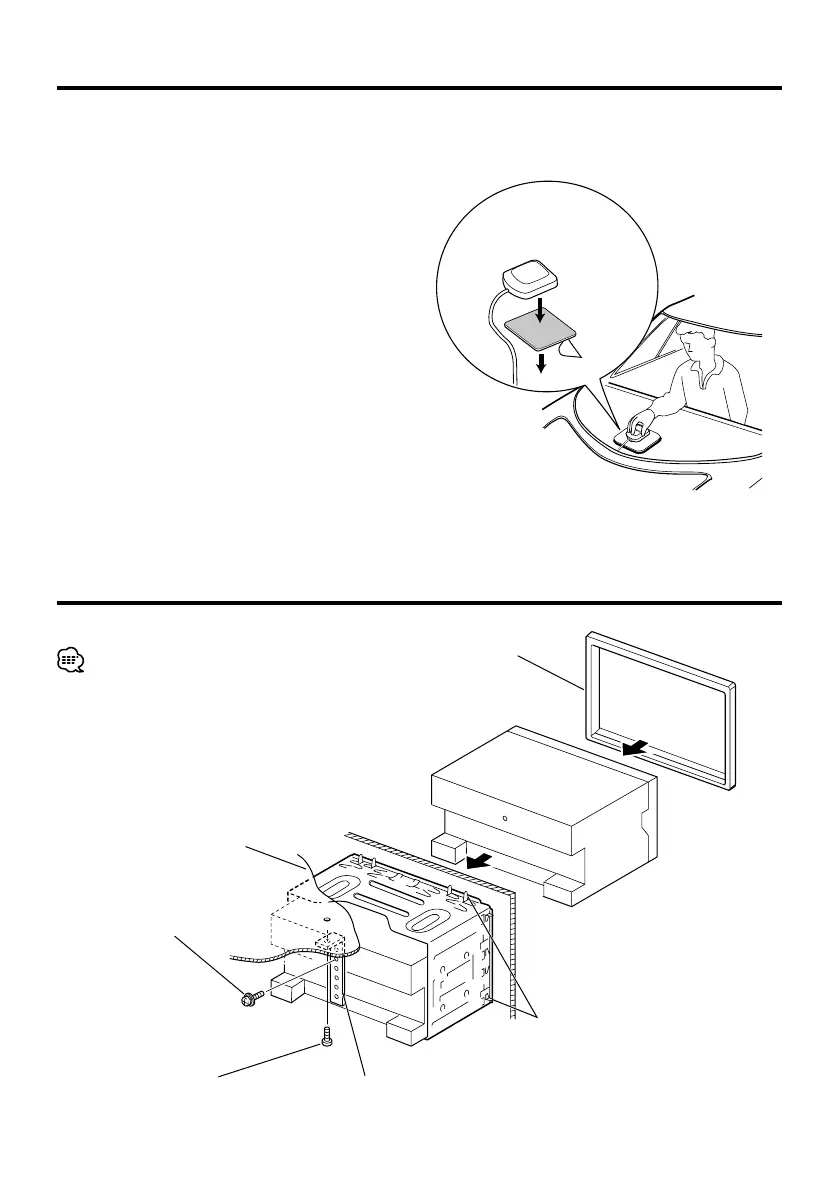
Installing the GPS Antenna
GPS antenna is installed inside of the car. It should
be installed as horizontally as possible to allow easy
reception of the GPS satellite signals.
To mount the GPS antenna inside your vehicle:
1. Clean your dashboard or other surface.
2. Peel the backing off of the adhesive on the bottom
of the metal plate (Accessory 9).
3. Press the metal plate (Accessory 9) down firmly on
your dashboard or other mounting surface. You can
bend the metal plate (Accessory 9) to conform to
a curved surface, if necessary.
4. Place the GPS antenna (Accessory 8) on top of the
metal plate (Accessory 9).
¤
• Depending on the type of car, reception of the GPS satellite
signals might not be possible with an inside installation.
• The GPS antenna should be installed at a position that is
spaced at least 12 inch (30 cm) from cellular phone or other
transmitting antennas. Signals from the GPS satellite may be
interfered with by these types of communication.
• Painting the GPS antenna with (metallic) paint may cause a
drop in performance.
Installation for Monitor/Player Unit
Accessory 8
Accessory 9
Bend the tabs of the mounting
sleeve with a screwdriver or similar
utensil and attach it in place.
Metal mounting strap
(commercially available)
Self-tapping screw
(commercially available)
Screw (M4X8)
(commercially available)
Make sure that the unit is installed securely in place. If
the unit is unstable, it may malfunction (eg, the sound
may skip).
Firewall or metal support
Accessory 7
(escutcheon)
DNXDDX7instaEEnr1.indd8DNXDDX7instaEEnr1.indd8 08.1.311:39:46PM08.1.311:39:46PM


 To Next Page