12
clock setting
When the microwave is connected to the mains power, the LED display will show “1:01”, and the
microwave will sound once. Please ensure that you have set the clock prior to use.
Please follow the steps below to set the clock.
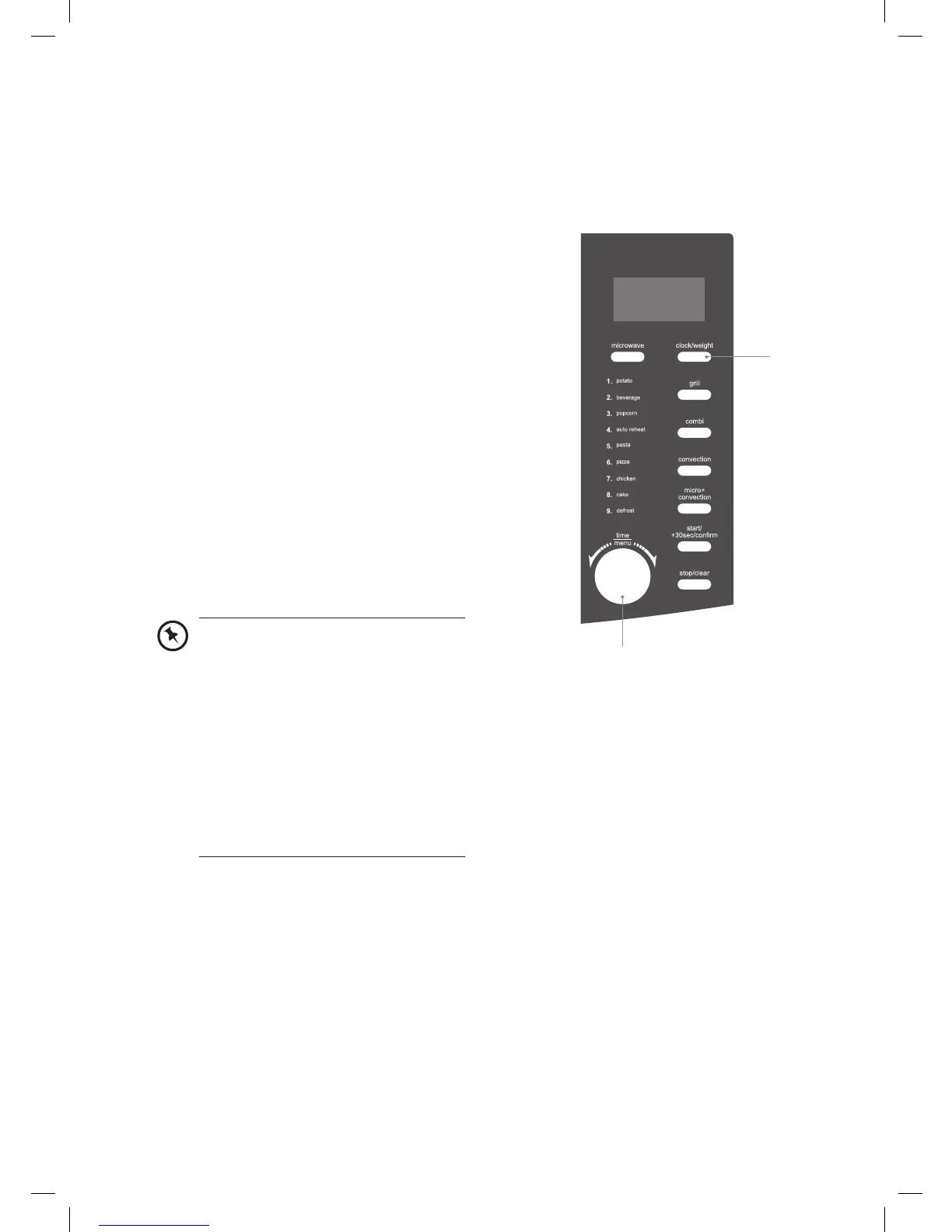
1. Press the clock/weight button once for
12-hour setting. Press the clock/weight
button again for 24-hour setting.
2. Turn the time/menu dial to adjust the hour
digits.
3. Press the clock/weight button and the
minute digits will display.
4. Turn the time/menu dial to adjust the
minute digits, the input time has to be
within 00-59.
5. Press the clock/weight button again to
complete the clock setting.
“:” will start flashing and the time will
illuminate.
2, 4
1, 3, 5
• In the process of clock setting, if
the stop/clear button is pressed
or if there is no operation within 1
minute, the microwave will go back
to the previous status automatically.
• If the clock needs to be reset,
please repeat steps 1 to 3.
• To find out the current time while
the microwave is operating, press
the clock/weight button. It will last
for 2-3 seconds and then return to
its original display.
K30CSS10_IB_final110127.indd 12 27/01/2011 5:14 PM


 To Next Page