22
defrosting
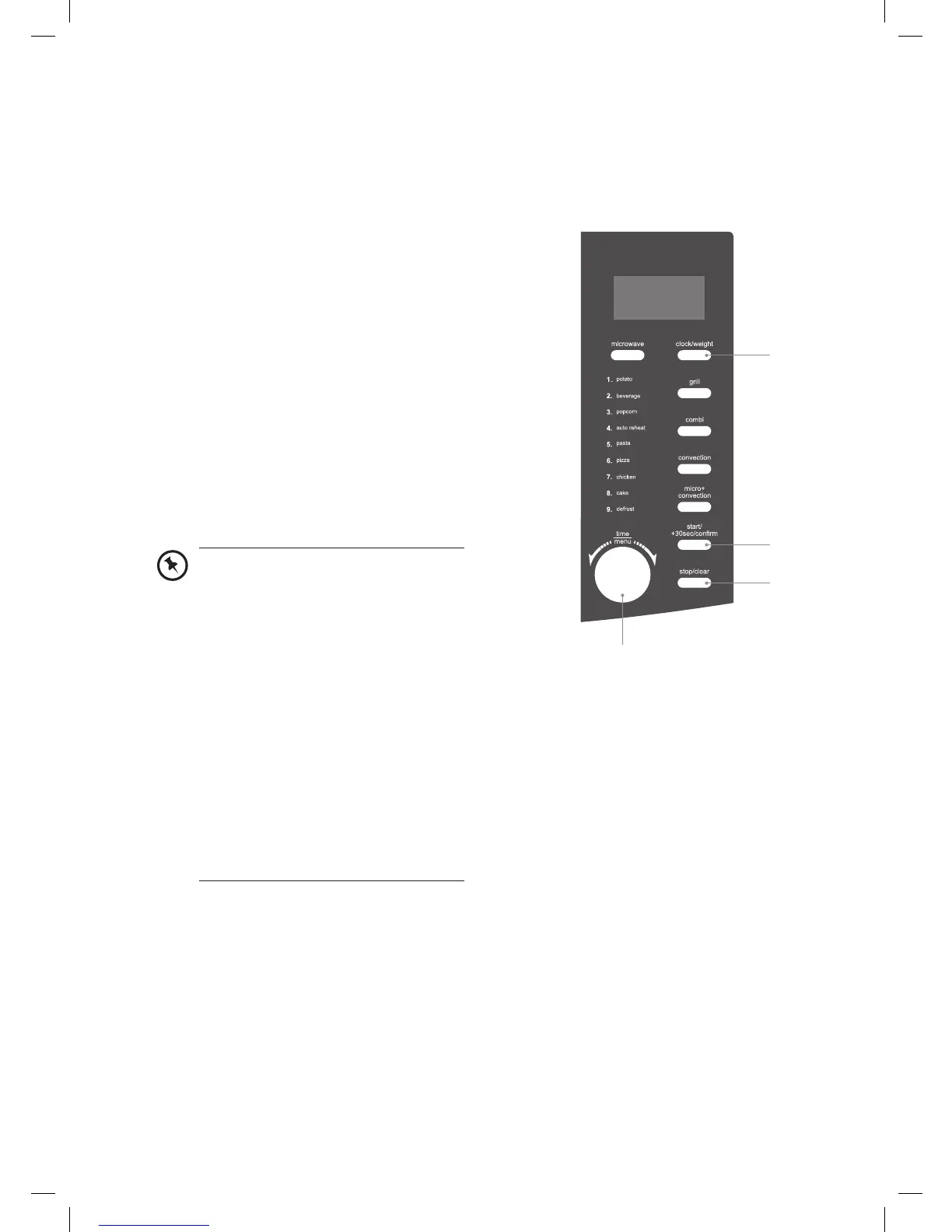
This feature allows you to defrost your frozen foods simply by entering the time.
defrost by time
1. Press stop/clear button once to clear any
previous programme setting.
2. Turn the time/menu dial anti-clockwise until
the LED display shows “CODE A-9”.
3. Press the clock/weight button and then
turn the time/menu dial to adjust the
defrosting time.
4. Press the start/+30sec/confirm button to
start defrosting.
5. Press the stop/clear button to stop
defrosting. Press the stop/clear button
again to cancel the setting.
2
4
1, 5
3
• The microwave will sound 3 times
and pause after 2/3 of the running
time has elapsed. You will need to
open the door. After you rotate the
food, close the door and press the
start/+30sec/confirm button to
restart defrosting.
• Large items may be frozen in the
centre. To ensure even thawing,
turn them over from time to time
and break them into smaller pieces
during defrosting.
• Place roasts fat-side down or whole
poultry breast-side down.
• Drain liquids during defrosting as
the juices from food can get hot and
cook the food.
K30CSS10_IB_final110127.indd 22 27/01/2011 5:14 PM


 To Next Page