EasyManua.ls Logo

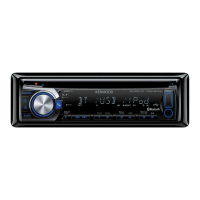
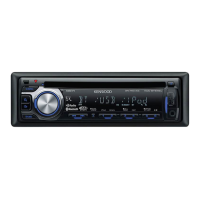
Kenwood KDC-BT43U - User Manual

Kenwood KDC-BT43U
19 pages
Print Icon
To Next Page IconTo Next Page
Loading...
GET0859-004A (EF)© 2012 JVC KENWOOD Corporation
KDC-BT43U
KDC-BT33U
CD-RECEIVER
INSTRUCTION MANUAL
CD-RECEIVER
BEDIENUNGSANLEITUNG
CD-PECИBEP
ИHCTPУKЦИЯ ПO ЭKCПЛУATAЦИИ
CD-РЕСІВЕР
ІНСТРУКЦІЯ З ЕКСПЛУАТАЦІЇ
Изделие изготовлено во Франции
CoverRear_GET0859_004A.indd 1CoverRear_GET0859_004A.indd 1 11/2/12 5:21:58 PM11/2/12 5:21:58 PM

Questions and Answers

  • A
    Adam BrownSep 18, 2025
    Why can't I control my Bluetooth player with my Kenwood Car Receiver?
    • E
      Elijah HensleySep 18, 2025
      If the connected Bluetooth audio player cannot be controlled with your Kenwood Car Receiver, check whether the connected Bluetooth audio player supports Audio/Video Remote Control Profile (AVRCP). You can also disconnect and reconnect the Bluetooth player.
  • A
    April HarperAug 25, 2025
    Why can't I pair my device with my Kenwood KDC-BT43U Car Receiver?
    • P
      Pam HornAug 25, 2025
      If you are unable to pair your Kenwood Car Receiver, ensure that you have entered the same PIN code on both the unit and the Bluetooth device. If pairing still fails, delete the pairing information from both devices and try the pairing process again.
  • J
    John SmithAug 25, 2025
    What does “DEVICE FULL” mean on my Kenwood KDC-BT43U Car Receiver?
    • A
      Autumn CrawfordAug 26, 2025
      If your Kenwood Car Receiver displays “DEVICE FULL”, the number of registered devices has reached its limit. Delete an unnecessary device and try again.
  • P
    Patricia HartAug 27, 2025
    Why can't I hear sound from my Kenwood KDC-BT43U Car Receiver?
    • C
      Cindy WolfeAug 27, 2025
      If your Kenwood Car Receiver isn't producing any sound, try adjusting the volume to a suitable level. Also, inspect the cords and connections to ensure they are properly connected.
  • G
    Gail ElliottSep 22, 2025
    Why are correct characters not displayed on my Kenwood KDC-BT43U?
    • W
      Wendy KimSep 22, 2025
      This Kenwood Car Receiver unit can only display uppercase letters, numbers, and a limited number of symbols.
  • Q
    qzunigaSep 23, 2025
    What does “HF ERROR” mean on my Kenwood KDC-BT43U Car Receiver?
    • J
      jennifer62Sep 23, 2025
      If your Kenwood Car Receiver displays “HF ERROR”, reset the unit and try the operation again. If the problem persists, further assistance may be needed.
  • R
    Ryan BoydSep 9, 2025
    Why aren't tracks playing in the correct order on my Kenwood KDC-BT43U?
    • S
      Shane ThompsonSep 9, 2025
      If tracks on your Kenwood Car Receiver aren't playing back in the order you expect, the playback order is determined when the files are recorded.
  • B
    Benjamin MedinaSep 12, 2025
    Why does “READING” keep flashing on my Kenwood Car Receiver?
    • A
      Alexandra CarterSep 12, 2025
      If your Kenwood Car Receiver displays “READING” and it keeps flashing, avoid using too many hierarchical levels or folders on your device.
  • T
    Troy CarrSep 3, 2025
    What to do if my Kenwood KDC-BT43U says “NO DISC”?
    • L
      Lori AllenSep 3, 2025
      If your Kenwood Car Receiver displays “NO DISC”, insert a playable disc into the loading slot.
  • R
    Rodney KochSep 1, 2025
    What does “READ ERROR” mean on my Kenwood KDC-BT43U?
    • R
      Randy LevySep 1, 2025
      If your Kenwood Car Receiver displays “READ ERROR”, copy the files and folders to the USB device again. If the issue persists, reset the USB device or try using a different USB device.

Summary

Getting Started Guide

Radio Operation Details

CD, USB, and iPod Playback

Basic Playback Control Functions

How to play, pause, resume, fast forward, and reverse media.

Bluetooth Connectivity

Pairing a Bluetooth Device

Step-by-step guide to pair your phone or audio device with the unit.

Bluetooth Mobile Phone Operations

Managing Incoming and Ongoing Calls

How to receive, reject, end calls, and switch between call modes.

Phone Book and Call History

Accessing and using the phone book and call history for dialing.

Bluetooth Settings and Search

Configuring Bluetooth Settings

Adjusting settings like pairing, auto answer, reconnect, and PIN codes.

Bluetooth Audio Player and Display Settings

Controlling Bluetooth Audio Playback

Playback controls, track selection, and playback modes for Bluetooth audio.

Audio Settings and Customization

Equalizer and Sound Boost Settings

Adjusting preset EQs, bass boost, loudness, and balance for optimal sound.

Product Information and Troubleshooting

General Troubleshooting Guide

Remedies for common issues like no sound, error messages, and device recognition.

Wiring Connection Details

Standard Wiring Harness Connections

Explains power, ground, speaker, and remote control wire connections.

Unit Mounting and Removal

Kenwood KDC-BT43U Specifications

General IconGeneral
TypeCar Receiver
BrandKenwood
ModelKDC-BT43U
Maximum Output Power50 W x 4
RMS Power22 W x 4
BluetoothYes
USB InputYes
AUX InputYes
CD PlayerYes
Radio TunerYes
Display TypeLCD
MP3 PlaybackYes
WMA PlaybackYes
WAV PlaybackYes
FLAC PlaybackYes
Subwoofer ControlYes
Remote ControlYes
Compatible Audio FormatsMP3, WMA, WAV, FLAC
Built-in MicrophoneYes
Steering Wheel Control ReadyYes
Preamp Outputs2 Pairs (Front + Rear/Subwoofer Selectable)
Equalizer13-band graphic equalizer

Related product manuals