EasyManua.ls Logo

Kenwood KMM-100 - User Manual

Kenwood KMM-100
20 pages
Print Icon
To Next Page IconTo Next Page
Loading...
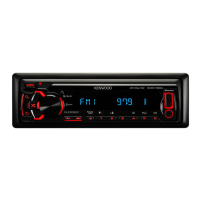
KMM-100
KMM-100U
DIGITAL MEDIA RECEIVER
INSTRUCTION MANUAL
RÉCEPTEUR MULTIMÉDIA NUMÉRIQUE
MODE D’EMPLOI
RECEPTOR DE MEDIOS DIGITALES
MANUAL DE INSTRUCCIONES
Take the time to read through this instruction manual.
Familiarity with installation and operation procedures will help you obtain the best performance from
your new Digital Media Receiver.
For your records
Record the serial number, found on the back of the unit, in the spaces designated on the warranty card, and in the
space provided below. Refer to the model and serial numbers whenever you call upon your Kenwood dealer for
information or service on the product.
Model
KMM-100/ KMM-100U
Serial number
US Residents Only
Register Online
Register your Kenwood product at www.Kenwoodusa.com
GET0867-001A (KN)© 2013 JVC KENWOOD Corporation
EN_KMM-100[KN]3.indd 1 11/21/12 8:50:26 AM

Questions and Answers

  • R
    Raymond OlsenAug 20, 2025
    Why does my Kenwood KMM-100 Car Receiver say 'PROTECT'?
    • P
      Patrick PriceAug 20, 2025
      The 'PROTECT' message on your Kenwood Car Receiver indicates that the terminals of the speaker wires may not be properly insulated. To resolve this, ensure the speaker wire terminals are correctly insulated and then reset the unit. If the issue persists, consider consulting a service center.
  • D
    davisdaleAug 22, 2025
    How to fix Kenwood Car Receiver when sound cannot be heard?
    • T
      theodore23Aug 22, 2025
      If you cannot hear any sound from your Kenwood Car Receiver, try the following: * Adjust the volume to the appropriate level. * Check the cords and connections to ensure they are properly connected. * Clean the connectors.
  • D
    Daniel ChavezAug 25, 2025
    What does 'USB ERROR' mean on my Kenwood KMM-100 Car Receiver and how to fix it?
    • J
      Joseph PetersonAug 25, 2025
      If your Kenwood Car Receiver displays 'USB ERROR', remove the USB device, turn the unit off, and then turn it back on. If the error continues, try connecting a different USB device.
  • W
    William RomeroAug 26, 2025
    What to do if Kenwood Car Receiver shows 'READ ERROR'?
    • A
      Adam HuffmanAug 27, 2025
      If your Kenwood Car Receiver displays 'READ ERROR', try copying the files and folders onto the USB device again. If the problem persists, reset the USB device or try using another USB device.
  • I
    Isaac Wilson DDSAug 28, 2025
    What does “NO DEVICE” mean on Kenwood Car Receiver and how to solve it?
    • C
      Catherine NicholsAug 28, 2025
      If your Kenwood Car Receiver displays 'NO DEVICE', connect a USB device and then switch the source back to USB.
  • S
    susan74Aug 30, 2025
    What does 'iPod ERROR' mean on Kenwood Car Receiver and how do I fix it?
    • D
      Dylan SimpsonAug 30, 2025
      If your Kenwood Car Receiver shows 'iPod ERROR', try reconnecting the iPod. If the error persists, reset the iPod.
  • T
    thompsonkennethSep 1, 2025
    Why does my Kenwood KMM-100 say “NA FILE”?
    • R
      Regina MorenoSep 1, 2025
      If your Kenwood Car Receiver displays “NA FILE”, ensure that the media you are using contains supported audio files.
  • D
    Dawn PalmerSep 3, 2025
    Why does my Kenwood KMM-100 Car Receiver say “NO MUSIC”?
    • D
      Denise TranSep 3, 2025
      If your Kenwood Car Receiver displays “NO MUSIC”, connect a USB device that contains playable audio files.
  • P
    Patricia PhillipsSep 5, 2025
    What does “COPY PRO” mean on Kenwood KMM-100 Car Receiver?
    • C
      Christian SandersSep 5, 2025
      The message “COPY PRO” on your Kenwood Car Receiver indicates that a copy-protected file is being played.
  • C
    Chad BlanchardSep 7, 2025
    Why does Kenwood Car Receiver keep flashing “READING”?
    • D
      Douglas ParkSep 7, 2025
      If your Kenwood Car Receiver continuously flashes “READING”, avoid using too many hierarchical levels or folders on your device.

Summary

BASICS

Basic Operations

Explains how to turn on/off, adjust volume, and select sources using the unit.

GETTING STARTED

Set the clock

Step-by-step instructions for setting the current time on the unit.

RADIO

Search for a station

How to find and tune into radio stations using the unit.

USB; iPod Playback

Starting Playback

Connecting devices and initiating playback for USB and iPod sources.

PANDORA INTEGRATION

Listening and Station Management

How to play, control, and manage Pandora stations.

AUDIO SETTINGS

Sound Level Adjustments

Controls for subwoofer, bass, mid, treble, balance, and fader.

TROUBLESHOOTING

Common Sound and Power Issues

Solutions for sound problems, 'PROTECT' error, and unit not turning on.

USB;iPod and Pandora Errors

Troubleshooting steps for device connection and application errors.

INSTALLATION; CONNECTION

Safety Warnings and Precautions

Important safety notices and cautions before and during installation.

INSTALLATION PROCEDURE

Basic Installation Steps

Outline of the overall installation process.

WIRING CONNECTION

Speaker and Power Wiring Diagram

Visual guide for connecting speakers, power, and antenna wires.

WARRANTY INFORMATION

Warranty Scope and Limitations

Details on what is covered, not covered, and implied warranty limitations.

Kenwood KMM-100 Specifications

General IconGeneral
TunerFM / AM
BluetoothNo
USB PortYes
Aux InputYes
Display TypeLCD
MP3 PlaybackYes
WMA PlaybackYes
FLAC PlaybackNo
Subwoofer OutputYes
Detachable FaceplateYes
AAC PlaybackNo
Remote ControlNo
CD PlayerNo
Power Output50W x 4

Related product manuals