
 To Next Page
B
Brandy ShieldsSep 17, 2025
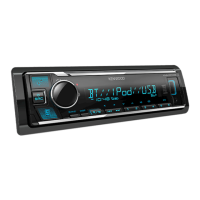
What does “NO ENTRY” mean on my Kenwood KMM-BT408?
- JJessica HartSep 18, 2025
If the message “NO ENTRY” appears on your Kenwood Car Receiver, there is no registered device connected/found via Bluetooth.

What does “NO ENTRY” mean on my Kenwood KMM-BT408?
If the message “NO ENTRY” appears on your Kenwood Car Receiver, there is no registered device connected/found via Bluetooth.
What to do if my Kenwood KMM-BT408 Car Receiver does not work?
If your Kenwood Car Receiver is not working, try resetting the unit.
How to fix Kenwood KMM-BT408 when no Bluetooth device is detected?
If your Kenwood Car Receiver is not detecting any Bluetooth devices: * Try searching for the Bluetooth device again. * Reset the unit.
Why is phone sound quality poor on my Kenwood KMM-BT408?
If the phone sound quality is poor on your Kenwood Car Receiver: * Reduce the distance between the unit and the Bluetooth device. * Move the car to a location with better signal reception.
What to do if “ERROR” appears on Kenwood KMM-BT408 Car Receiver?
If the message “ERROR” appears on your Kenwood Car Receiver: * Try the operation again. * If “ERROR” appears again, check if the device supports the function you have tried.
What does “SWITCHING NG” mean on my Kenwood KMM-BT408 Car Receiver?
If the message “SWITCHING NG” appears on your Kenwood Car Receiver, the connected phones might not support the phone switching feature.
What to do if “READING” keeps flashing on Kenwood Car Receiver?
If the message “READING” keeps flashing on your Kenwood Car Receiver: * Avoid using too many hierarchical levels and folders. * Try reattaching the device (USB/iPod/iPhone).
Why does “LOADING” appear when I enter search mode on my Kenwood KMM-BT408?
If the message “LOADING” appears when you enter search mode on your Kenwood Car Receiver, the unit is still preparing the iPod/iPhone music list. Allow some time to load, and try again later.
What to do if “UNRESPONSIVE DEVICE” appears on Kenwood Car Receiver?
If the message “UNRESPONSIVE DEVICE” appears on your Kenwood Car Receiver, make sure the USB device is not malfunctioning, and then reattach the USB device.
Why is the radio reception poor on my Kenwood KMM-BT408?
If you are experiencing poor radio reception with your Kenwood Car Receiver, ensure the antenna is firmly connected.
Grants license, prohibits modification/distribution, outlines user obligations.
Defines rights, user liability, and conditions for agreement termination.
Covers destruction, copyright protection, and export restrictions.
Details copyright information for various software components and license terms.
Outlines terms for MIT, nanopb, sha2, Posix licenses.
Details usage terms for Carnegie Mellon, T-Kernel, BSD, Apache licenses.
Emphasizes reading manual, warnings, and cautions for proper use.
Identifies key controls on the unit's faceplate.
Instructions for resetting the unit after detaching the faceplate.
Details the functions and operation of the optional remote control.
Guides through initial language selection and demonstration setup.
Step-by-step instructions for setting the clock and date.
Details how to configure various optional settings like display and system preferences.
Instructions for selecting the crossover type for speaker configuration.
Methods for finding and storing radio stations.
How to tune directly to a station frequency using the remote.
Configuration options for tuner settings like seek mode and reception.
Guide to connecting USB storage devices for playback.
Instructions for connecting iPod/iPhone devices.
Common playback controls for USB/iPod sources.
How to choose storage drive and search files for USB playback.
Methods for selecting audio files via list, quick, skip, or alphabet search.
Configuration for skip search ratio in file selection.
How to connect and play audio from an auxiliary device.
Instructions for installing and preparing the remote application.
Steps to launch and connect the remote application.
Settings for selecting and managing connected iOS or Android devices.
Overview of supported Bluetooth profiles and codecs.
Instructions for connecting the external microphone.
Step-by-step guide to pairing and connecting Bluetooth devices.
Procedures for handling incoming calls and auto-pairing setup.
Operations for managing phone calls and voice quality.
Listening to audio from Bluetooth devices and controlling playback.
Methods for initiating calls and accessing call history.
Managing and dialing contacts from the phonebook.
Using voice commands and saving contacts for quick dialing.
General settings for Bluetooth operation.
Advanced Bluetooth settings for device management and connection.
Checking Bluetooth profile connectivity.
Controlling playback of audio from Bluetooth devices.
How to play iPod/iPhone music wirelessly via Bluetooth.
Main section for adjusting audio parameters like EQ and subwoofer.
Provides preset EQ settings or detailed manual equalization.
Configures speaker crossover frequencies and slopes.
Various audio enhancement and speaker configuration settings.
Detailed settings for 2-way speaker crossover configuration.
Detailed settings for 3-way speaker crossover configuration.
Adjusts speaker delay for optimal sound staging.
Identifies zones for display adjustments and how to control dimmer.
Steps to modify display color, brightness, and text scrolling.
Settings for display colors, level meter, clock, demo mode, and brightness.
How to connect external components like the microphone.
Wiring instructions for connecting external amplifiers.
Procedures for installing the unit into a dashboard or without a sleeve.
Instructions on how to detach the unit from the dashboard.
Detailed guide to connecting the unit's wiring harness.
Cleaning instructions for the unit and its connectors.
List of supported audio files and USB device limitations.
Notes on iPod/iPhone compatibility and device information.
How to cycle through different display information modes.
Common issues and solutions for general operation and radio reception.
Solutions for USB/iPod device detection and playback errors.
Solutions for Bluetooth connection, audio playback, and call problems.
Technical specifications for FM, AM, and USB functions.
Technical specifications for Bluetooth and auxiliary inputs.
Audio output power, impedance, dimensions, and voltage.
 General
| DIN Size | Single DIN |
|---|---|
| Subwoofer RCA Preamp Output | Yes |
| Bluetooth Compatibility | Yes |
| MP3 Playback | Yes |
| WMA Playback | Yes |
| WAV Playback | Yes |
| FLAC Playback | Yes |
| Radio Data System (RDS) | Yes |
| Built-in Microphone | Yes |
| RMS Power Output | 22 Watts x 4 Channels |
| Bluetooth Profiles Supported | A2DP, AVRCP, HFP |
| Radio Tuner | Yes |
| Equalizer | 13-band |
| Steering Wheel Control Compatible | Yes |
| EQ | 13-band |
| Faceplate Security | Detachable |
| Peak Power Output | 50 Watts x 4 Channels |