EasyManua.ls Logo

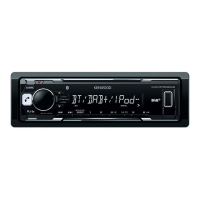
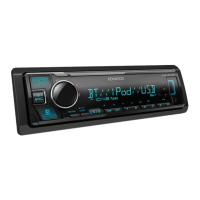
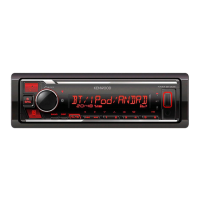
Kenwood KMM-BT505DAB - User Manual

Kenwood KMM-BT505DAB
124 pages
Print Icon
To Next Page IconTo Next Page
Loading...
Data Size: B6L (182 mm x 128 mm)
Book Size: B6L (182 mm x 128 mm)
B5A-2604-00 (EN)© 2018 JVC KENWOOD Corporation
KMM-BT505DAB
KMR-M505DAB
DIGITAL MEDIA RECEIVER
INSTRUCTION MANUAL
DIGITAL-MEDIA-RECEIVER
BEDIENUNGSANLEITUNG
RICEVITORE MULTIMEDIALE DIGITALE
ISTRUZIONI PER L’USO
JS_KWD_KMM_BT505DAB_EN_C00.indd 1JS_KWD_KMM_BT505DAB_EN_C00.indd 1 9/27/2018 9:25:04 AM9/27/2018 9:25:04 AM

Other manuals for Kenwood KMM-BT505DAB

Questions and Answers

  • S
    Scott PhillipsSep 12, 2025
    What to do if “READING” keeps flashing on my Kenwood KMM-BT505DAB?
    • L
      Larry GregorySep 13, 2025
      If the Kenwood Receiver keeps flashing “READING”, avoid using too many hierarchical levels and folders. Additionally, try reattaching the device (USB/iPod/iPhone).
  • S
    Seth ObrienAug 25, 2025
    Why is the phone sound quality poor on my Kenwood KMM-BT505DAB?
    • S
      Stephanie FaulknerAug 25, 2025
      If you are experiencing poor sound quality during a phone conversation on your Kenwood Receiver, try reducing the distance between the unit and the Bluetooth device. Additionally, move the car to a location with better signal reception.
  • A
    Anthony HermanAug 25, 2025
    Why is the sound being interrupted during Bluetooth playback on my Kenwood KMM-BT505DAB Receiver?
    • L
      Laura JohnsonAug 26, 2025
      If you are experiencing interruptions or skipping during playback from a Bluetooth audio player on your Kenwood Receiver, try reducing the distance between the unit and the Bluetooth audio player. Also, try turning the unit off and then on again, and attempt to connect again. It's also possible that other Bluetooth devices might be trying to connect to the unit.
  • C
    cwardSep 23, 2025
    What to do if “NO DEVICE” or “READING” keeps flashing on my Kenwood KMM-BT505DAB (Android)?
    • D
      davisrebeccaSep 23, 2025
      Reconnect the Android device. If USB connection does not work, connect the Android device via Bluetooth or through auxiliary input jack.
  • Z
    zballSep 13, 2025
    What does “UNSUPPORTED DEVICE” mean on my Kenwood Receiver?
    • S
      Stephen MartinezSep 13, 2025
      If your Kenwood Receiver displays “UNSUPPORTED DEVICE”, check whether the connected USB device is compatible with this unit and ensure the file systems are in supported formats. Also, try reattaching the USB device.
  • S
    Savannah ChavezSep 22, 2025
    What does “RELATED SERV FOUND” mean on my Kenwood KMM-BT505DAB Receiver?
    • M
      Melanie WilliamsSep 22, 2025
      Press the volume knob to activate Soft-Link or press to cancel.
  • M
    Michael BellSep 6, 2025
    What does “ERROR” mean on my Kenwood KMM-BT505DAB?
    • M
      Madison GrantSep 6, 2025
      If your Kenwood Receiver displays “ERROR”, try the operation again. If “ERROR” appears again, check if the device supports the function you have tried.
  • M
    Mr. John ClarkSep 7, 2025
    What does “NO INFO” mean on my Kenwood Receiver?
    • C
      Caleb CunninghamSep 7, 2025
      If your Kenwood Receiver displays “NO INFO” or “NO DATA”, the Bluetooth device cannot get the contact information.
  • A
    Amanda WilliamsSep 23, 2025
    What does “COPY PRO” mean on my Kenwood Receiver?
    • C
      Carrie MillerSep 23, 2025
      A copy-protected file is being played (USB).
  • N
    Nathan EdwardsAug 30, 2025
    What does “CHECK APP” mean on my Kenwood KMM-BT505DAB?
    • J
      John SmithAug 31, 2025
      If your Kenwood Receiver displays “CHECK APP”, the Spotify application is not connected properly or the user is not logged in. End the Spotify application and restart it, then log in to your Spotify account.

Summary

Software License Agreement

Software License Agreement Articles

Terms, conditions, and legal clauses of the software license.

Before Use

IMPORTANT

Essential reading for proper product operation and safety.

WARNING

Critical safety notices to prevent hazards during operation.

Caution

Important operational advice and precautions for safe use.

Getting Started

Faceplate Overview

Description of the unit's front panel and controls.

Initial Setup Guide

Steps for language, clock, date, and basic settings.

Crossover Type Selection

Configuration for speaker crossover settings.

Digital Radio Features

DAB Overview and Search

Explanation of DAB and how to find stations.

DAB Settings and Options

Various configuration options for DAB reception.

Analog Radio Features

FM;AM Station Search

How to find and store radio stations.

Analog Radio Settings

Configuration options for radio reception.

Media Playback (USB;iPod;Android)

Connecting and Starting Playback

Initial steps for USB/iPod/Android.

File Navigation and Control

How to browse and manage media files.

Remote App and Streaming

Using companion apps and streaming services.

USB;iPod;Android Settings

Additional configuration options.

Auxiliary Input (AUX)

Connecting and Using AUX

Setup and operation of external audio input.

Spotify Integration

Spotify Setup and Playback

Instructions for using the Spotify app.

Bluetooth Connectivity

Connection Basics

Pairing, profiles, codecs, and microphone setup.

Call Management

Handling incoming and outgoing calls.

Voice Quality and Voice Control

Improving audio and using voice commands.

Advanced Bluetooth Settings

Device management, PIN, and test mode.

Audio Streaming and App Control

Playing audio and using remote apps via Bluetooth.

Device Specific Bluetooth Features

Using Apple/Android devices and Spotify via Bluetooth.

Audio Settings

Audio Control and Equalizer

Adjusting sound levels and equalizer settings.

Sound Effects and Enhancements

Applying audio effects and enhancements.

Speaker and Crossover Configuration

Setting up speakers and crossovers.

Digital Time Alignment

Adjusting speaker delay for optimal soundstage.

Vehicle and Speaker Settings

Car type and rear speaker configuration.

Display Settings

Zone Identification

Overview of display zones.

Color and Brightness Adjustment

Customizing display appearance.

Text Scrolling and Level Meter

Display information options.

References and Information

Maintenance and Compatibility

Cleaning, updates, and device compatibility.

File Playback and Device Notes

Supported files and device specifics.

Bluetooth and Display Info

Bluetooth compatibility and display changes.

Troubleshooting

General Issues

Common problems and basic remedies.

Radio Reception Problems

Issues with Digital and Analog Radio.

USB;iPod;Android Issues

Connection and playback errors.

Bluetooth and Spotify Problems

Connectivity and app issues.

Installation and Connection

Safety and Components

Warnings, cautions, and parts list.

Mounting and Wiring

Step-by-step installation of the unit.

Wiring Connections

General and specific wiring diagrams.

External Components and Antenna

Connecting external devices and DAB antenna.

Antenna Installation Details

Antenna placement and mounting.

Final Antenna Installation Steps

Completing antenna setup.

Specifications

Digital Radio and Tuner Specs

DAB, FM, MW, LW performance data.

USB and Bluetooth Specs

USB, Bluetooth, and Auxiliary interface details.

General and Audio Specs

Overall unit performance and output specifications.

Kenwood KMM-BT505DAB Specifications

General IconGeneral
CategoryReceiver
BrandKenwood
ModelKMM-BT505DAB
TypeDigital Media Receiver
Power Output4 x 50W
BluetoothYes
DAB/DAB+Yes
USB PortYes
Aux InputYes
Display TypeLCD
Variable Color IlluminationYes
Android Music PlaybackYes
iPhone/iPod Music PlaybackYes
FLAC PlaybackYes
AM/FM TunerYes
Built-in MicrophoneYes
Compatible with AndroidYes
Compatible with iPhoneYes
Preamp Outputs3 (Front, Rear, Subwoofer)
Remote ControlOptional

Related product manuals