EasyManua.ls Logo

Kenwood KRK-11 - User Manual

Kenwood KRK-11
2 pages
Print Icon
To Next Page IconTo Next Page
Loading...
KRK-11
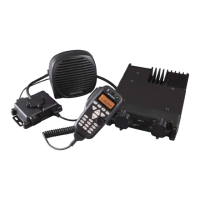
HANDHELD CONTROL HEAD INTERFACE KIT
INSTRUCTION MANUAL
© B62-2102-00 (M)
Features
This is an optional accessory for the KCH-16.
You can connect an external speaker to the interface box.
supplied accessories
Item Part Number Quantity
Interface Box
1
Main body panel assembly
1
Ground cable E30-3085-XX 1
Retaining band J61-0307-XX 1
Retaining bracket J21-4354-XX 2
Connector E59-0426-XX 1
Screw set N99-2069-XX 1
Screw set N99-2070-XX 1
Instruction manual B62-2102-XX 1
Main body panel assembly
Screw set : N99-2069-XX
(For Interface box)
Interface box
Ground cable
Retaining band Retaining bracket
Screw set N99-2070-XX
(For Main body panel assembly)
Connector
Note:
The following instructions are for use by your
Kenwood
dealer, an
authorized
Kenwood
service facility, or the factory.
Refer to the Service manual for detailed information regarding the
installation of the KCH-16.
installation
The following tools and parts are required for installing the handheld
control head interface kit.
Phillips No. 2 screw driver
KCT-22 Remote Control Cable
Transceiver
External speaker
(Option)
KCT-22 (Option)
Remote Control
Cable
Interface box
KCH-16
hanger
Note:
When connecting the KCH-16 to the Interface box, do not connect
the MIC to the programming connector of the Interface box.
The programming connector of the interface box is dedicated to
programming.
The control connector of the interface box is dedicated to the
KCH-16; do not use this connector for other equipment.
The optional jack is supplied for future expansion. It cannot be used
at this time.
Do not remove the covers or caps of connectors that are not
currently being used.
After connecting the KCH-16 and turning on the power, do not
remove the KCH-16.
KCT-18 (Option)
Ignition Sense Cable
Question and Answer IconNeed help?

Do you have a question about the Kenwood KRK-11 and is the answer not in the manual?

Summary

Product Features

Supplied Accessories

Installation Guide

Summary

Product Features

Supplied Accessories

Installation Guide

Overview

The KRK-11 is a Handheld Control Head Interface Kit designed as an optional accessory for the KCH-16. Its primary function is to facilitate the connection of an external speaker to the interface box, enhancing the audio output capabilities of the KCH-16 system.

Function Description:

The KRK-11 interface kit serves as a crucial link between the KCH-16 handheld control head and other components of a communication system, particularly a transceiver. It allows for the remote operation and control of the transceiver via the KCH-16, providing flexibility in installation and user interaction. The interface box acts as a central hub, managing connections for the KCH-16, an external speaker, and various control cables.

Important Technical Specifications:

The kit includes several components, each with a specific part number and quantity, ensuring a complete and functional setup:

  • Interface Box: 1 unit
  • Main body panel assembly: 1 unit
  • Ground cable: Part Number E30-3085-XX, 1 unit
  • Retaining band: Part Number J61-0307-XX, 1 unit
  • Retaining bracket: Part Number J21-4354-XX, 2 units
  • Connector: Part Number E59-0426-XX, 1 unit
  • Screw set (for Interface box): Part Number N99-2069-XX, 1 unit
  • Screw set (for Main body panel assembly): Part Number N99-2070-XX, 1 unit
  • Instruction manual: Part Number B62-2102-XX, 1 unit

The installation process requires a Phillips No. 2 screwdriver and the KCT-22 Remote Control Cable. The system diagram illustrates the connections: the KCH-16 connects to the interface box, which then links to the transceiver. An optional external speaker can be connected to the interface box, and an optional KCT-18 Ignition Sense Cable can be used for ignition-controlled power. The KCT-22 Remote Control Cable is essential for connecting the interface box to the transceiver.

Usage Features:

The KRK-11 offers several features that enhance its usability and integration into a communication system:

  • External Speaker Connectivity: A key feature is the ability to connect an external speaker to the interface box. This is particularly useful in environments where the KCH-16's internal speaker may not provide sufficient volume or clarity, allowing for improved audio monitoring.
  • Remote Control Capability: By integrating with the KCH-16 and KCT-22 Remote Control Cable, the KRK-11 enables remote control of the transceiver. This allows for flexible mounting options for the KCH-16, separate from the main transceiver unit.
  • Dedicated Connectors: The interface box features dedicated connectors for specific functions:
    • Programming Connector: This connector is exclusively for programming purposes. It is explicitly stated that the MIC should not be connected to this port when the KCH-16 is connected to the interface box.
    • Control Connector: This connector is dedicated to the KCH-16 and should not be used for other equipment.
  • Future Expansion: An optional jack is provided for future expansion, indicating the system's adaptability to potential upgrades or additional functionalities. However, it cannot be used at the current time.
  • Ignition Sense Integration (Optional): The KCT-18 Ignition Sense Cable can be used to integrate the system with the vehicle's ignition, allowing for automatic power management.
  • Dealer/Service Facility Installation: The instructions are specifically for Kenwood dealers, authorized Kenwood service facilities, or the factory, ensuring proper installation and configuration by trained professionals. This emphasizes the technical nature of the installation and the importance of correct setup for optimal performance.
  • Service Manual Reference: Users are directed to refer to the Service manual for detailed information regarding the installation of the KCH-16, indicating that the KRK-11 is part of a larger system and requires comprehensive understanding for proper integration.

Maintenance Features:

While the manual primarily focuses on installation and usage, some points touch upon maintenance and best practices:

  • Proper Connection Procedures: Strict adherence to connection guidelines is crucial. For instance, not connecting the MIC to the programming connector when the KCH-16 is connected to the interface box prevents potential damage or malfunction.
  • Connector Protection: Users are advised not to remove the covers or caps of connectors that are not currently being used. This protects the connectors from dust, debris, and potential damage, ensuring their long-term functionality.
  • System Stability: Once the KCH-16 is connected and power is turned on, it should not be removed. This suggests that the system is designed for a stable, continuous connection, and frequent disconnections might impact its performance or integrity.
  • Professional Installation: The requirement for installation by authorized personnel implies that any maintenance or troubleshooting beyond basic operation should also be handled by professionals, ensuring the system's longevity and adherence to warranty conditions.
  • Component Integrity: The inclusion of specific screw sets for different parts (Interface box and Main body panel assembly) highlights the importance of using the correct fasteners to maintain the structural integrity of the device.
  • Cable Management: The retaining band and retaining bracket are provided to help manage cables, preventing strain and accidental disconnections, which contributes to the overall reliability and lifespan of the installation.
  • Grounding: The inclusion of a ground cable is critical for electrical safety and to prevent interference, ensuring stable operation of the communication system.

Kenwood KRK-11 Specifications

General IconGeneral
BrandKenwood
ModelKRK-11
CategoryRecording Equipment
LanguageEnglish

Related product manuals