10
Measurement
& Icon Units
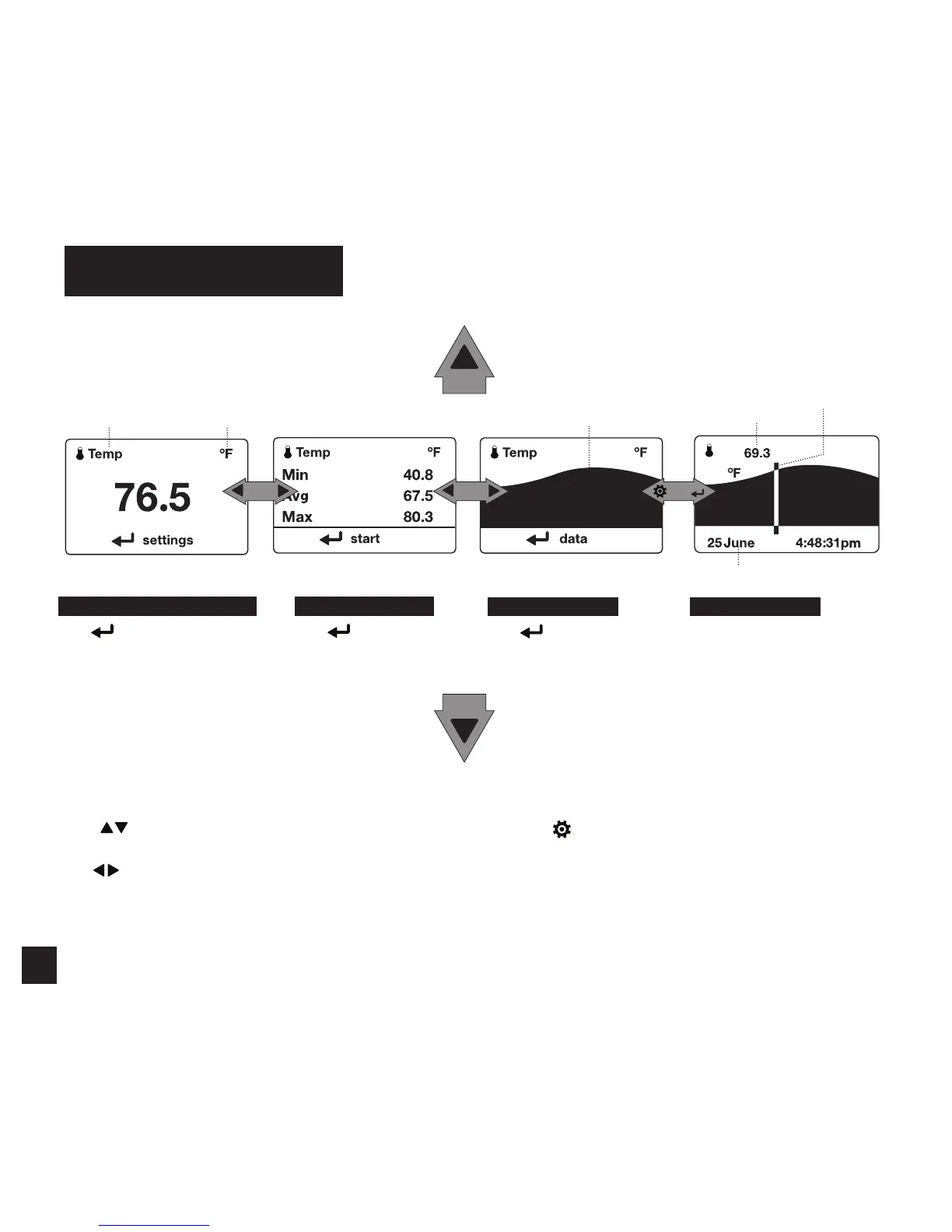
WEATHER MODE SCREENS
Graph of Stored Data Log
Data Point Value
Data Point Scroll Bar
Current Measurement Screen
Press
SELECT to enter settings
menu for that measurement.
Min Ave Max Screen
Press
SELECT to start, stop
and clear the Min/Avg/Max
tracking.
Data Graph Screen
Press
SELECT to enter
the Data Log Detail Screen to
view logged data points.
Data Points Screen
Press LEFT/RIGHT to scroll through
data points. Press OPTIONS to exit
Data Log Details Screen.
MORE MEASUREMENTS
MORE MEASUREMENTS
Data Point Time Stamp
» The UP/DOWN buttons navigate between all weather
measurements set to “On” in Options|Measurements.
» The
LEFT/RIGHT buttons scroll between the three
display screens for the measurement.
» The
OPTIONS button exits the settings submenu
and Data Log Detail Screen.



 To Next Page