8
BUTTONS
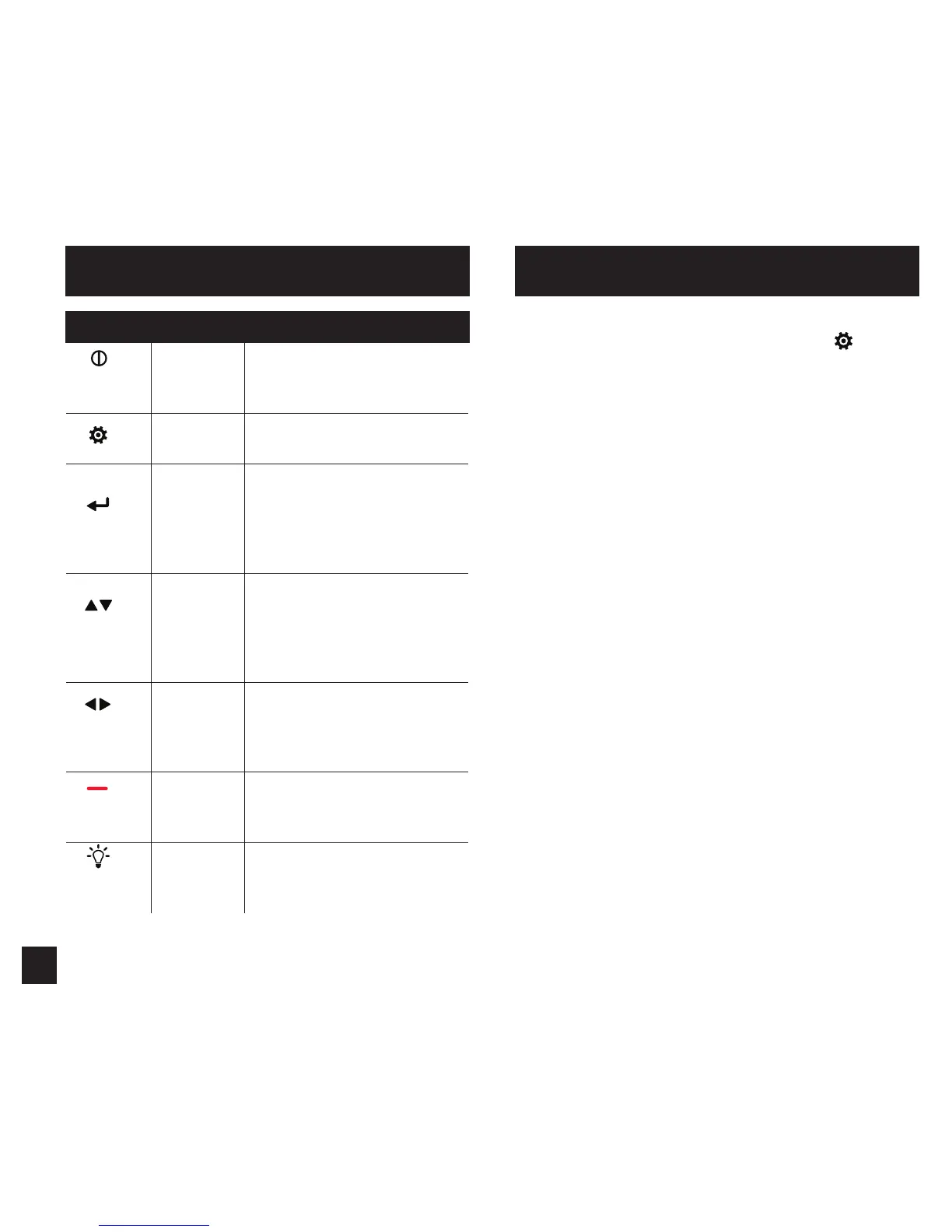
Button Name Function
POWER Turns Kestrel on and o.
Press for on, hold for two
seconds to turn o.
OPTIONS/
EXIT
Enter the main Options
menu or exit a menu.
SELECT Access Settings on any
measurement screen or
select a menu option to
enter its submenu or conrm
a task.
UP/DOWN Scroll up and down through
measurement screens or
menus. Adjust values when
entering text in name
menus.
LEFT/
RIGHT
Scroll options left and
right. Adjust values in
combo menus and setting
submenus.
CAPTURE In Weather Mode, manually
capture all environmental
values.
BACK-
LIGHT
Turn backlight on or o.
(Also turns o automatically
after one minute.)
Most system-wide and weather setup options are accessed
from the main Options menu by pressing the
button
from any Weather Measurement Screen or the main
Targeting Screen.
• BLUETOOTH
» Bluetooth On/O
• DATA PORT
• MEMORY OPTIONS
» Clear Log
» Auto Store
» Store Rate
» Overwrite
• GRAPH SCALE
• DISPLAY
» Auto Shutdown
» Contrast
» Backlight
• SYSTEM
» Time & Date
» Measurements
» Units
» Lang
» Batt
» Factory Restore
• ABOUT
» Version
» Legal
KESTREL OPTIONS MENU



 To Next Page