46
10-2-7 Specifying a password
In order to prevent the specified measuring conditions from being modified unexpectedly, a pass-
word may be specified to prevent other users from changing the specified conditions. The pass-
word is 4 characters in length and may be set using the following characters: digits from 0~9,
letters from A~Z, and hyphens (i.e., ‘—’).
If the password has been set to any password other than the default password of ‘0000’ set at the
time of shipment, whenever the key is pressed to specify measuring conditions the indicator
‘PASS’ is displayed in the weight display area and the user is required to enter a password.
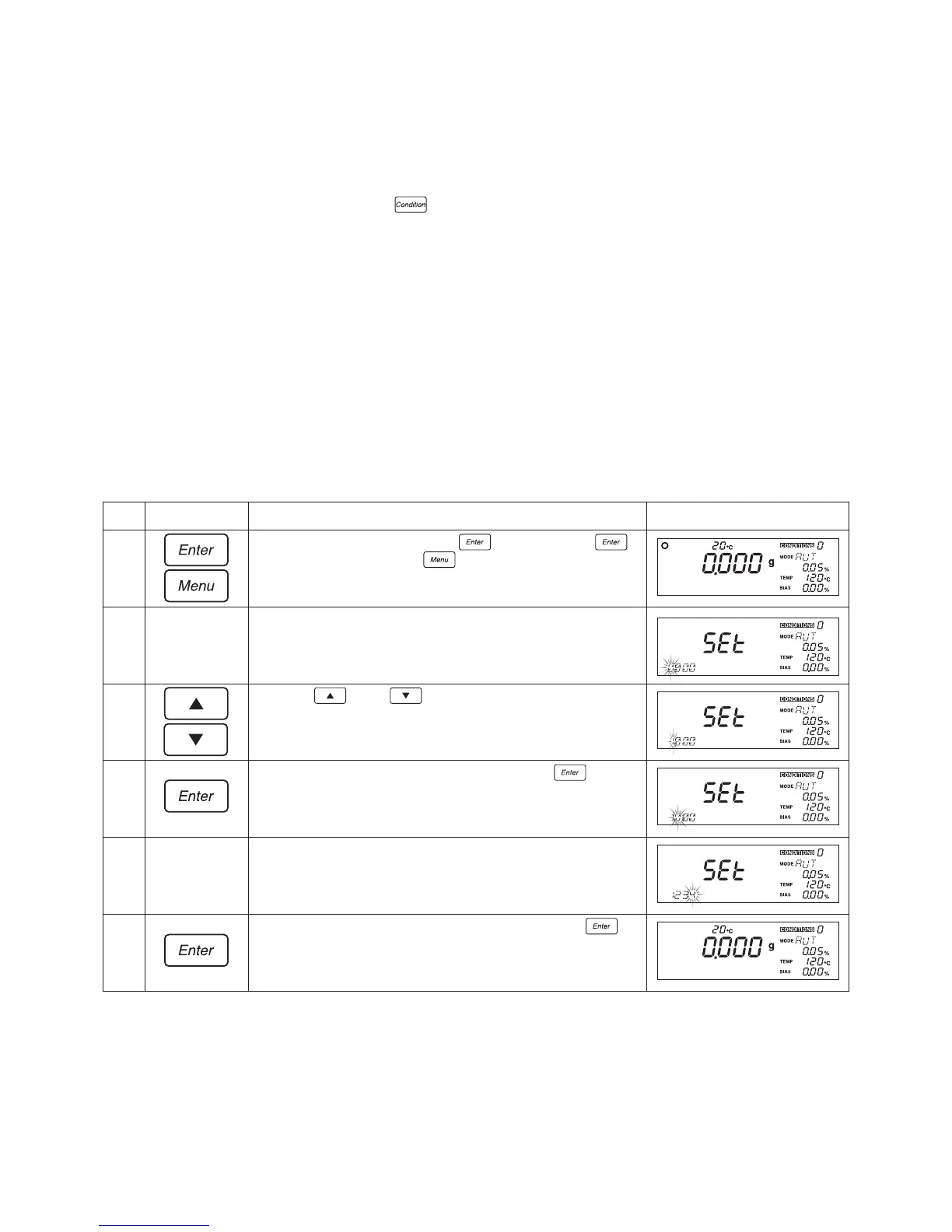
How to specify a password
Key(s) used Operating instructions
From the weight display, press the
key and hold the
key down while pressing the key.
The default password of ‘0000’ will be displayed with the first
character of the password flashing. The indicator ‘SEt’ will be
displayed in the weight display area.
Press the key or key to select the desired character
(i.e., a digit from 0~9, a letter from A~Z, or a hyphen). Note that
here the letter ‘1’ has been selected.
When the desired character is displayed, press the key.
The first character will then have been specified and the second
character will begin to flash.
Repeat steps 3 and 4 until the fourth character has been
specified. Note that here a value of ‘1234’ has been specified.
When the fourth character has been specified, press the
key. This will complete the setting of the password, and the
display will return to the standard weight display.
Step
1
2
3
4
5
6
Display


 To Next Page