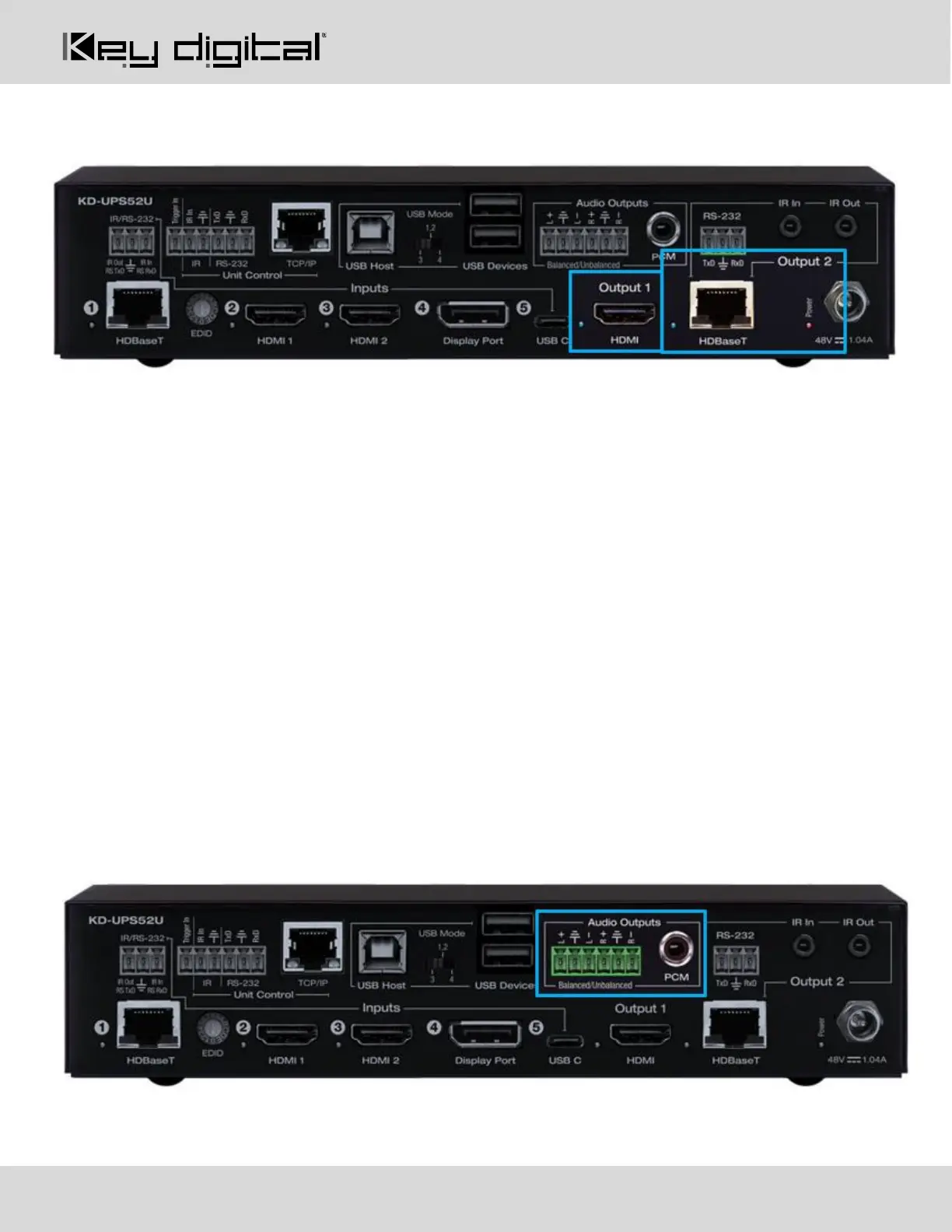
Outputs
The HDMI and HDBaseT outputs are mirrored. The selected source is viewed on both outputs simultaneously.
HDMI (Output 1): Using an HDMI cable, connect your display or system. For DVI-D/DVI-I sources use an
appropriate adapter. For Display Port, use active adapters.
• Supports up to UHD/4K @ 50/60 fps [4:4:4], 18Gbps
• Supports HDR10
• Compliant with HDCP 2.2 and previous
• Supports lossless compressed audio formats including Dolby® TrueHD, Dolby® Digital Plus, Dolby
Atmos®, and DTS-HD Master Audio™
• Supports CEC Manager™ control of connected supporting display. Does not support CEC pass through.
• Link light to the left of port illuminates when there is HPD from the connected display.
HDBaseT (Output 2): Connect a CAT5e/6 cable to the Rx unit at the HDBaseT Input port.
• 4K/UHD (18G): Up to 100m / 328ft
• 1080p: Up to 150m / 492ft in Long Range Mode
• Use with included KD-X100MRx.
• Compatible with third party HDBaseT Rx, including projectors, but cannot be guaranteed.
• Provides power over HDBaseT to connected transmitter
• Link light to the left of the port illuminates solid from healthy HDBaseT connectivity with Rx unit.
• Does not support Dolby® Vision
Audio Outputs
• Analog and digital de-embedded audio from the selected source



 To Next Page