8 HX3.5 Mainboard
Controls
Up to 64 pushbuttons or switches and up to 88 potentiometers (also drawbars) can be connected
to the HX3.5 mainboard.
Panel16
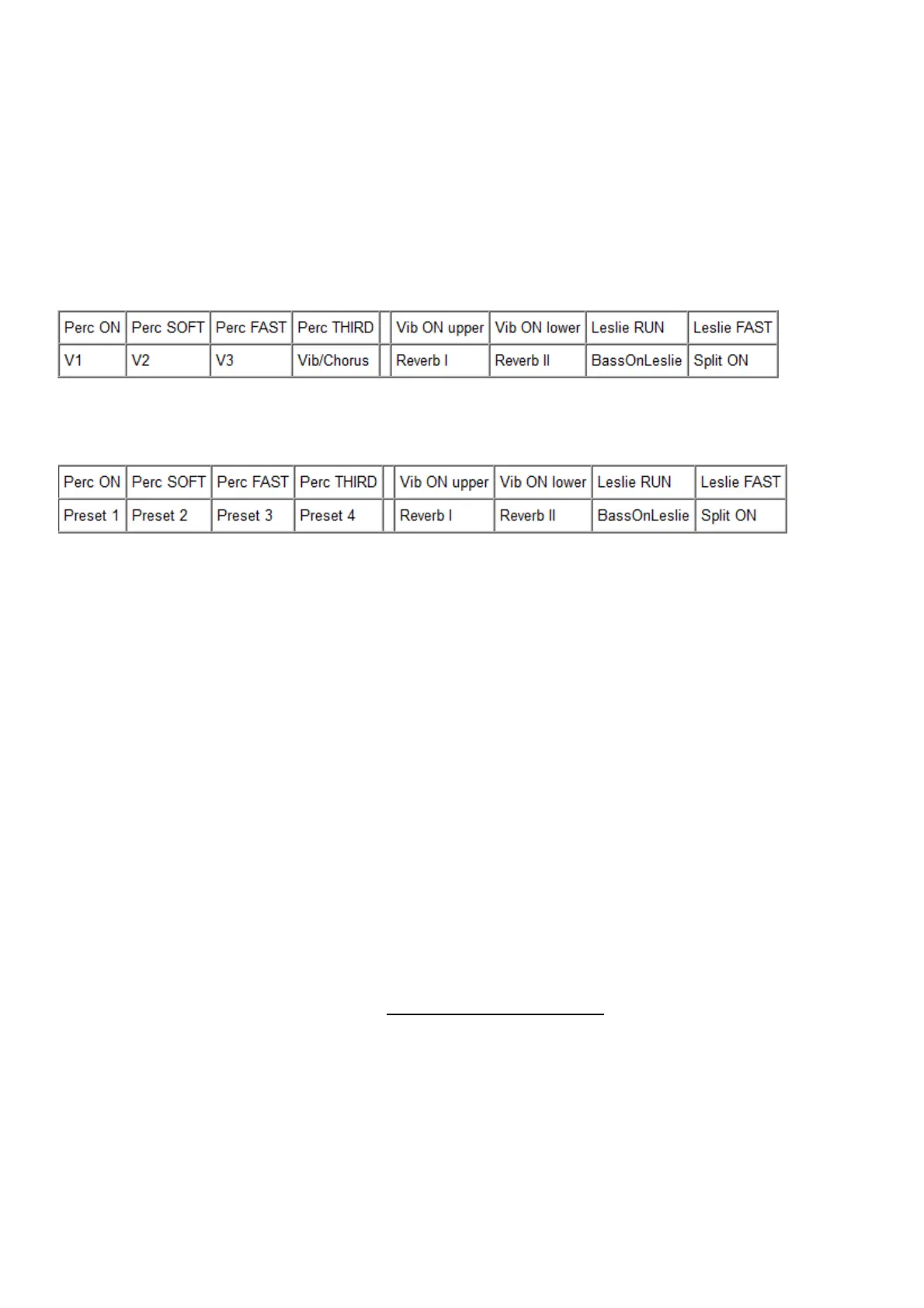
In the default configuration, a Panel16 is required. Default assignment of the Panel16 (parameter
1504 in the editor = 0, 5108 = 60, 5109 = 61, 5110 = 62, 5111 = 63):
If a rotary switch is used to switch between V1...V3/C1...C3 (parameter 1497 = 0), the four buttons
at the bottom left can be used to quickly select presets (parameter 1504 = 2):
The preset buttons are binary coded, i.e. preset 1 toggles between 0 and 1, preset 2 between 0
and 2, preset 3 between 0 and 4, preset 4 between 0 and 8. You can press several buttons
simultaneously and thus select values from 0 to 15.
The buttons of the Panel16 can be assigned differently in the editor as desired. Preset buttons can
optionally be used for drawbar presets (like the inverse buttons of a classic Hammond console).
See section 'Setting up the Hardware Configuration' in the HX3.5 Manager manual.
Preset12-2/Preset16
The drawbar presets (Voices) can be switched independently from the common presets and are
also selectable via the Menu Panel. Register boards Preset12-2 or Preset16 are required for fast
switching by keystroke.
Use the Preset12-2 board in conjunction with inverse preset keys on the keyboard. This allows
you to recall 2 x 12 drawbar presets.
The Preset16 board has two rows of 8 LED buttons each. A second Preset16 board can be added.
All details about the configuration in the HX3.5 Installation Manual.
To save a drawbar setting as a voice, press and hold the target button for two seconds.
If a common preset is selected and thus overwrites the current voice, the LED of the respective
button flashes. Press the button if the voice preset is to take effect again instead of the drawbar
preset stored in the common preset.



 To Next Page