Product Declassification and Security Product Name: Network Analyzer
Model Number(s): E5061B/E5063A
Page 11 of 16
Storage Removal Procedure A
1. Clearly mark the spare hard drive as "Unsecured!"
2. If there is the file named *.lic under E:\License directory, copy it into your USB memory.
This file contains software option information.
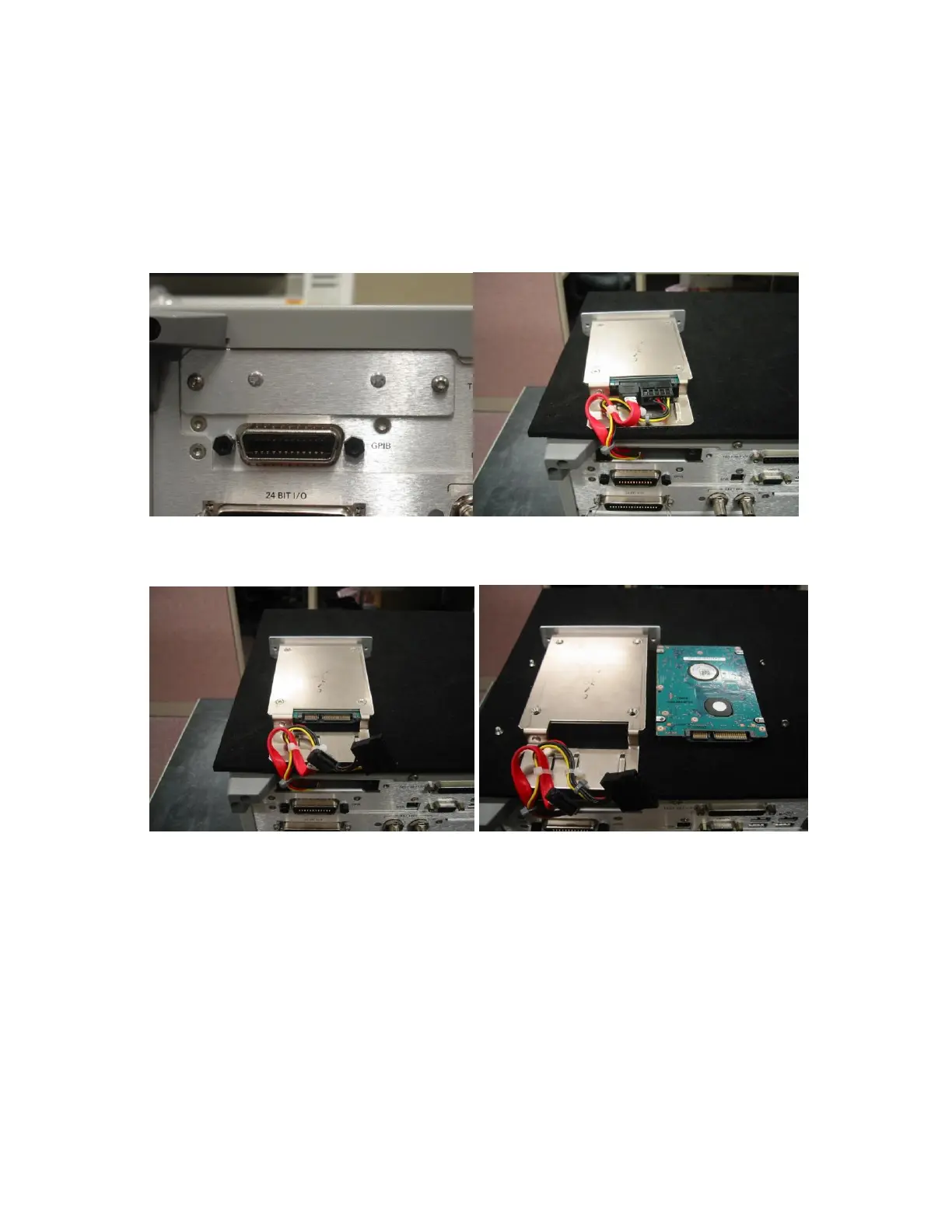
3. Remove the two screws on the rear panel. Remove the case with the hard drive and put
it on the top panel. (It is recommended to place a cushion on the top panel to put the hard
drive.)
4. Disconnect both connectors from the HDD, and then remove the four screws holding
the hard drive to the case.
5. Replace the original “Secured” hard drive with the spare "Unsecured" hard drive.
6. Connect an external keyboard and mouse to the connectors on the E5061B. Turn on the
E5061B.
7. Press [Macro Setup] and press Load Project... in the softkey menu.
8. A dialog box will appear for you to select the program to load. Select
RestoreSysCorFile.vba from the D:\Agilent\Service folder and then press the Open button.
9. Press [Macro Run]. The RestoreSysCorFile dialog box will appear. Click OK.
10. Place the gen.lic files into the E:\License directory. Manually create the License
directory if the directory does not exist.
The E5061B/E5063A can now be used elsewhere or sent for servicing without fear of
leaking any sensitive information.













 To Next Page