09 | Keysight | Low Current Semiconductor Measurements Using the B2980A Series Ammeter - Technical Overview
(continued)
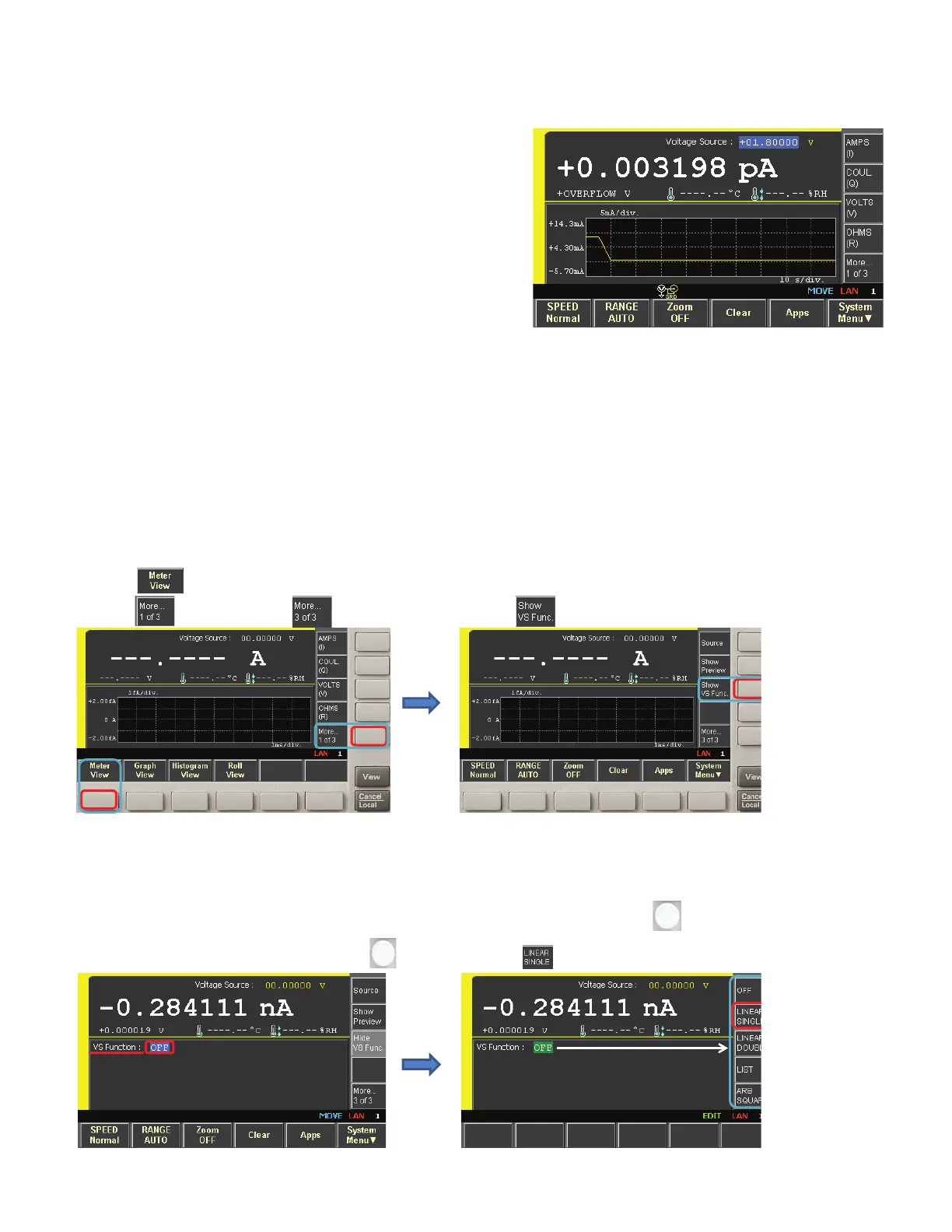
(3) Check the current transient in the Roll view display and note the
The following steps outline how to plot the I/V characteristics of an LED.
Step 1. (1) Press the [Meter View] function key at the bottom of the screen.
(2) Then press the [More ... 1 of 3] assist key twice so that the third set [More ... 3 of 3] of softkey labels is displayed on the
assist keys at the right of the screen.
(3) Press the [Show VS Func.] assist key to show the VS function menu.
Step 2. (1) Move the cursor by rotating the [Knob] until the cursor is on the VS Function and then select it by pushing the knob.
The VS Function is now in edit mode and the assist softkey menu at the right of the screen represents the available VS
Functions.
(2) Press on the [LINEAR SINGLE] assist key.
(3) press key.
3.
(1) Press key, then
(2) press key two times until key appears.
1.
2.
(1) Click on the VS Function by , and the VS
menu options are displayed.
(2) Press assist key.
1.
Move the cursor on the VS Function by rotating .
2.











 To Next Page