INSTALLATION
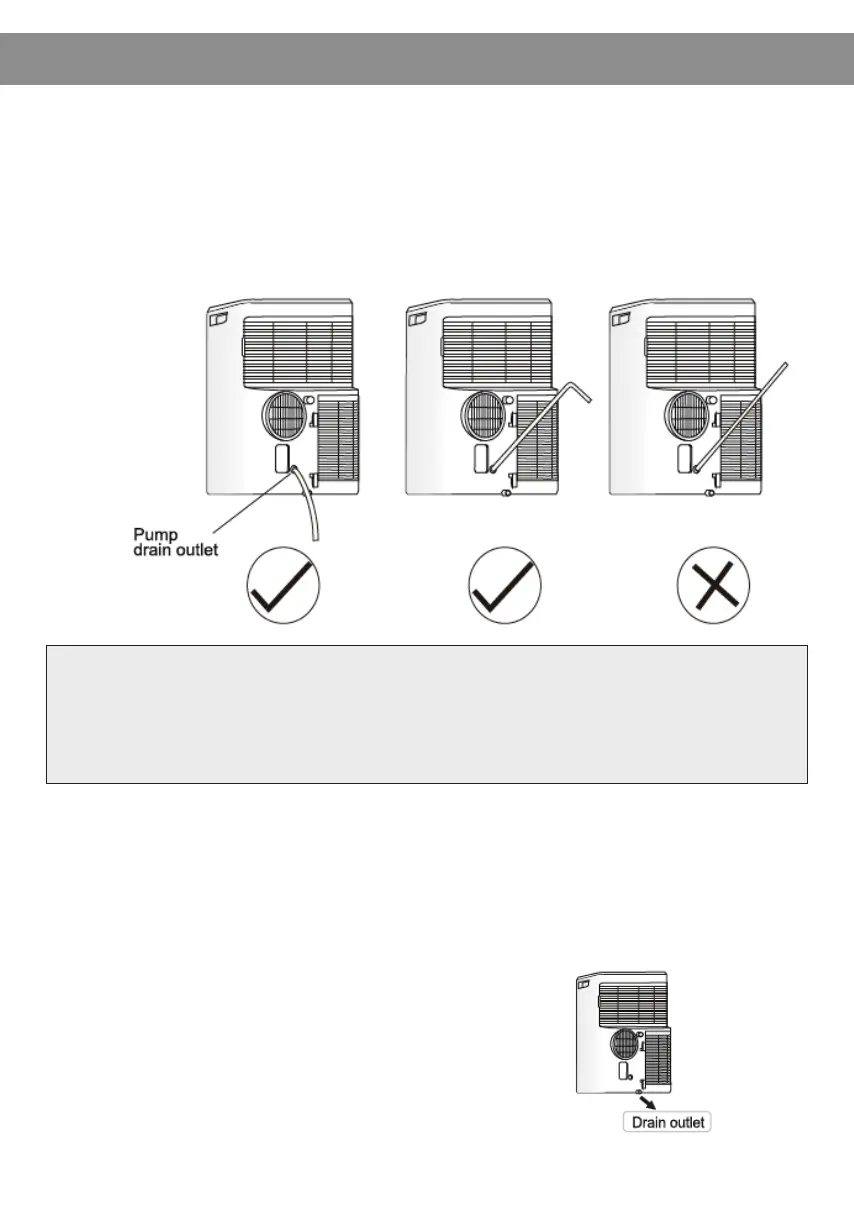
*If the unit you have bought has the pump drain outlet, as shown below,
please drain in this way:
* When the water level of the bottom tray reaches predetermined level,
the digital display area shows “P1” and the WATER FULL indicator light
illuminates. Carefully move the unit to a drain location, remove the
bottom drain plug, and restart the machine until the P1 symbol
disappears. If the error repeats, call for service.
Note: Be sure to reinstall the bottom
drain plug before using the unit.
Remove the pump drain from the back of the unit, attach the drain hose
to the hole. Place the other end of the hose in the drainage way, or
other drainage area such as a window.
Note: Make sure the hose is secure and there are no leaks. Direct the hose
towards the drain, making sure that there are no kinks that will stop the
water flow. Place the end of the hose into the drain, and make sure that
the end of the hose is down to let the water flow smoothly.
- 12 -


 To Next Page