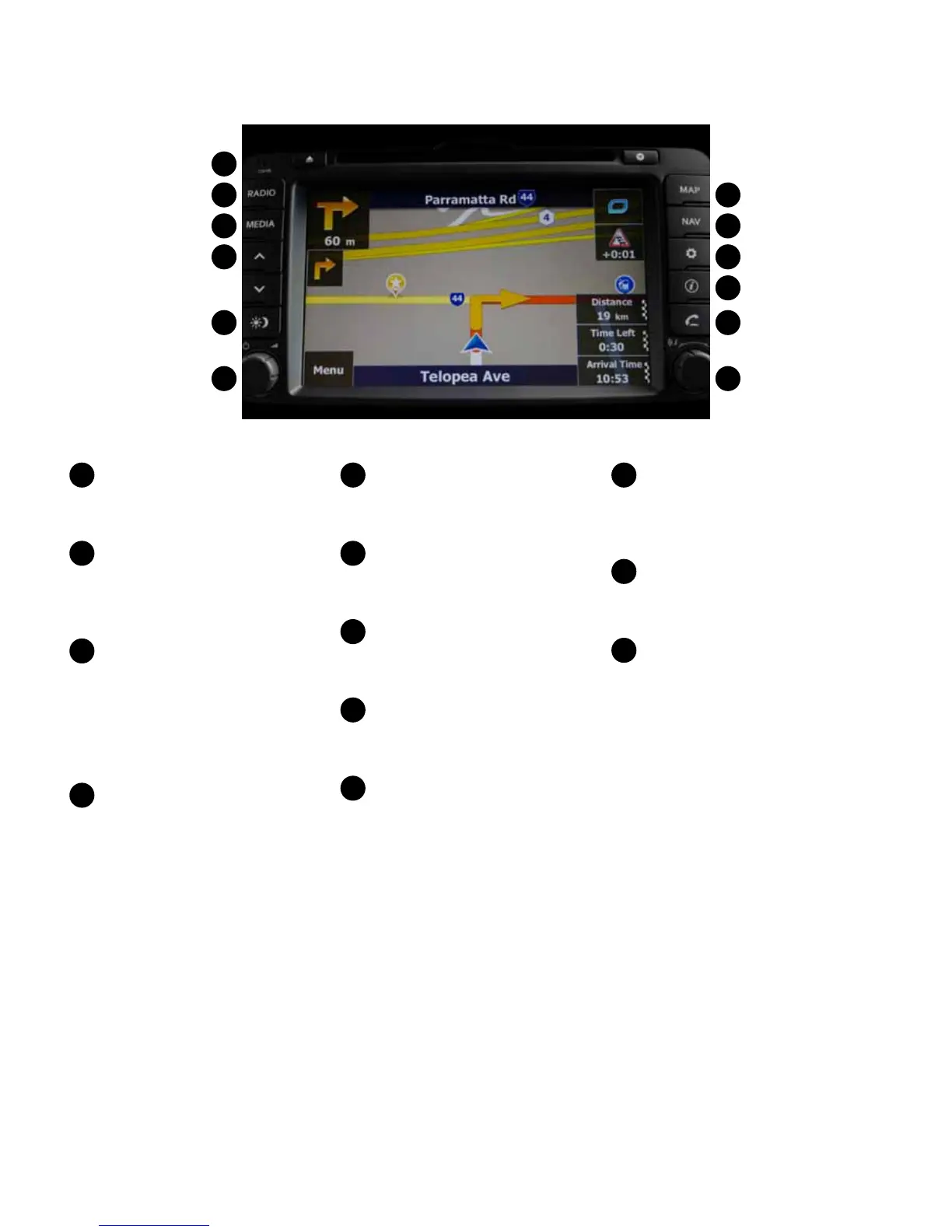
Kia Multimedia Overview:
DISC insert indicator LED
Displays when a DISC has
been inserted.
RADIO
Each press will change the bands
in the following order:
FM -> AM -> FM...
MEDIA
Each press will change the input in
the following order:
DISC (CD, MP3 )-> USB or iPod©
-> Aux -> Bluetooth Media -> DISC
(CD, MP3)...
^
v
(Seek buttons)
• SHORT KEY
- FM/AM Mode: automatically
searches for the previous or
next broadcast frequency and
starts playing.
- CD, MP3, US B, iPod© Mode:
plays the previous or next track/
le/song.
• LONG KEY
- FM/AM Mode: quickly moves
through the frequencies while
the key is pressed. Once released,
automatically searches for
broadcasts which can be received.
- CD, MP3, US B, iPod© Mode:
REW/ FF the current playing track/
le/song.
Display on/o
Switches between the display on
and o.
Left rotary
Push knob: turns the power on/o.
Turn knob: adjusts the volume.
MAP
Displays the MAP screen for the
current position.
NAV
Displays the Destination menu
screen.
SETUP
• SHORT KEY
Displays the Setup menu screen.
• LONG KEY
Displays the device ID, the
software version, the navigation
version, and the map version.
Info
Press to view the destination,
route, and trac information
when the route guidance is active.
PHONE
Displays the Bluetooth®
handsfree screen.
Right rotary
• Turn knob:
- FM/AM Mode: searches for the
previous or next radio frequency.
(Manual tuning).
- CD, MP3, USB, iPod© Mode: plays
the previous or next track/le/
song.
- Navigation Mode: changes the
map scale on the map screen.
(ZOOM IN/OUT )
• Push knob: repeats the voice
guidance.
1
1
2
2
7
7
3
3
8
8
4
4
9
9
10
10
11
11
12
12
5
5
6
6



 To Next Page