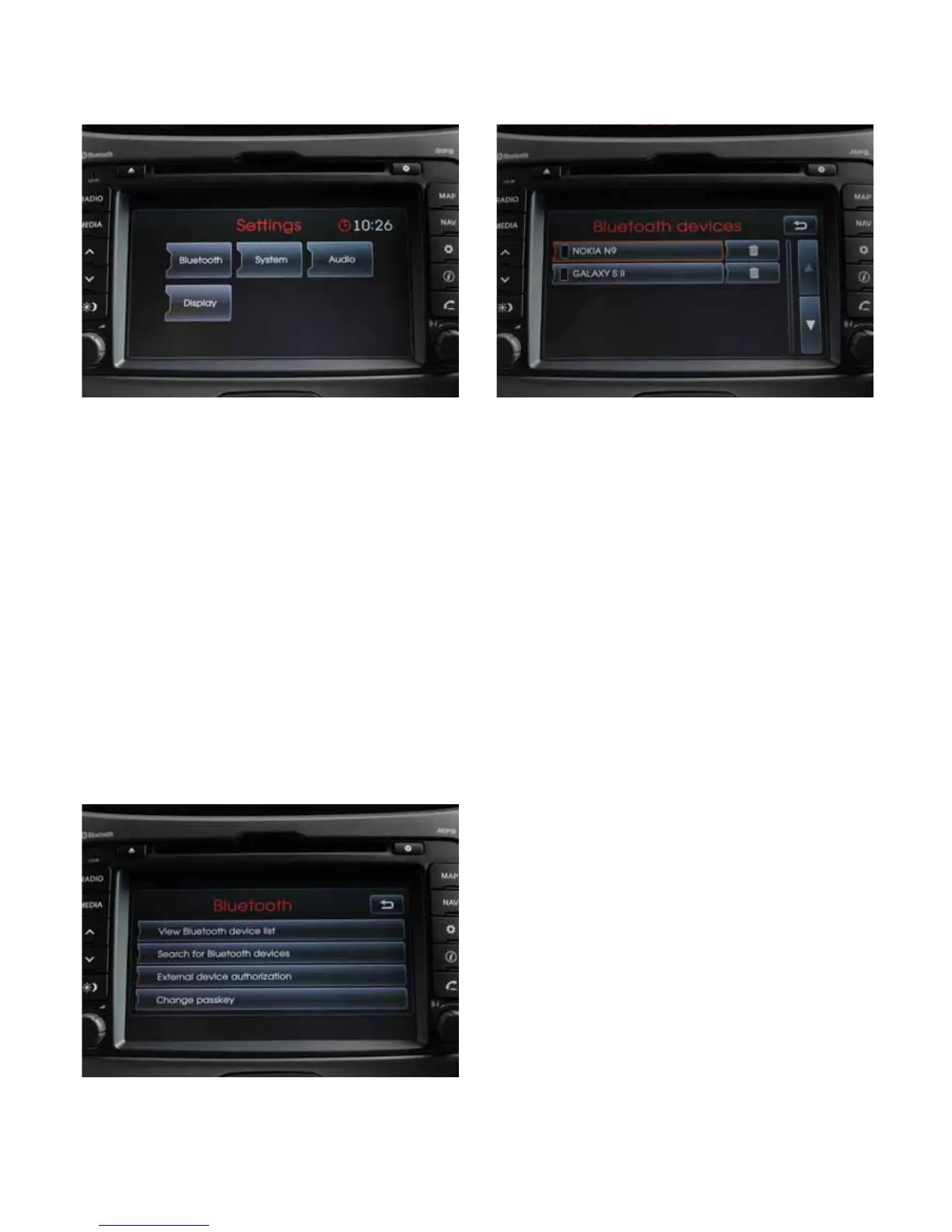
Kia Multimedia Overview:
Phone Pairing:
• Ensure Bluetooth is active on your phone
• Press Setup button on Kia multimedia unit
• Touch Bluetooth tab in Settings menu
• Touch Search for Bluetooth devices on Bluetooth
menu
• Once your device is identied, select (touch) your
device name
• The screen will display a 4 digit code, to be entered
into your phone
• Pairing will be complete when Bluetooth symbol is
displayed on the top right of the screen – make sure
your phone settings enable automatic pairing
Alternatively:
• Search for devices via your mobile phone using
External Device Authorisation – Bluetooth menu
• Refer to your mobile device owners manual for device
specic instructions
Phone Connection (Selection):
Up to 10 phones or Bluetooth devices can be paired to
the Kia Multimedia system.
Device selection:
• Ensure Bluetooth is active on your phone
• Press Setup button on Kia multimedia unit
• Touch Bluetooth tab in Settings menu
• Touch View Bluetooth device list on Bluetooth
menu
• Select desired phone to activate pairing
Streaming from Bluetooth Devices:
Device selection:
• Ensure device is paired to Multimedia unit (see
instructions on pairing)
• Press the Media button
• With most devices the media / audio player will have
to be active for the streaming to commence



 To Next Page