10
*IF EQUIPPED
NIRO EV FEATURES & FUNCTIONS GUIDE
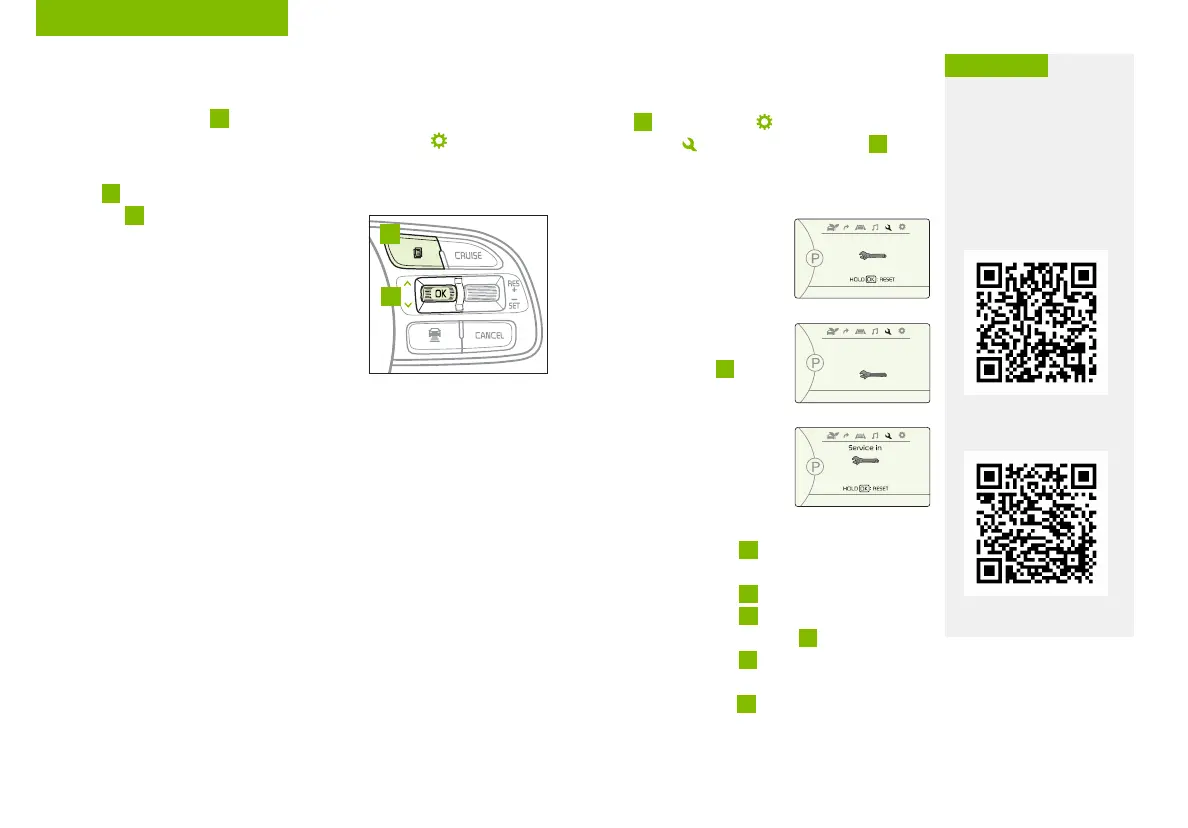
Service Interval Mode
To enter Service Interval mode, press the Mode
button
A
, User Settings , then scroll to Service
Interval Mode and press the OK button
B
.
The system will display number of miles
remaining until next service is due, as well
as type of service.
When service is required, the
following will be displayed:
Service Required
To reset the Service Interval
mode system, press and
hold the OK button
B
for
more than 1 second.
To turn Service In OFF,
go to User Settings.
Service Interval Setting
To set the service interval
when in User Settings mode:
• Press the OK button
B
up/down and scroll to Service Interval.
Press the OK button
B
to enter
• Press the OK button
B
up/down and toggle to
ON, then press the OK button
B
again. Then
press the OK button
B
to scroll and select the
desired miles or months for your next service
• Press the OK button
B
again
User Settings
To enter the User Settings mode in the LCD Instrument Cluster Modes,
press the Mode button
A
when the vehicle is at a standstill and the
Engine Start/Stop button is on and select User Settings .
You can navigate the selections on the display by pressing the OK
button
B
up/down, and then selecting the item by pressing the
OK button
B
again.
Driving Assistance*:
• Lane Safety
• Driver Attention Warning (DAW)*
• Leading Vehicle Distance
• Smart Cruise Control (SCC) Reaction
• Forward Collision-Avoidance Assist (FCA)*
• Forward Collision Warning (FCW)*
• Blind-Spot Collision Warning (BCW)
• Rear Cross-Traffic Collision Warning (RCCW)*
To view a video on your
mobile device, snap these
QR Codes or visit the listed
website.
Refer to page 2 for more
information.
LCD Display Video
LCD Display:
Maintenance Video
QR CODES
www.youtube.com/KiaFeatureVideos
(Buttons located on Steering Wheel – Type B)
MODE
RES
CRUISE
CANCEL
OK
SET
MODE
RES
CRUISE
CANCEL
OK
SET
MODE
A
B
Service in
Off
Service Required
0000
mi.
0000
mi.
Door:
• Automatically Lock
• Automatically Unlock
• Two Press Unlock
Lights:
• Ambient Light
Brightness
• Ambient Light Color
• Headlamp Delay
Sound:
• Parking Distance
Warning-Forward*
Volume
Convenience:
• Seat Easy Access*
• Utiliity Mode
• Welcome Mirror/Light
• Wireless Charging
System*
• Wiper/Lights Display*
• Auto Rear Wiper
• Smart Regeneration
• Icy Road Warning
Service Interval:
• Enable Service
Interval
• Adjust Interval
• Reset
Other features:
• Aux.Battery Saver+
• Energy Consumption
Reset
• Temperature Unit
• Tire Pressure Unit
• Instrument Cluster
Layout
Reset
• Choosing reset will
restore defaults for all
User Settings menus
INSTRUMENT CLUSTER



 To Next Page