28
NIRO EV FEATURES & FUNCTIONS GUIDE
*IF EQUIPPED †LEGAL DISCLAIMERS ON BACK INSIDE COVER
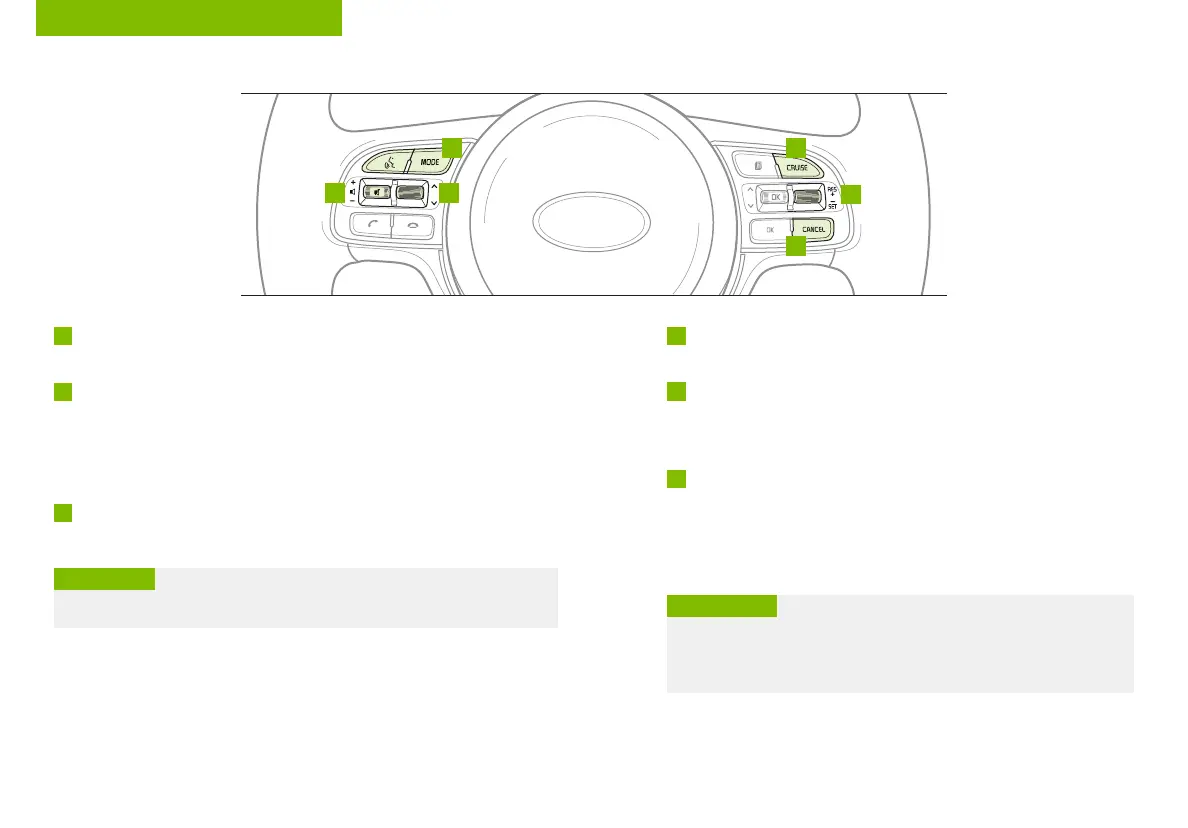
Audio Controls
†20
A D
E
F
C B
Standard Cruise Control
†21
A
Audio MODE button: Press to cycle through FM/AM/SiriusXM
®
/Media modes
Audio System ON/OFF: Press and hold to turn power on; Press to turn power off
B
Seek/Preset button:
FM/AM/SiriusXM
®
Modes: Press up/down to advance through Preset Stations.
Press and hold to auto seek
Media Mode: Press up/down to move Track Up/Down. Press & hold up/down to
fast forward/rewind (except for Bluetooth
®
Audio)
C
Volume button: Press up/down to raise/lower volume
Mute button: Press to mute/unmute all audio
D
CRUISE Control ON/OFF button: Press to turn the Cruise Control
ON/OFF
E
Cruising Speed button:
• Press up to resume or increase Cruising Speed
• Press down to set or decrease Cruising Speed
F
Cruise Control CANCEL button: To cancel Cruise Control setting,
do one of the following:
• Press the brake pedal
• Press the CANCEL button
• Cruise Control is designed to function above 20 mph
• The Cruise Control system will not activate until the brake pedal has
been depressed at least once after ignition ON or engine start
QUICK TIPS
Driving while distracted is dangerous and should be avoided. Drivers should remain attentive to driving and
always exercise caution when using the steering-wheel-mounted controls while driving. To help minimize
driver distraction, some audio system functionalities have been modified while the vehicle is in Drive, Reverse
or moved out of Park.
For further audio system operations, refer to pages 31-34.
Your vehicle’s steering wheel buttons may differ from those in the illustrations. See your Owner’s Manual for
more details.
Pressing the Audio Mode button for more than 1 second will turn Audio Mode ON/OFF.
QUICK TIP
(Type A shown)
REMINDER: Standard Cruise Control is a part of the Smart Cruise Control (SCC)
system and can be set as the operating mode. To switch from SCC to Standard
Cruise Control, press and hold the SCC button for two seconds (the SCC system
must not be activated to change modes). Repeat to switch back to SCC mode.
STEERING WHEEL CONTROLS



 To Next Page