16
*IF EQUIPPED
NIRO EV FEATURES & FUNCTIONS GUIDE
Zero Emission
POWER
CHARGE
FAULT
Zero Emission
POWER
CHARGE
FAULT
Zero Emission
POWER
CHARGE
FAULT
Zero Emission
POWER
CHARGE
FAULT
(Trickle / normal charge shown)
ELECTRIC VEHICLE (EV) FEATURES
Charging Your Electric Vehicle (Continued)
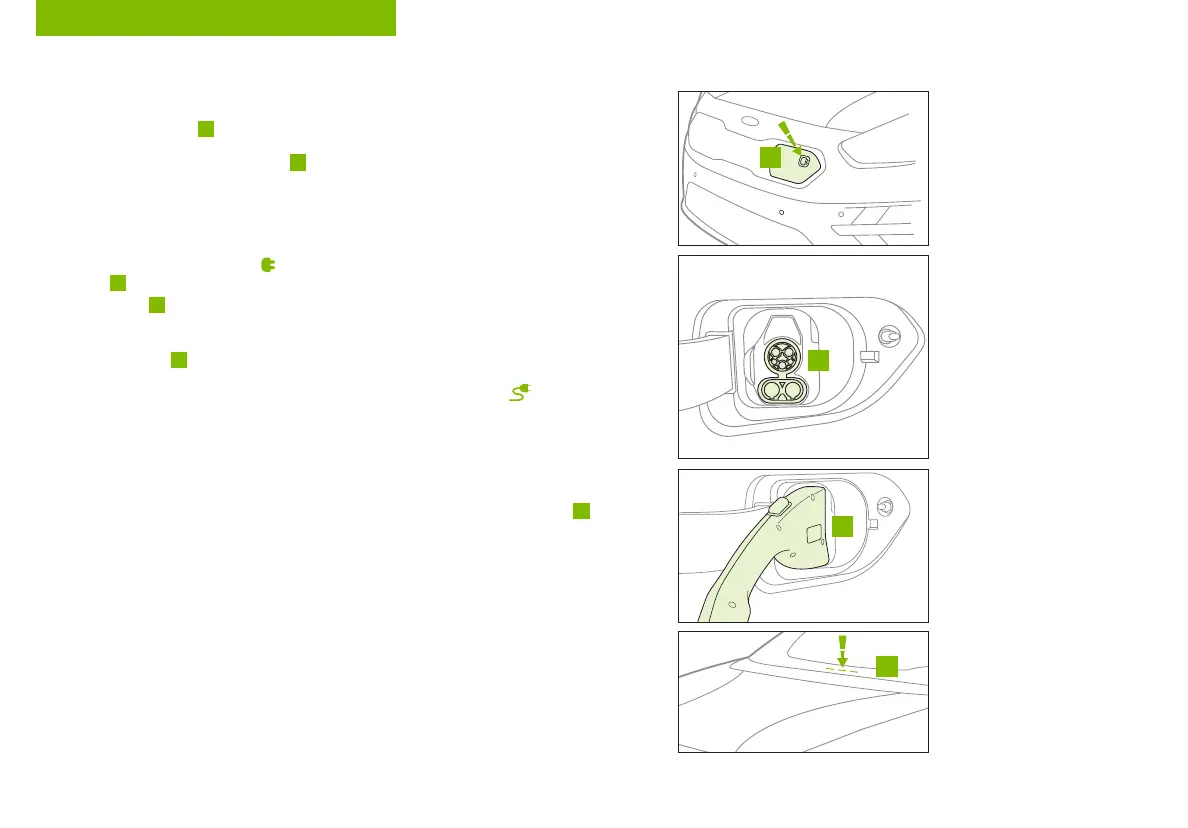
To charge the Niro EV using a normal/trickle charger:
1. Connect the ICCB
A
plug to a dedicated 120 volt/20 amp electrical outlet
2. Check if the power light (green)
B
on the ICCB turns on
3. Press the brake pedal and engage the parking brake
4. Turn off all switches, put the shift lever in P (Park), and turn off the vehicle
5. Press the charging symbol
on the charging door to open the charging
door
F
at the front of the vehicle and remove the trickle/normal charging
inlet cover
G
(the charging door can be opened when the vehicle is unlocked)
6. Hold the charging connector handle and connect it to the vehicle’s trickle/normal
charging inlet
H
by pushing the connector until you hear a clicking sound
7. Charging begins automatically (Ensure the charge indicator light is illuminated
on your instrument cluster, indicating the vehicle is charging, and ensure
scheduled charging is not set)
Checking the Charging Status
The charging status can be checked by viewing the charging status indicator
I
on
the dash panel. The lights will progressively become lit as the vehicle approaches a
full charge. Ensure scheduled charging is not set.
REMINDER: For more detail and/or subsequent steps in charging your vehicle, including safety
precautions that should be taken, please see the Owner’s Manual.
I
G
F
H



 To Next Page