OPTIMA FEATURES & FUNCTIONS GUIDE
8
*IF EQUIPPED
To view a video on your
mobile device, snap these
QR Codes or visit the listed
website.
Refer to page 2 for more
information.
LCD Display:
Maintenance Video
LCD Display Video
www.KuTechVideos.com/jf13/2017
www.KuTechVideos.com/jf13/2017
(Type B cluster)
Service in
Off
Service Required
0000
mi.
0000
mi.
QR CODES
User Settings Service Mode
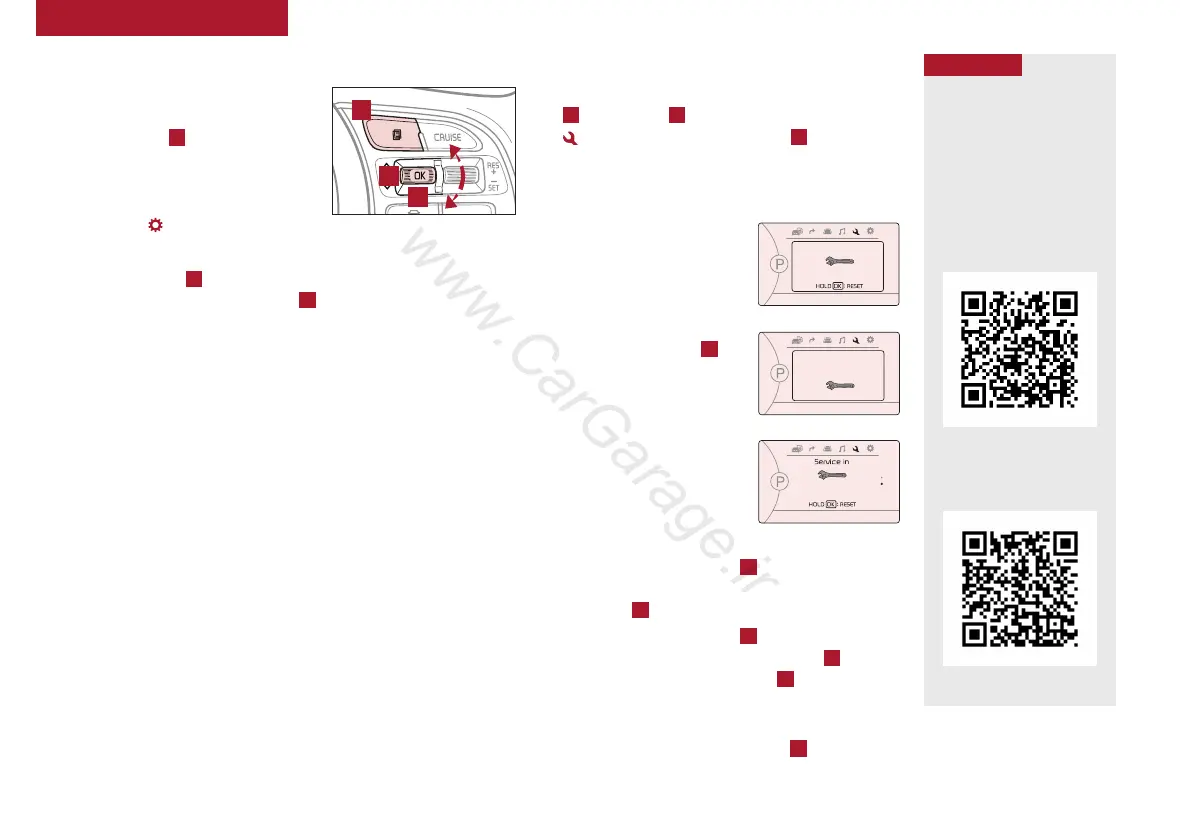
To enter the User Settings mode in the
LCD Instrument Cluster Modes, press
the Mode button
A
when the vehicle
is at a standstill and with the ignition
switch or the ENGINE START/ STOP
button* in the ON position and select
User Settings .
You can navigate the selections on the display by pressing the
Move/Scroll button
B
up and down, and then selecting the item
by pressing the Select/Reset button
C
.
(Located on Steering Wheel)
A
B
C
Driving Assist*:
• Smart Cruise Control Response*
• Rear Cross Traffic Alert (RCTA)*
• FCW (Forward Collision Warning)*
• AEB (Autonomous Emergency
Braking)*
Door/Trunk:
• Automatic Lock & Unlock
• Smart Trunk*
• Two-Press Unlock
• Horn Feedback
Lights:
• One-Touch Turn Signal*
• Headlamp Delay
• Welcome Light*
Sound:
• Park Assist System Volume*
• Blind Spot Detection Sound*
• Welcome Sound*
Convenience:
• Seat Easy Access*
• Steering Position
• Wireless Charging
System*
• Wiper/Light Display*
Service Interval:
• Service Interval On/Off
• Set mileage/months
Other Features:
• Fuel Economy Auto Reset
• Fuel Economy Unit
• Temperature Unit
• Tire Pressure Unit*
To enter Service mode, press the Mode button
A
, scroll using
B
(Move/Scroll) to Service Mode
and press Select/Reset button
C
. System
will display number of miles remaining until next
service is due, as well as type of service.
When service is required,
the following will be
displayed: Service
Required.
To reset the Service mode
system, press and hold the
Select/Reset button
C
for
more than 1 second.
To turn Service In OFF,
go to User Settings.
Service Interval Setting
To set the service interval
when in User Settings
mode:
• Press the Move button
B
and scroll to
Service Interval. Press the Select/Reset
button
C
to enter
• Press the Move button
B
and toggle to ON,
then press the Select/Reset button
C
.
Then press the Move button
B
to scroll and
select the desired miles or months for your
next service
• Press the Select/Reset button
C
to enter
INSTRUMENT CLUSTER















 To Next Page