OPTIMA FEATURES & FUNCTIONS GUIDE
6
*IF EQUIPPED
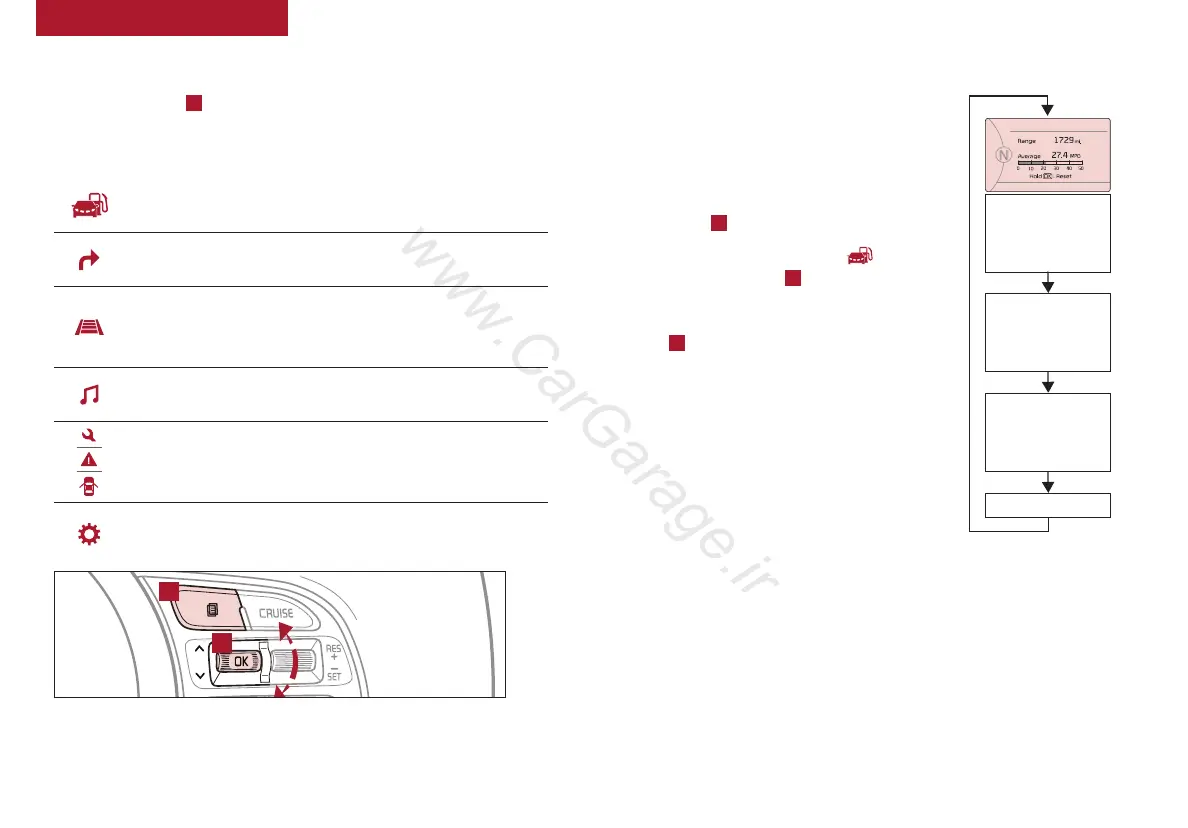
LCD Instrument Cluster Modes*
(Type A; Buttons located on Steering Wheel)
A
B
Trip Computer Mode: Displays driving information for
tripmeter, fuel economy, etc.
Turn-by-Turn Mode*: Displays the state of the navigation
Advanced Smart Cruise Control (ASCC) / Lane Departure
Warning System (LDWS)*: Displays the state of the ASCC
and LDWS
A/V Mode*: Displays the state of the A/V System
Service Modes: Informs on upcoming service intervals /
Warning messages related to TPMS and others / When any
door is not securely closed, this indicator will illuminate
User Settings Mode: Change settings of the doors, lamps
and other features
Press Mode button
A
to scroll through different LCD Instrument
Cluster Modes.
Type B cluster:
Your vehicle’s steering wheel buttons may differ from those in the illustrations.
Trip Modes / Trip Computer
The Trip Computer is a system to relay
pertinent driving information. It appears on the
display when the ignition switch or the Engine
Start/Stop button* is in the ON position.
To cycle through the Trip Modes, press the
Mode button
A
.
When in the Trip Computer mode , press
the Select/Reset button
B
to cycle through
the screens. When displaying TRIP A or TRIP
B screens, press and hold the Select/Reset
button
B
to reset the Tripmeter to zero (Type
A Steering Wheel).
REMINDERS:
• Appearance of Tripmeter display may differ as equipped
• All stored driving information (except Odometer and
Range) is reset if the battery is disconnected
INSTRUMENT CLUSTER
FUEL ECONOMY
•
Range
•
Average MPG
•
Instant MPG
TRIP A
•
Tripmeter
•
Average MPG
•
Elapsed Time (E/T)
TRIP B
•
Tripmeter
•
Average MPG
•
Elapsed Time (E/T)
DIGITAL SPEEDOMETER
(Type B Cluster)















 To Next Page