21
ALWAYS CHECK THE OWNER’S MANUAL FOR COMPLETE OPERATING INFORMATION AND SAFETY WARNINGS.
*IF EQUIPPED
Your vehicle’s steering wheel buttons may differ from those in the illustrations. See your
Owner’s Manual for more details.
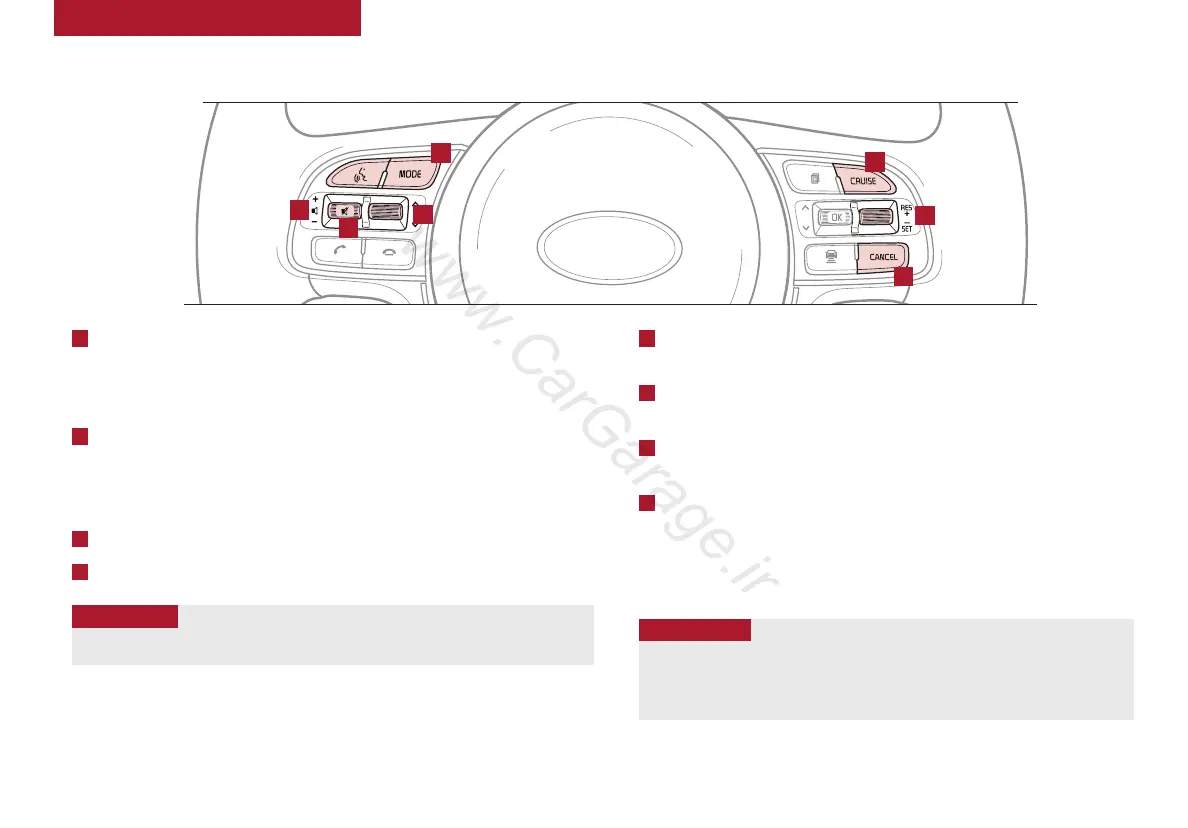
Audio Controls* Cruise Control*
E
CRUISE Control ON/OFF button: Press to turn the Cruise
Control ON/OFF
F
Resume Cruising Speed button: Press up to resume or
increase Cruising Speed
F
Set Cruising Speed button: Press down to set or decrease
Cruising Speed
G
Cruise Control CANCEL button: To cancel Cruise Control
setting, do one of the following:
• Press the brake pedal
• Press the CANCEL button
A
Audio MODE button: Press to cycle through FM 1-2/AM/SAT 1-3/CD/
USB/Aux/iPod
®
Audio System ON/OFF: Press and hold to turn power on; Press to turn
power off
B
Seek/Preset button:
Radio Mode: Press to advance through Preset Stations. Press and hold
to auto seek
Media Mode:
Press to move Track Up/Down. Press & hold to FF/REW
C
Volume button: Press up/down to raise/lower volume
D
Mute button: Press to mute all audio
For further audio system operations, refer to pages 22-23.
Driving while distracted is dangerous and should be avoided. Drivers should remain attentive to
driving and always exercise caution when using the steering-wheel-mounted controls while driving.
Pressing the Audio Mode button for more than 1 second will turn Audio Mode ON/OFF.
QUICK TIP
• Cruise Control is designed to function above 25 mph
• The Cruise Control system will not activate until the brake pedal has been
depressed at least once after ignition ON or engine start
QUICK TIPS
A
E
F
G
D
C
B
STEERING WHEEL CONTROLS















 To Next Page