ADVANCED DRIVER ASSISTANCE SYSTEMS (ADAS)
ADAS
ALWAYS CHECK THE OWNER’S MANUAL FOR COMPLETE OPERATING INFORMATION AND SAFETY WARNINGS. *IF EQUIPPED †LEGAL DISCLAIMERS ON BACK INSIDE COVER
11
Lane Keeping Assist (LKA)*
†6
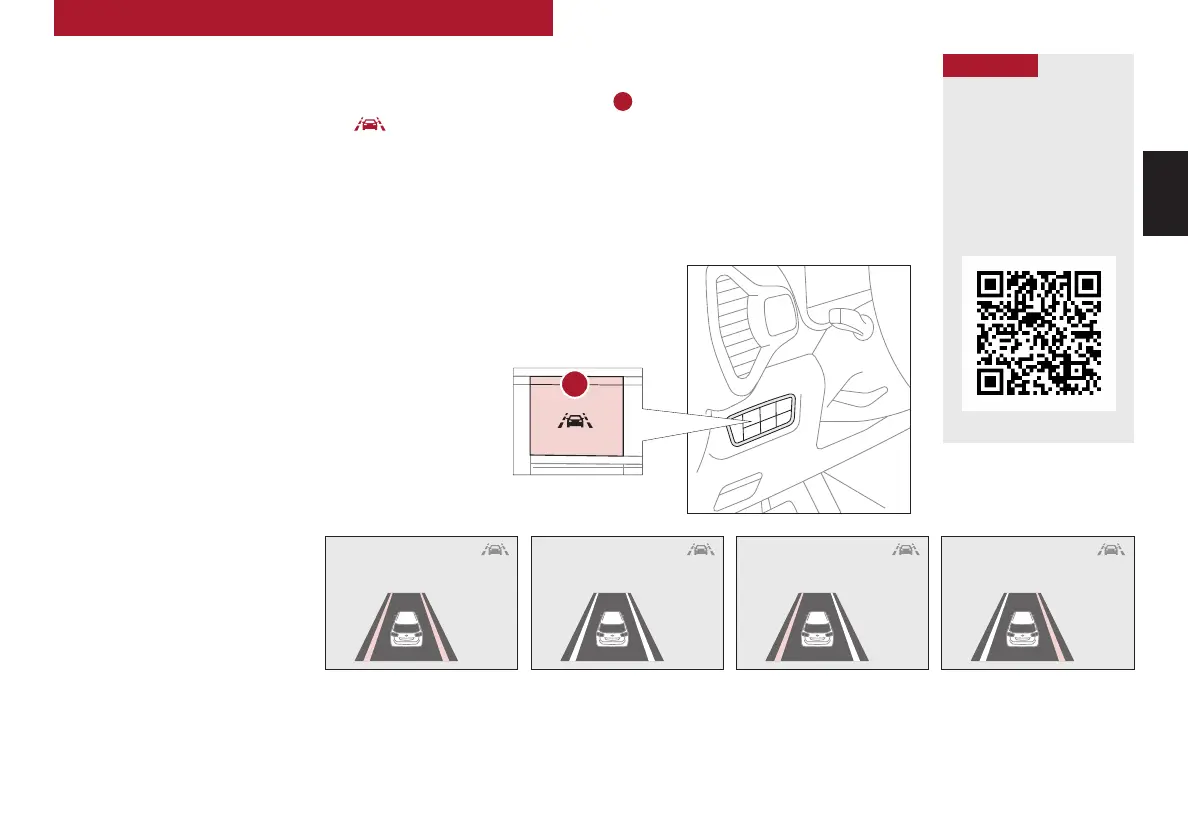
With the Engine Start/Stop button in the ON position, press the Lane Safety button
A
to turn the
system ON. The instrument cluster indicator will illuminate white. It will remain white when
vehicle is traveling less than 40 mph and the system does not detect the lane markers. When LKA
detects the lane markers and can assist the steering, the LKA icon will illuminate green.
If LKA detects that you are moving outside of your lane, the system may give an audible warning
and display a Lane Departure Warning alert on the instrument cluster. If the vehicle continues to
move outside of the lane, LKA can provide steering inputs, trying to prevent the vehicle from moving
outside its lane.
LKA is the operating mode by default when the Lane Safety button is depressed to ON.
To switch between LKA modes (Active LKA, LKA and Lane Departure Warning), go to
Vehicle Settings* in the audio control unit or the User Settings* in the Instrument Cluster.
All systems will operate under the following conditions:
• The vehicle exceeds approximately 40 mph
• The vehicle is between the lane markers
• LKA recognizes the lane the vehicle is traveling in
Lane Keeping Assist* is not a substitute for
safe and proper driving. Always drive safely
and use caution. LKA may not always alert the
driver if the vehicle is driven outside of its lane.
Refer to section 5 in the Owner’s Manual for
more information.
When the front view camera detects
the lanes traveling in, the indicators are
illuminated
When the front view camera does not detect
the lanes traveling in, the indicator will not
illuminate
When the front view camera detects the vehicle moving outside of the lane the vehicle’s
traveling in, a yellow indicator will illuminate, either on the left or right lane
Lane Keeping Assist Lane Keeping Assist Lane Keeping Assist
REMINDERS:
• When the vehicle changes lanes without
a turn signal, LKA may sound an audible
warning. The warning sound can be adjusted
in the User Settings.
• LKA/LDW will not issue a warning if the turn
signal or hazard signal is activated
• LKA/LDW will return to its previous state
when the ignition is cycled
Lane Keeping Assist
Video
To view a video on your
mobile device, snap this
QR Code or visit the listed
website.
Refer to the inside cover for
more information.
www.youtube.com/KiaFeatureVideos
QR CODE
(Button located in panel to the
left of steering wheel)
Lane Keeping Assist
A



 To Next Page