42 SOUL FEATURES & FUNCTIONS GUIDE
*IF EQUIPPED
OTHER KEY
FEATURES
OTHER KEY FEATURES
HOLD
To view videos on your
mobile device, snap these
QR Codes or visit the listed
website. Refer to the inside
cover for more information.
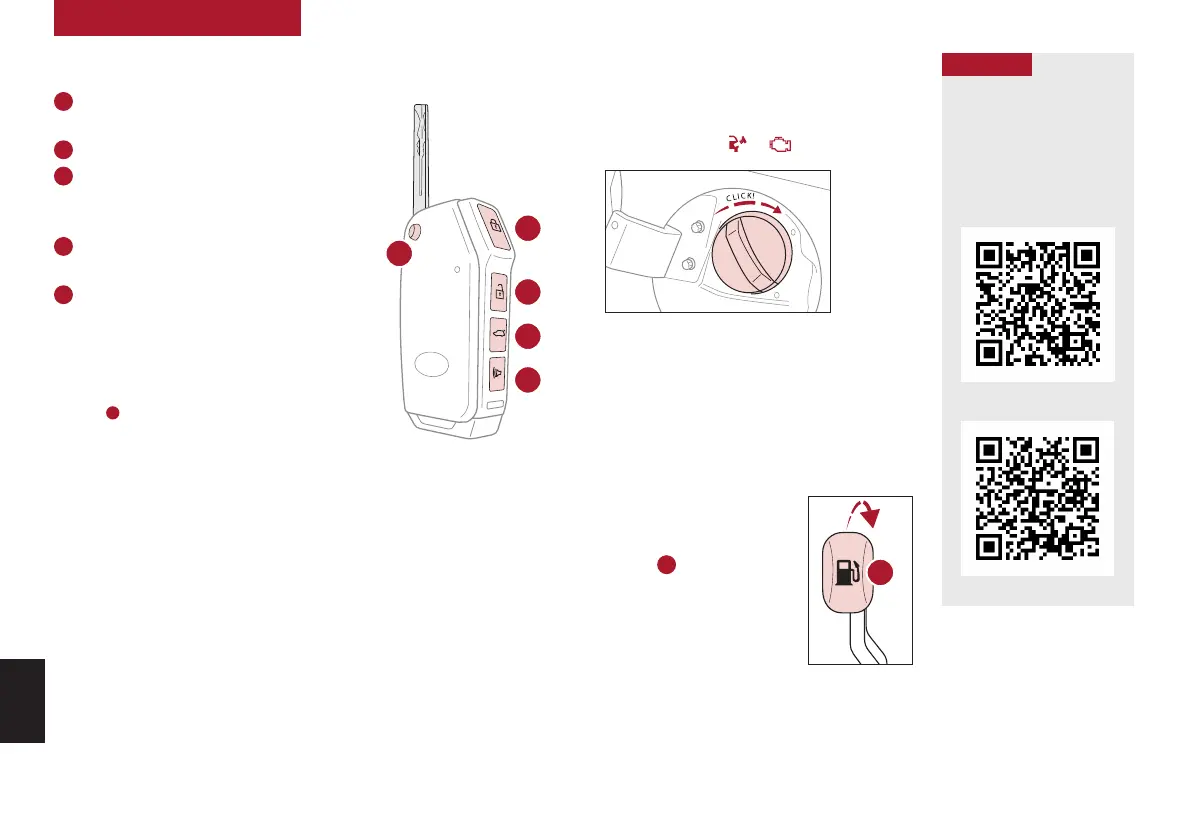
One-Click Fuel Cap
Video
Kia Key Fob Video
www.youtube.com/KiaFeatureVideos
QR CODE
(Lever located on the driver’s floor
near door sill)
Fuel Door
Release Lever
Lift the
F
lever upwards to
release the fuel door.
Remote Keyless Entry (Folding Key)*
A
Press the release button to release the
key
B
Press to Lock All Doors
C
Press to unlock Driver’s Door. Press
twice in 4 seconds to unlock All Doors
and Liftgate
D
Press and hold for more than 1 second
to unlock Liftgate and manually open
E
Press and hold more than 1 second for
Panic Alarm. To turn OFF Alarm, press
any button
REMINDERS:
• The Liftgate does not automatically open when the
button
D
is pressed
• The Liftgate unlocks when the Smart Key fob is within
close proximity of the rear liftgate
• Remote button configuration may vary depending on
vehicle options
Double-Turn Lock / Unlock All
• Turn counterclockwise once to unlock Driver’s Door
• Turn counterclockwise again within 4 seconds to unlock All Doors
• Turn clockwise once to Lock All Doors
Fuel Cap Open Warning
Indicator*
Tighten for ONE CLICK to prevent Fuel Cap Open
Warning Indicator or from illuminating.
REMINDERS:
• The Fuel Door Release Lever is located on the lower part
of the driver’s door sill
• It is normal operation when tightening to hear one click
and then when Fuel Cap is released, it clicks back
A
C
D
E
F
B
Refer to section 4 in the Owner’s Manual for more information.
Refer to section 4 in the Owner’s Manual for more information.
Refer to section 4 in the Owner’s Manual for more information.
Refer to section 4 in the Owner’s Manual for more information.



 To Next Page