ADAS
ADVANCED DRIVER ASSISTANCE SYSTEMS (ADAS)
14 SOUL FEATURES & FUNCTIONS GUIDE
*IF EQUIPPED †LEGAL DISCLAIMERS ON BACK INSIDE COVER
Images are for illustrative purposes only and may not reflect actual operation.
Refer to section 5 in the Owner’s Manual for more information.
Rear Cross-Traffic Collision-Avoidance Assist (RCCA)*
†6
REMINDERS:
• The RCCA Warning sound can be adjusted in the User Settings* or the Vehicle Settings* on the audio head unit
• When vehicle power is cycled, RCCA will remain in the previous state
• RCCA can be turned OFF/ON in User Settings
• RCCA will show a warning if the approaching vehicle speed is between 2.5-22 mph within sensing range.
See owner’s manual for other conditions
• RCCA is a supplemental system. Do not solely rely on this system and always pay attention to the road and
its conditions
A
B
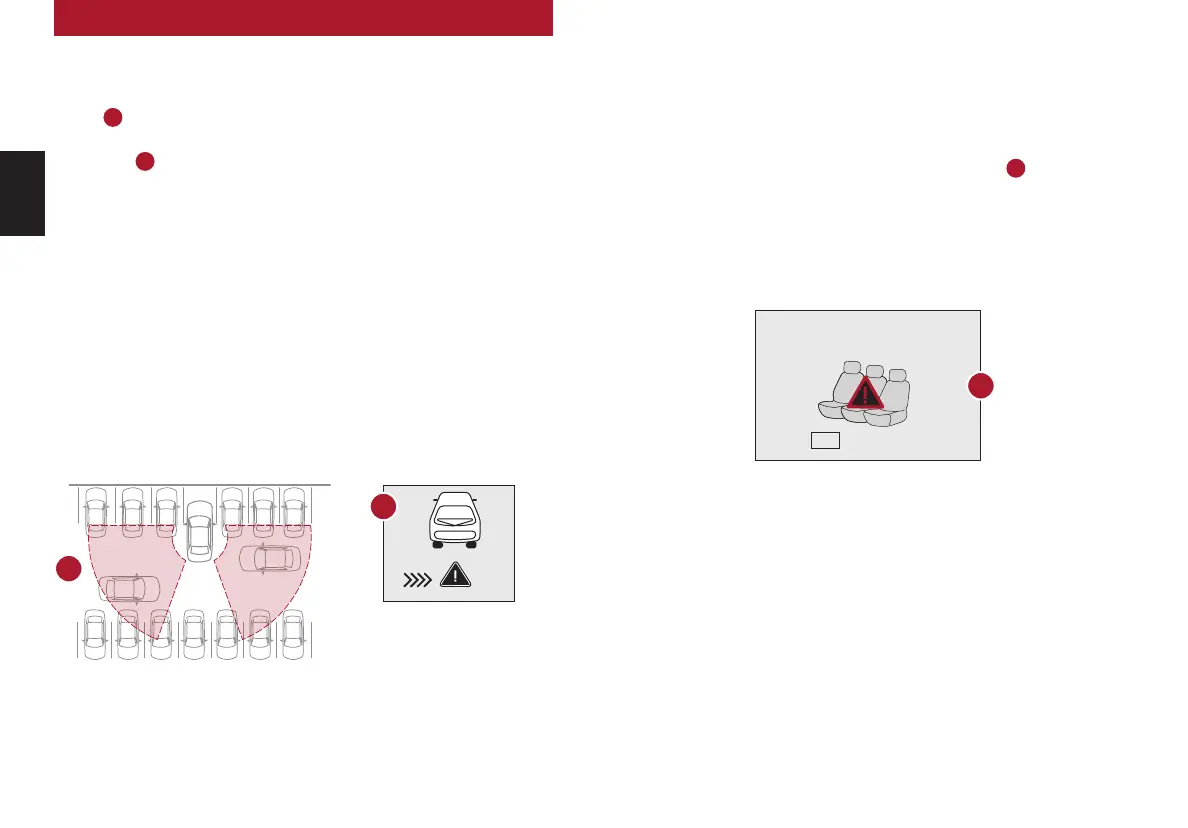
If RCCA detects approaching vehicles from the rear left or rear right side of the
vehicle
A
, the system will sound an audible warning, the warning indicators on the
outside rearview mirror will illuminate and a message will appear on the Instrument
Cluster LCD
B
. RCCA may activate the Electronic Stability Control (ESC) to help avoid
an imminent collision. RCCA may temporarily apply braking power when an approaching
vehicle is detected within a certain distance next to or behind the vehicle.
RCCA is designed to operate under the following conditions:
• When the gear shift is in Reverse
• When the vehicle is moving slower than 6 mph
Check rear seats
:
Alarm Off
OK
Rear Occupant Alert (ROA) System
The Rear Occupant Alert (ROA) system can help alert
the driver when a rear passenger may be left in the
vehicle. The alert will be a message on the Instrument
Cluster stating to “Check rear seats”
C
and a chime
will sound.
To turn the system OFF or ON, go to Vehicle Settings*,
select Convenience, then Rear Occupant Alert and
check/uncheck the box to enable/disable by pressing
the OK button on the Steering Wheel.
The Rear Occupant Alert system is not a substitute for one’s
attention. Always check the vehicle’s interior before exiting.
Image is for illustrative purposes only and may not reflect actual
feature or operation.
Refer to section 4 in the Owner’s Manual for more information.
REMINDER: Always be sure to check the passenger areas before
leaving the vehicle.
C



 To Next Page