ALWAYS CHECK THE OWNER’S MANUAL FOR COMPLETE OPERATING INFORMATION AND SAFETY WARNINGS. *IF EQUIPPED †LEGAL DISCLAIMERS ON BACK INSIDE COVER
29
MIST: Single wipe
OFF: Wiper off
INT: Intermittent wipe
LO: Slow wipe
HI: Fast wipe
HI
LO
OFF
IN T
HI: Continuous wipe
LO: Intermittent wipe
OFF: Wiper off
Rear Wiper & Washer*
To operate:
• Rotate Rear Wiper switch to
change Wiper modes
• Push lever to spray and wipe
On Rear Wipers, intermittent wipe
function is not adjustable.
QUICK TIP
HI
LO
OFF
IN T
Windshield Wipers & Washers
• Moving lever to HI increases intermittent wipe frequency and wipe speed
• Moving lever to LO decreases frequency of wipes
• Set the wiper to OFF position when the wiper is not in use
QUICK TIPS
STEERING WHEEL
CONTROLS
STEERING WHEEL CONTROLS
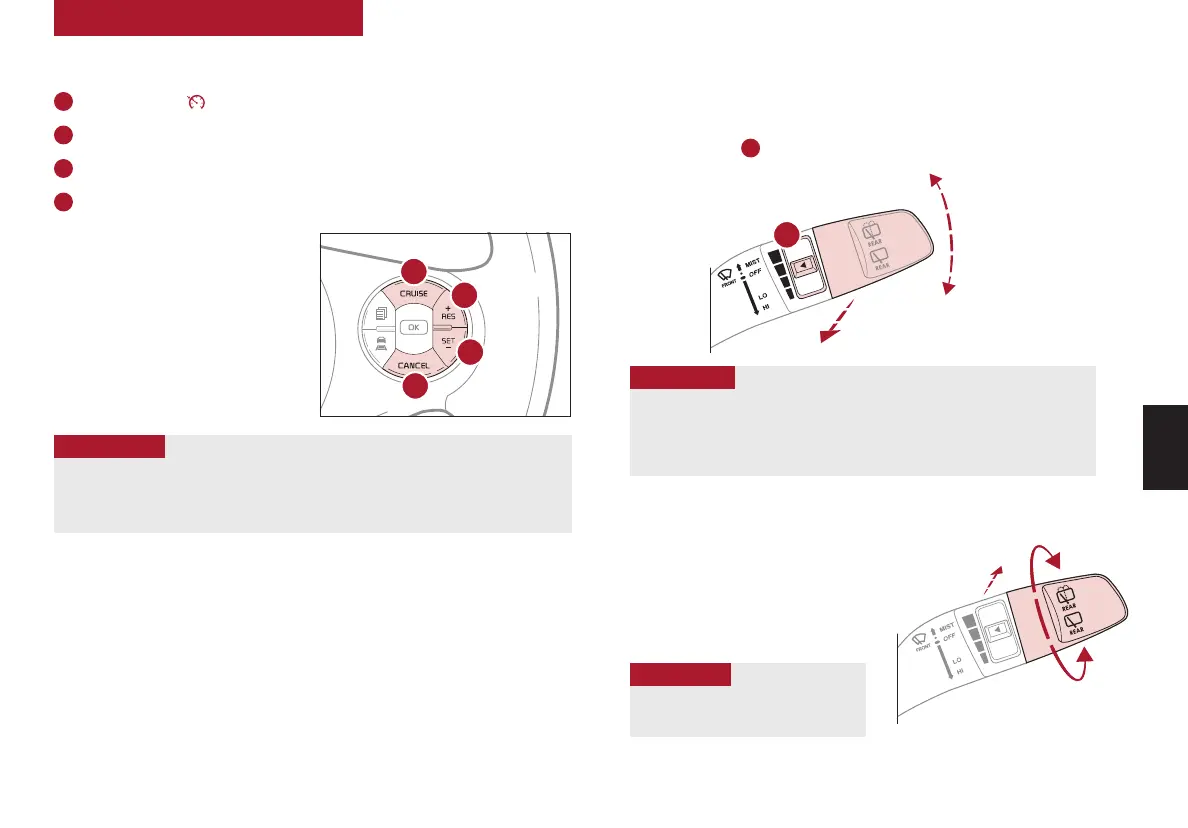
To operate:
• Move lever Up/Down to change Wiper modes
• Press button
E
to adjust intermittent wipe
• Pull lever to spray and wipe
Cruise Control (CC)*
†21
Your vehicle’s steering wheel buttons may differ from those in the illustrations. Refer to section
5 in the Owner’s Manual for more information.
A
Driving Assist button: Press to turn the Cruise Control on/off
B
RES+: Press to resume preset speed or increase Cruising Speed
C
SET–: Press to set or decrease Cruising Speed
D
CANCEL button: To cancel Cruise Control, do one of the following:
• Press the brake pedal
• Press the CANCEL button
SCC sys
• Cruise Control is designed to function above 25 mph
• Cruise Control will not activate until the brake pedal has been depressed at least
once after ignition ON or engine starting
QUICK TIPS
REMINDER: Standard Cruise Control is a part of Smart Cruise Control and can be set as the
operating mode. To switch from SCC to Standard Cruise Control, press and hold the Driving
Assist button (SCC must not be activated to change modes). Repeat to switch back to SCC
mode.
A
B
C
D
Refer to section 4 in the Owner’s Manual for more information
Refer to section 4 in the Owner’s Manual for more information
E



 To Next Page