26
DIY DCDC INSTALL
To install a different brand of DCDC Charger on the Control Hub, follow these
instructions.
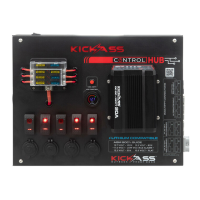
There are two pre-drilled holes for cabling on the face of the control hub, these are
covered by the sticker. Simply locate one of these two holes and find a suitable location
for mounting your DCDC on the front face of the unit. Cut the sticker with a sharp knife
and drill suitable holes to mount your DCDC Charger.
If you wish to make use of the KickAss Plug and play wiring kits, blank 2 and 3 pin
Anderson style plugs are available for purchase from the KickAss Store. These plugs can
be mounted easily by cutting away or removing the foam insert on the inside of the
control hub.
To connect your DCDC Charger output to your second battery via the control hub, simply
attach the output positive to the DCDC charger positive post and the earth output to the
DCDC charger ground post. Note: The fuse has been suitably sized for a 25A charger,
should you be using a larger charger to may need to increase the fuse size.
Note: Mounting a DCDC charger to your control hub will not affect your warranty, unless
it is determined to be the cause of the failure.
DCDC Charger
Positive Post
DCDC Charger
Earth Post
Optional area to
mount 2 and 3 pin
Anderson style
connector


 To Next Page