13
WIRING INSTRUCTIONS
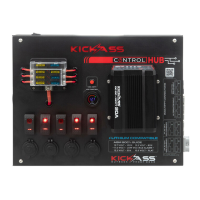
The unit comes fully assembled and ready to use. The following instructions are for
wiring in the 5 switches and connecting the unit to your battery
WIRING IN SWITCHES
What You Will Need
Wire StripperWire Crimper
Phillips Head
Screwdriver
Utility Knife
Note: Ensure the unit is disconnected from the battery prior to attempting any wiring
Step 1: Using the supplied allen key, remove the 4 screws and open the Control Hub
Step 2: For wiring in switches, select the appropriate sized spade and ring terminal for
your accessories wiring.
Note: The yellow terminals are recommended for use with 10-12AWG wire and the blue
terminals are recommended for use with 12-14AWG wire.
Step 3: Using a knife, cut the grommets on the side or bottom of the unit that your
accessory wires will run through. Push approximately 30cm of your accessories wiring
through the grommet
30cm


 To Next Page