27
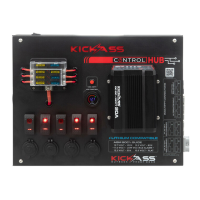
The Control Hub has been designed to work with our KickAss range of lithium batteries.
Underneath the sticker, holes have been cut in the face panel to allow you to mount the
RDU on the control hub without any drilling.
KICKASS LITHIUM REMOTE DISPLAY UNIT
What You Will Need
KickAss Lithium Battery
KA12120-LION
12V 120AH LiFePO4
LITHIUM BATTERY
RDU and Extension
2x M4 Nuts
and Bolts
Note: Ensure the unit is disconnected from the battery prior to attempting any wiring
Step 1: Using the supplied allen key, remove the 4 screws and open the Control Hub
Step 2: Locating the 3 holes on the rear side of the face panel, cut away the sticker
using a sharp knife.


 To Next Page