8
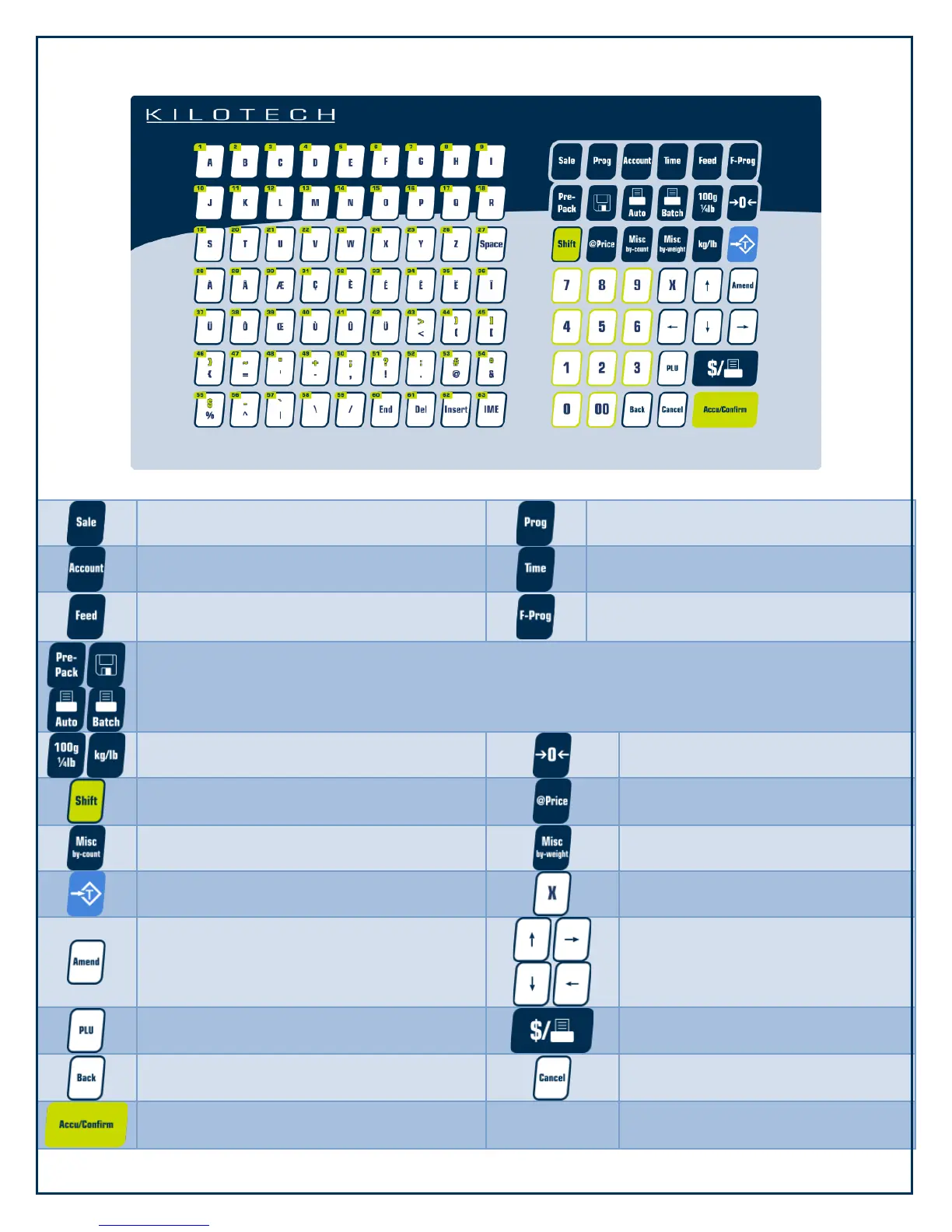
Keypad
Enter sale mode
Enter program mode
Enter accounting mode
Display current date and time
Feed a label and clear printer buffer
Fast program mode. Always used in
combination with other keys
Switch between sales modes
Switch between pricing units
Set the scale to zero
Access second level speed keys and change
case sensitivity during text input
Override the unit price
Miscellaneous by count transaction
Miscellaneous by weight transaction
Tare the scale
Input count: amount in count sale
Amend transaction data in sale
interface and store amended data in the
program interface
Switch among sequential steps and
numbers in the program and
account interfaces
When you type a PLU number and press
this key, it will call up that PLU
Print labels or receipts according to
settings
Return to previous step without saving
Clear data, cancel operations or go
back to previous step
Save accumulative transaction data into
sale buffer




 To Next Page