Page 31
AUTOMATIC SATELLITE SWITCHING
1. After you have properly configured the King-Dome antenna for your satellite service, the
King-Dome will automatically switch between satellites by simply selecting your desired
channel using the receiver’s remote control.
.
Note: For better performance when using the automatic satellite switching feature, change channels by selecting your
program from the channel guide rather than channel surfing.
It is common for the picture to pixel or display an error message when the antenna is switching between
satellites, or if the signal has been temporarily blocked. PLEASE BE PATIENT. THE PICTURE WILL RETURN.
If an error message appears for an extended period, selecting CANCEL may help clear the message
more quickly.
Dish Network HD users: If you are unable to receive all of your HD programming, see Dish Network HDTV:
Changing the Satellite Trio on page 32.
IN-MOTION OPERATION
1. Perform a stationary search as shown on the previous page.
2. Allow your programming to download.
3. Press .
When the status light is steady green, the target satellite is found and the unit is tracking.
Note: While driving and in tracking mode, objects such as bridges, buildings and trees may occasionally block the
satellite signal from reaching the antenna. Line of sight obstructions may cause the picture on your TV to
freeze, pixel or be lost temporarily. PLEASE BE PATIENT. THE PICTURE WILL RETURN.
If the antenna does not sense vehicle motion after several minutes, it will enter sleep mode. The antenna will
automatically wake and begin tracking if it senses vehicle motion or a severe drop in satellite signal.
When you park for the evening or any extended period, it is recommended that you perform a stationary search.
initializing
potential satellite found
target satellite found (tracking)
STATUS LIGHT SYSTEM STATUS
ALTERNATE SEARCH METHOD (Above method is the manufacturer’s preferred method)
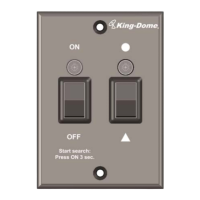
1. Press ON.
2. Press . Before putting the vehicle into motion, wait for the status light to turn steady
green and your programming to download.
a) alternating colors
b) GREEN-flashing
c) GREEN-steady


 To Next Page