EasyManua.ls Logo

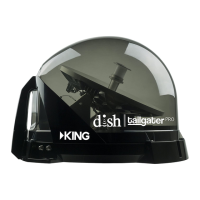
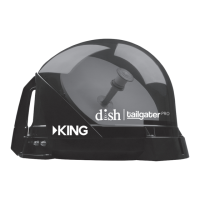
KING DISH Tailgater Pro DTP4900 - User Manual

KING DISH Tailgater Pro DTP4900
29 pages
Print Icon
To Next Page IconTo Next Page
Loading...
To subscribe to programming or for assistance with using the
DISH Tailgater Pro, call 1-800-963-DISH (3474).
This manual contains detailed information on your DISH Tailgater Pro.
To start using your DISH Tailgater Pro right away,
see the Quick Reference Guide.
DTP4900 & DTP4950 Owner’s Manual
Designed and Manufactured by
For Sales Information Please Contact RoadTrucker Inc (www.RoadTrucker.com)
8312 Sidbury Rd.; Wilmington, NC 28411 - (800) 507-0482 / (910) 686-4281

Questions and Answers

  • F
    frichardsonAug 18, 2025
    What to do if my KING Antenna has complete signal loss - 015A?
    • A
      Ashley JohnsonAug 18, 2025
      If you are experiencing complete signal loss (error 015A) with your KING Antenna, check for the following possible causes: ensure that there are no obstructions blocking the DISH Tailgater Pro’s view of the southern sky, such as tree branches or severe rain. Also, verify that the coax cable is properly connected and hand-tightened between your Wally and the DISH Tailgater Pro. If you've selected a local channel, ensure you're within its spot beam area, or try a nationally broadcast channel and call DISH to switch your locals. Lastly, if the DISH Tailgater Pro has been moved, initiate a new scan.
  • R
    Rhonda BrownAug 20, 2025
    How to resolve 'Channel Signal Loss - 004' on KING DISH Tailgater Pro DTP4900?
    • T
      timothygibsonAug 20, 2025
      If you are experiencing 'Channel Signal Loss - 004' on your KING Antenna, it may be that the DISH Tailgater Pro has not tracked to the appropriate orbital slot upon channel change. Verify there are no obstructions blocking the signal from the newly chosen satellite, or move the DISH Tailgater Pro to have a better view of the southern sky and initiate a new scan. Once your system has found its satellites, it may take a few minutes to download the electronic program guide and acquire a signal before live TV appears.
  • A
    Abigail LawrenceAug 23, 2025
    What to do if I get 'OTA Channel Signal Lost - 739' on my KING DISH Tailgater Pro DTP4900 Antenna?
    • S
      sydney94Aug 23, 2025
      If you receive an 'OTA Channel Signal Lost - 739' error on your KING Antenna, it means the signal has been lost for this over-the-air channel, possibly due to antenna relocation or realignment. Reposition the antenna into an optimal position to get the clearest signal and you may need to scan again for OTA channels. Also, there might be an obstruction of the signal. Remove any obstruction from the signal path.
  • M
    Mckenzie BrooksAug 26, 2025
    What to do for Local Channels Interrupted - 536 on KING DISH Tailgater Pro DTP4900?
    • R
      Rebecca MolinaAug 26, 2025
      Call DISH at 1-800-333-DISH to have your locals switched to your current area.
  • R
    Ronald HowardAug 28, 2025
    Why is my KING DISH Tailgater Pro DTP4900 Antenna remote not working?
    • R
      Renee SanchezAug 28, 2025
      There are several reasons why your remote might not be working. First, ensure the remote is in the correct mode by pressing the 'SAT' button on the left side. Second, check and replace the batteries if needed, ensuring they are properly inserted; if the 'SAT' light doesn't illuminate when pressing the 'SAT' button, replace the batteries. Finally, the remote may not be paired with the receiver; to pair it, press the 'SYS INFO' button on the front of the Wally and then press the 'SAT' button on the left side of the remote.
  • H
    holly83Aug 30, 2025
    How to fix 'All Satellites Not Found - 150' error on my KING DISH Tailgater Pro DTP4900?
    • V
      Vickie ButlerAug 31, 2025
      If you're getting an 'All Satellites Not Found - 150' error on your KING Antenna, it's likely due to obstructions blocking the DISH Tailgater Pro’s view of the southern sky, such as tree branches or severe rain. Make sure nothing is blocking the view. Also, your physical location may be outside the footprint of the desired orbital slot. Unplug the power cord of your receiver for 10 seconds and plug it back in; it may take up to 5 minutes to power back on.
  • J
    Jeremiah ToddSep 2, 2025
    What causes 'No Satellites Found - 151' on my KING DISH Tailgater Pro DTP4900 and how to resolve it?
    • E
      Elizabeth LopezSep 2, 2025
      The 'No Satellites Found - 151' error on your KING Antenna can be caused by obstructions blocking the DISH Tailgater Pro’s view of the southern sky, such as tree branches or severe rain. Ensure nothing is obstructing the view. It can also be due to a coax cable not properly connected between your receiver and the DISH Tailgater Pro. Check that the cable is connected properly and hand-tightened. Unplug the power cord of your receiver for 10 seconds and plug it back in. It may take up to 5 minutes for your receiver to power back on.
  • R
    robertmorrisSep 5, 2025
    How do I fix the “SmartCard Not Inserted” message (021) on my KING DISH Tailgater Pro DTP4900 Antenna?
    • A
      andersonericSep 5, 2025
      If you see a “SmartCard Not Inserted” message (021) on startup, it means the SmartCard is not fully seated in the Wally slot. Your SmartCard is located on the left side of the Wally. Pull out the SmartCard and insert it back into the slot, ensuring the arrow on the SmartCard is facing up and is inserted first into the receiver. If there is not a SmartCard in your receiver please call 1-800-333-DISH.
  • Z
    Zoe CareySep 7, 2025
    How do I fix the 'OTA Tuner Module Not Detected - 978' error on my KING DISH Tailgater Pro DTP4900 Antenna?
    • Z
      Zachary BrownSep 7, 2025
      If you encounter the 'OTA Tuner Module Not Detected - 978' error on your KING Antenna, it indicates that an over-the-air (OTA) tuner module has been removed. Reinstall the OTA tuner module. When this is complete, the Wally will request to be reset. Select YES to reset the Wally.
  • R
    Rachel PowellSep 10, 2025
    What causes missing channels on my KING DISH Tailgater Pro DTP4900, and how can I fix it?
    • M
      Mark MartinezSep 10, 2025
      Missing channels on your KING Antenna can occur if the electronic program guide is not set to “My Channels.” Press the GUIDE button on your remote twice to display the “Favorite Channels” menu. Select “None” or one of your favorite channels list. Also, you may not have the orbital slots required to view the missing television programming. Confirm that you subscribe to the missing channel by using dish.com/mychannels.

Summary

Product Registration

Introduction

Important Safety Instructions

Manual and Reference Guide

Keep manuals for future reference for safe operation.

Operational Warnings

Set up and operate the unit according to the provided instructions.

Physical Handling & Connections

Avoid power washing/submersion, hand-tighten cables, unplug in damp conditions.

Apply Rubber Feet to Antenna Unit

About Signal Loss

Obstructions and Signal Path

Ensure an unobstructed view of the southern sky for best reception.

Environmental Factors

Heavy weather can reduce signal; programming returns as conditions improve.

About Satellite TV Reception

Connect Receiver to TV

Connect Antenna Unit to Receiver

Coax Cable Connections

Connect RG-6 coax to MAIN and SATELLITE IN ports, hand-tighten.

Powering Up Equipment

Power the receiver and TV, select correct TV input.

New and Unactivated Receiver

Initial Receiver Setup

Wally startup screens will appear for initial setup.

Follow On-Screen Prompts

Your TV screen may differ; follow on-screen prompts for best results.

New and Unactivated Receiver (Continued)

Remote Control Pairing

Follow on-screen instructions to pair your remote control with the receiver.

Display Resolution Setup

Select your display resolution (e.g., 720p) via on-screen prompts.

Mobile Antenna Setup

Ensure antenna is placed correctly and select scan options.

New and Unactivated Receiver (Continued)

State Selection

Highlight and select your current state from the menu.

Mode Selection

Choose the correct satellite mode (e.g., WA 1 TV(110, 119, 129)).

New and Unactivated Receiver (Continued)

Satellite Scan Process

Scan for satellite signals; do not move the antenna during the process.

Receiver Activation

Call DISH to activate your receiver with a mobile antenna specialist.

New and Unactivated Receiver (Continued)

Software Download and Reboot

Receiver downloads software and reboots; do not disturb.

Activation Confirmation

Installation summary confirms successful receiver activation.

New and Unactivated Receiver (Continued)

Signal Acquisition and Viewing

Acquire signal and select "Watch TV" to view programming.

Standard Operation

Standard Operation (Continued)

Pre-operation Check

Ensure first-time setup procedure is completed if receiver is new.

Initial Startup and Prompts

Wally startup screens appear; follow on-screen prompts.

Standard Operation (Continued)

Mobile Antenna Setup

Ensure antenna is placed correctly and select scan options.

State and Mode Selection

Choose your current state and the appropriate satellite mode.

Standard Operation (Continued)

Satellite Scan Process

Scan for satellite signals; do not move the antenna during the process.

Signal Acquisition

Receiver acquires signal, may take up to 5 minutes.

Standard Operation (Continued)

Program Guide Download

Program guide downloads after signal acquisition, may take up to 10 minutes.

Operating Notes

Notes on signal loss, moving the unit, and reauthorization.

Second Receiver Operation

Initial Setup and Activation

Ensure second receiver is activated and connected to the MAIN port.

Downloading Programming

Reset second receiver to download guide for the selected satellite.

Proper Care of Your Equipment

Handling and Cleaning

Handle carefully, avoid dropping, and hand wash with mild soap and water.

Security and Accessories

Unit can be secured; information on optional accessories.

Accessories (Sold Separately)

AL1000 Alarm System

Alarm sounds if coax is disconnected from the DISH Tailgater Pro.

Mounting Brackets and Feet

Various mounting options like brackets, feet, and roof kits.

Roof Installation

Tools and Materials Required

Gather necessary tools like drill, wrench, sealant, and fasteners.

Antenna Unit Location Selection

Select an area on the roof with a clear view and proper wiring access.

Antenna Unit Location

Obstruction Clearance Guidelines

Maintain adequate distance from obstructions based on height.

Mounting Position Criteria

Mount on center line, minimize tilt, avoid obstructions, handle to rear.

Roof Installation (Continued)

Securing the Antenna Unit

Use fasteners and roof-compatible sealant for weatherproofing.

Coaxial Cable Connections

Connect coax to MAIN port, tighten hand-snug.

Roof Installation (Continued)

Coax Routing and Bending

Route coax, avoid sharp bends, secure every 12-18 inches.

Roof Entry and Sealing

Drill a 3/4" hole, feed coax, and seal completely.

Receiver Connection

Connect coax cable(s) to receiver(s) using Snap-n-Seal connectors.

Troubleshooting

SmartCard and Remote Issues

Resolve SmartCard not inserted or remote not working errors.

Complete Signal Loss (015 A)

Address obstructions, coax connection, or antenna movement.

Troubleshooting (Continued)

Signal Loss Errors

Resolve channel signal loss, all satellites not found, or no satellites found.

Troubleshooting (Continued)

Channel and Local Channel Issues

Fix OTA signal loss, local channel interruptions, and missing channels.

Troubleshooting (Continued)

Feature Access and Viewing Area

Troubleshoot feature access, sporting event blackouts, and viewing area issues.

Manufacturers Limited Warranty

Warranty Terms and Service

Understand parts/labor warranty, service procedures, and returns.

Warranty Exclusions

Learn what is not covered by the warranty.

FCC Guidelines

KING DISH Tailgater Pro DTP4900 Specifications

General IconGeneral
Power Source12V DC
Automatic SetupYes
Satellite AcquisitionAutomatic
PortabilityPortable
Operating Temperature-40°F to 140°F
TypeSatellite Antenna
CompatibilityDish Network
Satellite SupportDISH
Signal AcquisitionAutomatic
Warranty2 years

Related product manuals