Page 2
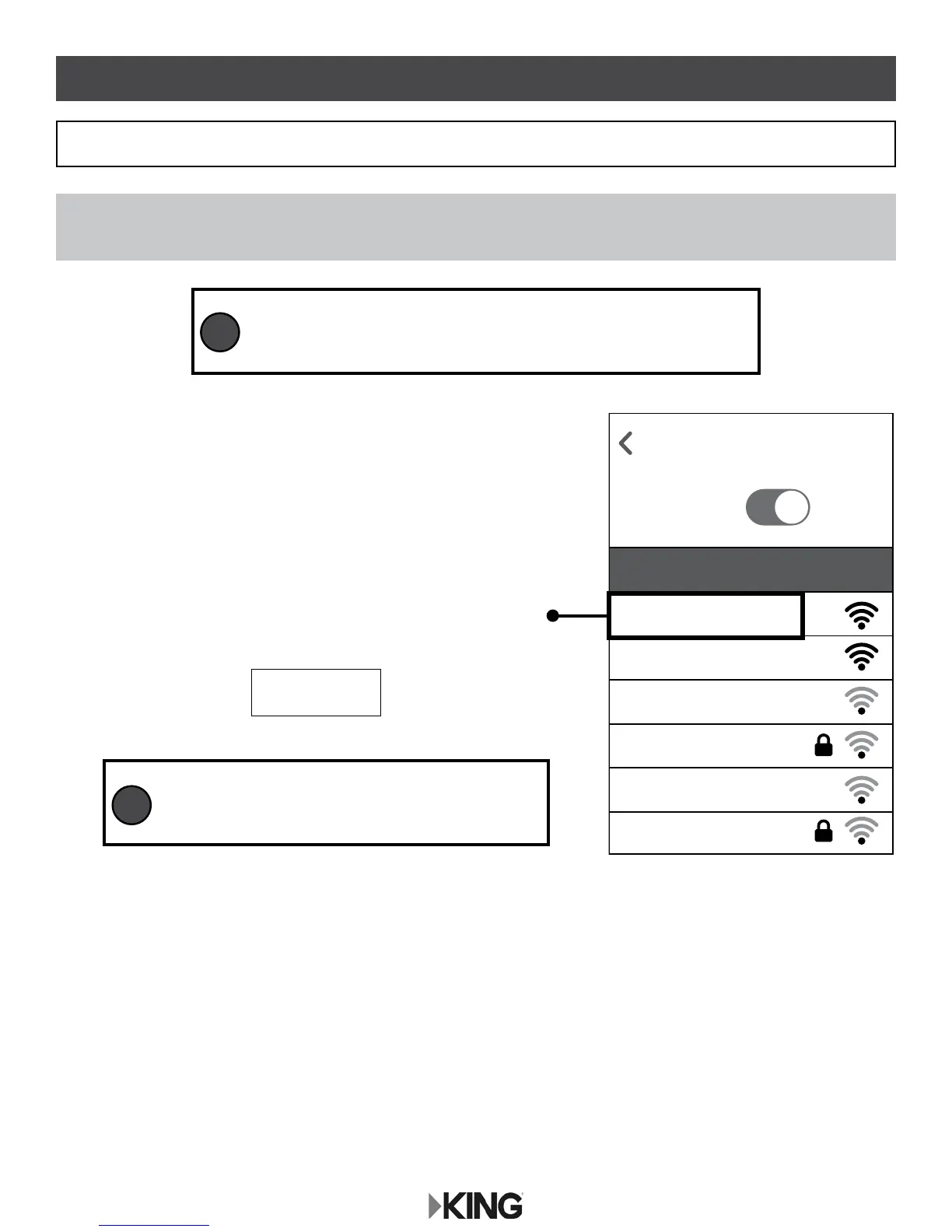
1. Go to your smart phone or tablet’s Wi-Fi settings page
and connect to the KING 5G network:
If you do not see KING_XXXXXX_5G (5GHz network), connect to KING_XXXXX (2.4GHz
network).
Always choose the 5G network if possible, as it is faster than the 2.4GHz network.
KING_XXXXXX_5G
Graphics will vary.
Back to Settings
WiFi
KC1074
ON
KING_XXXXXX_5G
KING_XXXXXX
Fun Lake Campground
Dad’s Campground
Chat Cafe
Campit Here
Choose a Network...
FIRST-TIME USE
1. SET UP KING WIFIMAX
NOTE: Make sure your KING WiFiMax and power injector are connected and powered on as
shown on page one (blue lights on both devices will turn on when power is connected).
XXXXXX is a number/letter combination
unique to your router and can be found on the
bottom of your router in the SSID row.
TIP
To maintain the best connection to your KING WiFiMax, it is
suggested that the cellular network on your smart phone or
tablet be turned off while completing the rst-time setup.
TIP










 To Next Page