Page 5
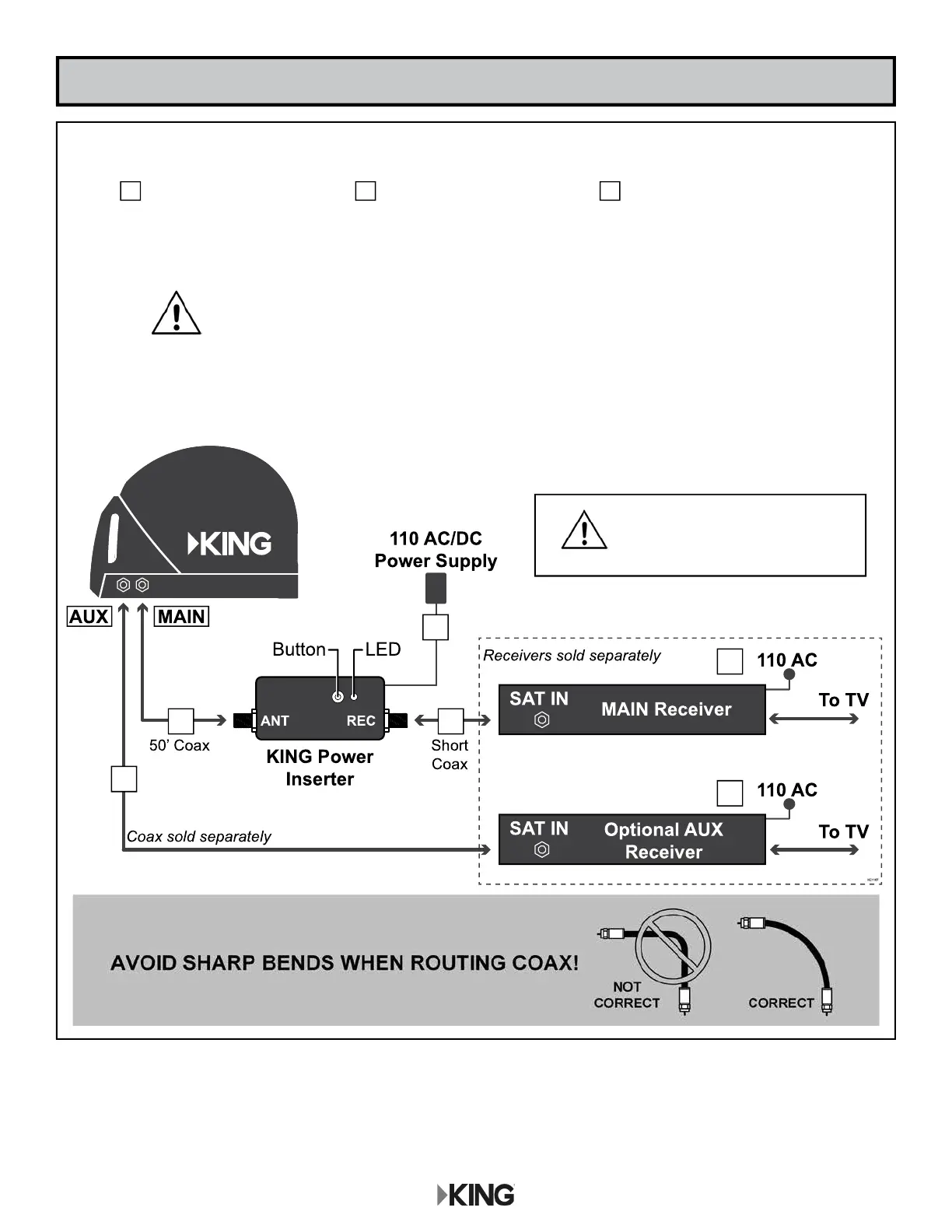
After connecting and plugging in all components, wait for the power inserter
LED to turn steady green.
The Mobile Antenna Setup screen should appear on your TV.
Go to the next page.
CONNECTIONS
HAND-TIGHTEN COAX.
OVER-TIGHTENING CAN
DAMAGE CONNECTIONS.
Connect components in following order.
Power inserter is for indoor use only.
Place the power inserter in an accessible location.
Do not over-tighten the coax connections.
Do not put sharp bends or kinks in the cables.
Do not route the cables where they can be tripped on
or run over by a vehicle.
A Connect coax cables. B Plug in power inserter. C Plug in receiver(s).
A
A A
C
C
B
NOTE: If your main receiver has two SAT IN ports: AUX coax may be connected to
second SAT IN port for dual tuner usage.



 To Next Page