Page 6
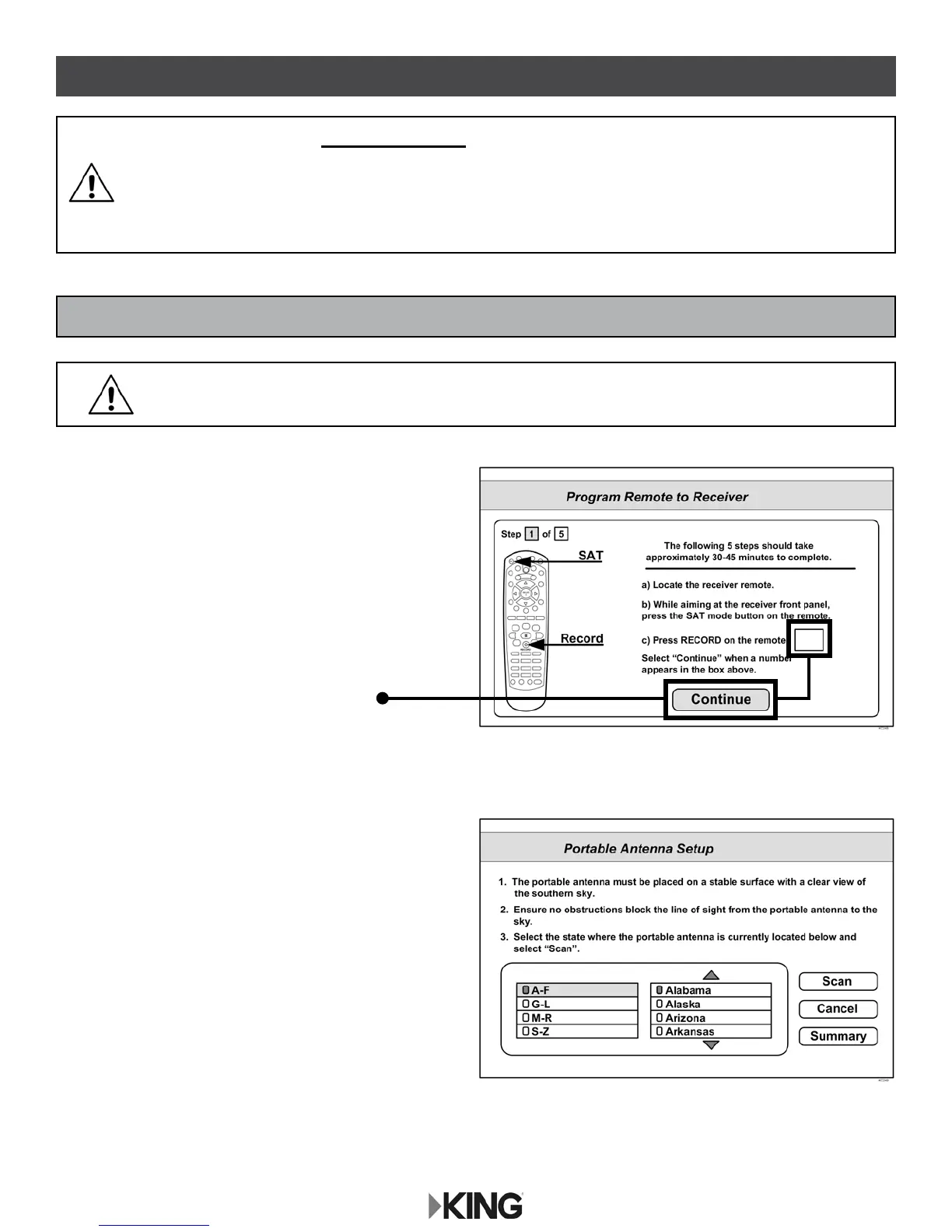
1. Point your receiver’s remote at the front of
the receiver and press SAT.
Press RECORD.
When a number appears in the box,
verify CONTINUE is highlighted.
Press SELECT on your remote.
The Portable Antenna Setup screen
will display.
IF YOU ARE USING A NEW RECEIVER WITH THE KING TAILGATER, YOU MUST
FOLLOW THE FIRST TIME SETUP PROCEDURE STARTING BELOW.
AFTER THIS FIRST TIME PROCEDURE, YOU CAN USE “STANDARD KING
TAILGATER OPERATION” STARTING ON PAGE 10.
KING TAILGATER OPERATION
FIRST TIME KING TAILGATER OPERATION WITH NEW RECEIVER
MAKE SURE TO INSTALL THE BATTERIES IN THE RECEIVER’S REMOTE
CONTROL (INCLUDED WITH REMOTE CONTROL).










 To Next Page