11
English
PARTS AND FEATURES OPERATING THE HAND BLENDER
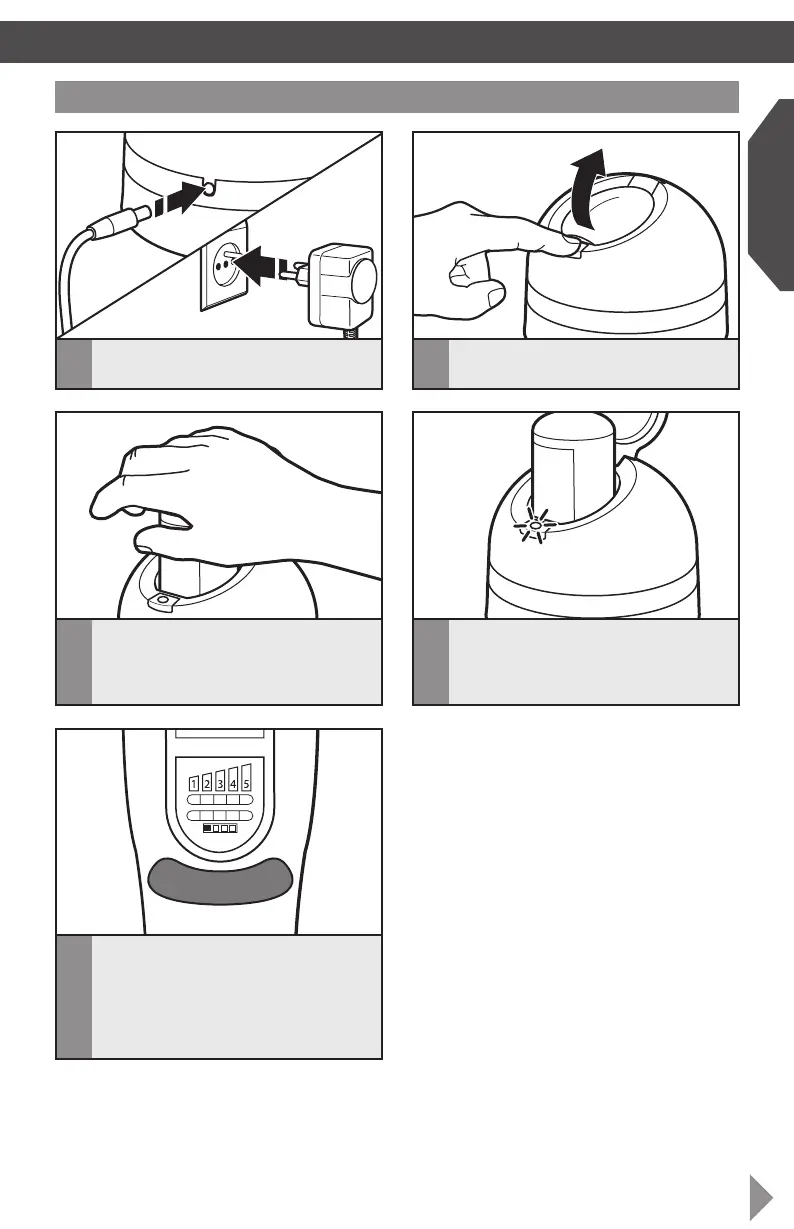
Before rst use: charging the battery
1
Plug in the charger.
3
Slide the battery into the charger,
aligning the flat side of the battery to the
flat side of the port, and push down to
click into place.
4
The LED indicator will begin to flash
slowly and continuously as it charges.
When the battery is fully charged, the
LED will display a continuous light.
NOTE: If the charger quickly flashes three
times after inserting the battery, there is
a battery error. Check that the battery is
placed properly in the charger. If the light
continues to flash rapidly, the battery may be
extremely cold, hot, wet or damaged. Allow
the battery to cool down, warm up or dry
out, then reinsert. If the problem persists,
see the “Service and Warranty” section.
5
Charge the battery after each use, when
the battery indicator lights show less
than 25% battery life remaining (only
one light displays on the LED battery
life indicator), or when the battery is
completely drained.
2
Push the lid release button to open
the lid.
NOTE: Batteries do not develop a
“memory” when charged after only a partial
discharge. It is not necessary to run down
the battery before placing it on the charger.
W10529667A_01_EN.indd 11 12/28/12 12:51 PM
Downloaded from www.vandenborre.be








 To Next Page