CMD + SHIFT CLICK TO CHANGE COPY CMD + SHIFT CLICK TO CHANGE COPY
16
TROUBLESHOOTINGCARE AND CLEANING
3
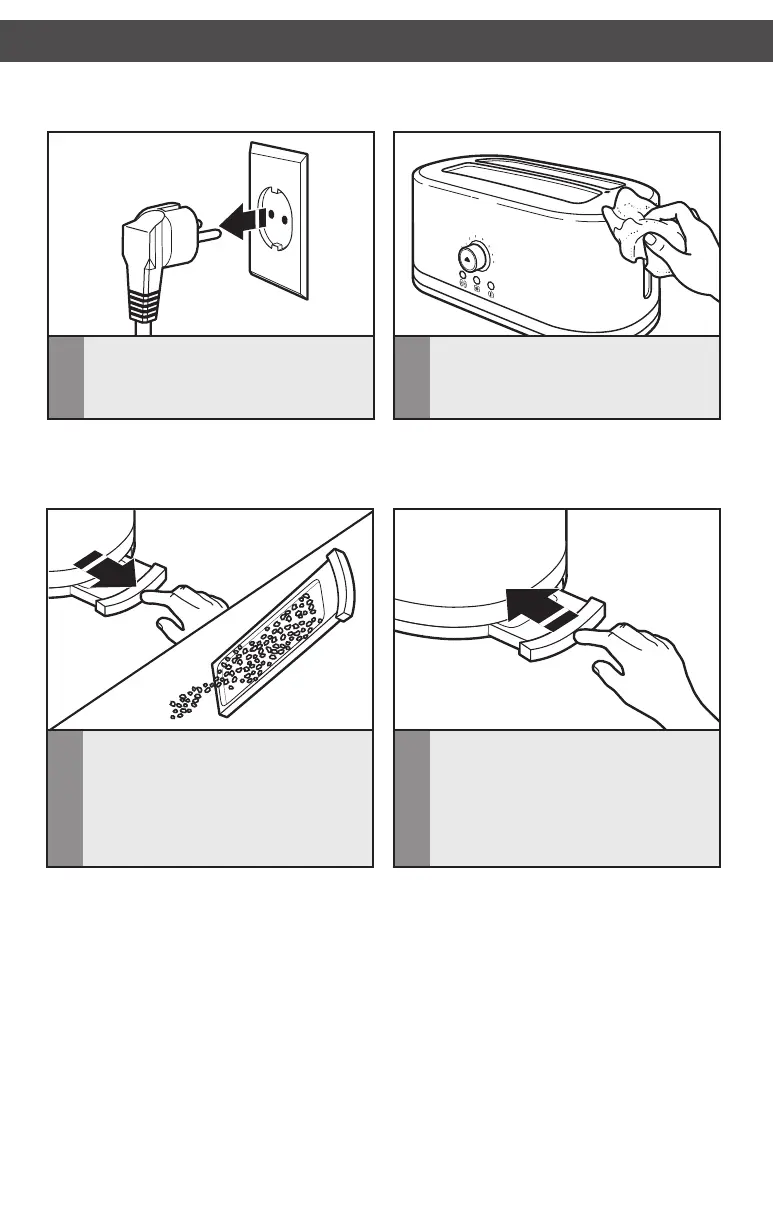
Press“PUSH”(locatedincenterofthe
crumbtray)sothatitopensslightly,
thenslideitoutoftheToaster.Shake
thecrumbsintoawastecontainer.For
consistentbrowningresults,emptythe
crumbtrayaftereachuse.Crumbtray
ishand-washonly
NOTE:KitchenAiddoesnotrecommend
theuseofatoastercover.
2
WipeToasterwithasoft,dampcotton
cloth.Donotusepapertowels,abrasive
cleansers or liquid cleaning products. Do
not immerse Toaster in water.
1
UnplugtheToasterandletitcoolbefore
cleaning.Plugwillvarybyregion.
IMPORTANT:Thetraywillbehotimmediatelyfollowingatoastingcycle.AllowToasterto
coolbeforeemptyingthecrumbtray.
NOTE:Ifgreaseoroilsplattersonthe
Toaster,wipesplattersawayimmediately
usingaclean,dampcottoncloth.
4
ReturncrumbtraytoToaster.Pressin
onthecenterofthecrumbtrayuntil
itclicksintoposition.Donotusethe
Toasterwithoutthecrumbtrayfully
in place.
W10739210B_01_EN_v01.indd 16 5/21/15 1:39 PM



 To Next Page