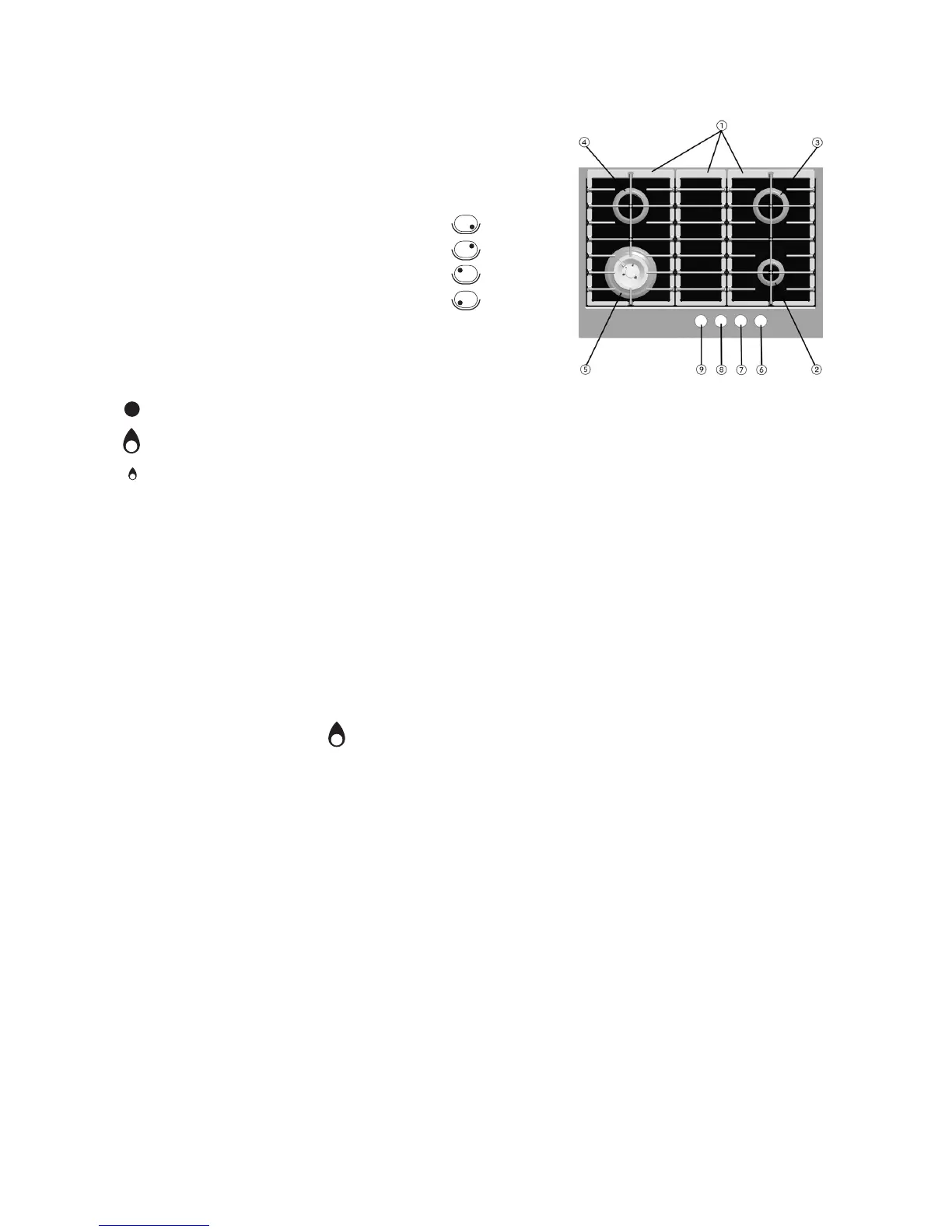
1. Removable pan supports
2. 1kWh auxiliary burner
3. 1.65kWh semi- fast burner
4. 1.65kWh semi- fast burner
5. Professional wok burner
6. Auxiliary burner control knob
7. Semi-fast burner control button
8. Semi-fast burner control button
9. Professional wok burner control button
Control Symbols
Off
Maximum flame
Minimum flame
Product description and symbols
To turn on one of the burners:
1. Turn the corresponding control knob
anticlockwise until the indicator coincides with
the maximum flame symbol .
2. Press the control knob to ignite the burner.
3. Once the burner has lit, keep the control knob
pressed for about 5 seconds to allow the safety
thermocouple fitted to each burner to engage.
The thermocouple will switch off the gas supply
to the burner should the flame be accidentally
lost ( A gust of air, momentary interruption of
gas supply or liquid spillage etc).
If the burner does not ignite within about 15
seconds, switch off the burner, check the
fitting of the burner cap and plate for correct
fitting. Wait at least 1 minute before trying
again.
If the burner goes out when the control knob
is released, the thermocouple did not engage.
wait al least 1 minute before repeating strps 1
to 3.
Using the burners
4








 To Next Page