ENGLISH
5
GETTING STARTED
SETTING THE CLOCK
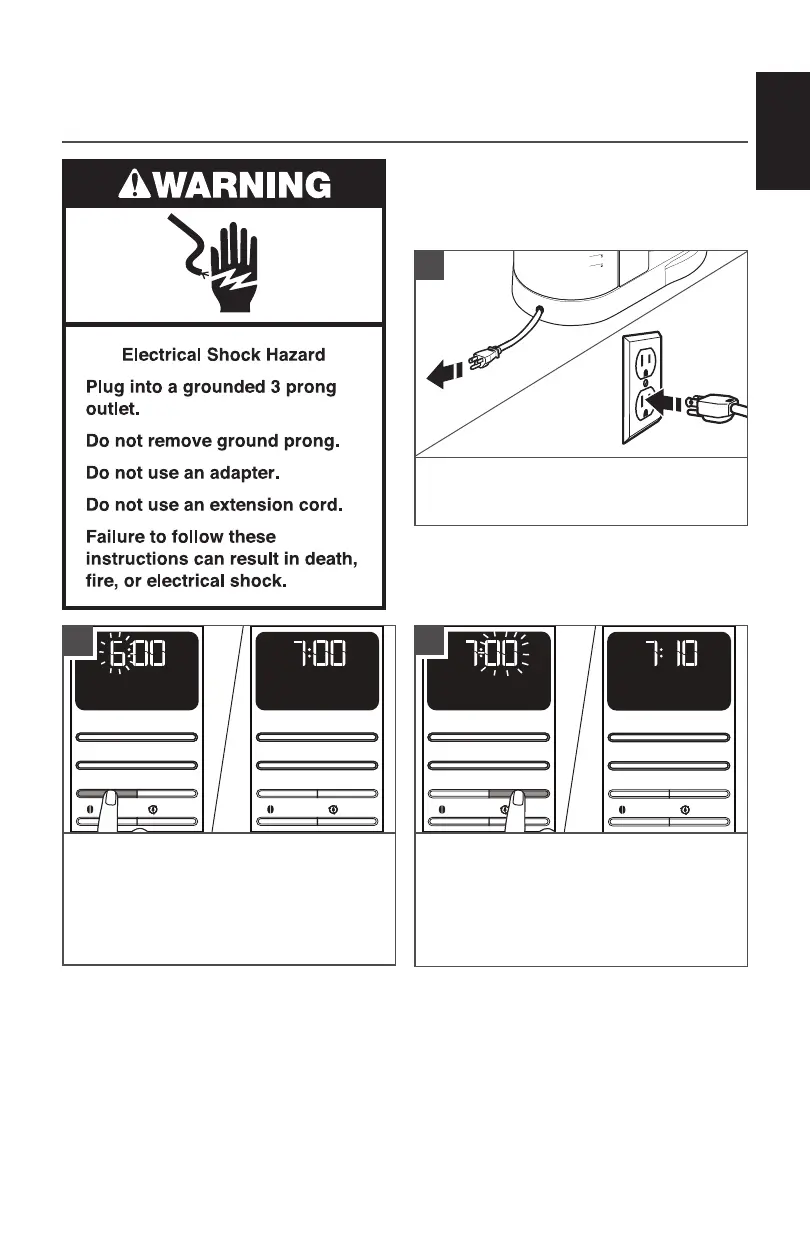
NOTE: When the Coffee Maker is first
plugged in or when power is restored
after an interruption, the display will
initially show 12:00 AM.
PM
x
AM
Hour
Bold
Clean
Minute
Auto Set
Brew/Cancel
PM
x
AM
Hour
Bold
Clean
Minute
Auto Set
Brew/Cancel
AM
PM
x
Hour
Bold
Clean
Minute
Auto Set
Brew/Cancel
AM
PM
x
Hour
Bold
Clean
Minute
Auto Set
Brew/Cancel
To set the hour: Press Hour.
The hour digits will change with each
press; or press and hold to scroll rapidly.
To set the minutes: Press Minute.
The minutes digits will change with each
press; or press and hold to scroll rapidly.
To save the current displayed time and exit
clock setup: Press any other button or do
not press any button for 10 seconds.
Cord is stored in base. If needed, gently
pull cord outwards. Plug into a grounded 3
prong outlet.
1
3
2









 To Next Page