ENGLISH
9
BREWING COFFEE
Auto
1
2
AM
xx
Auto
Set
Brew/
C
ance
l
Hour
Bold
Clea
n
M
inu
t
e
AM
PM
x
Hour
Bold
Clean
Minute
Auto Set
Brew/Cancel
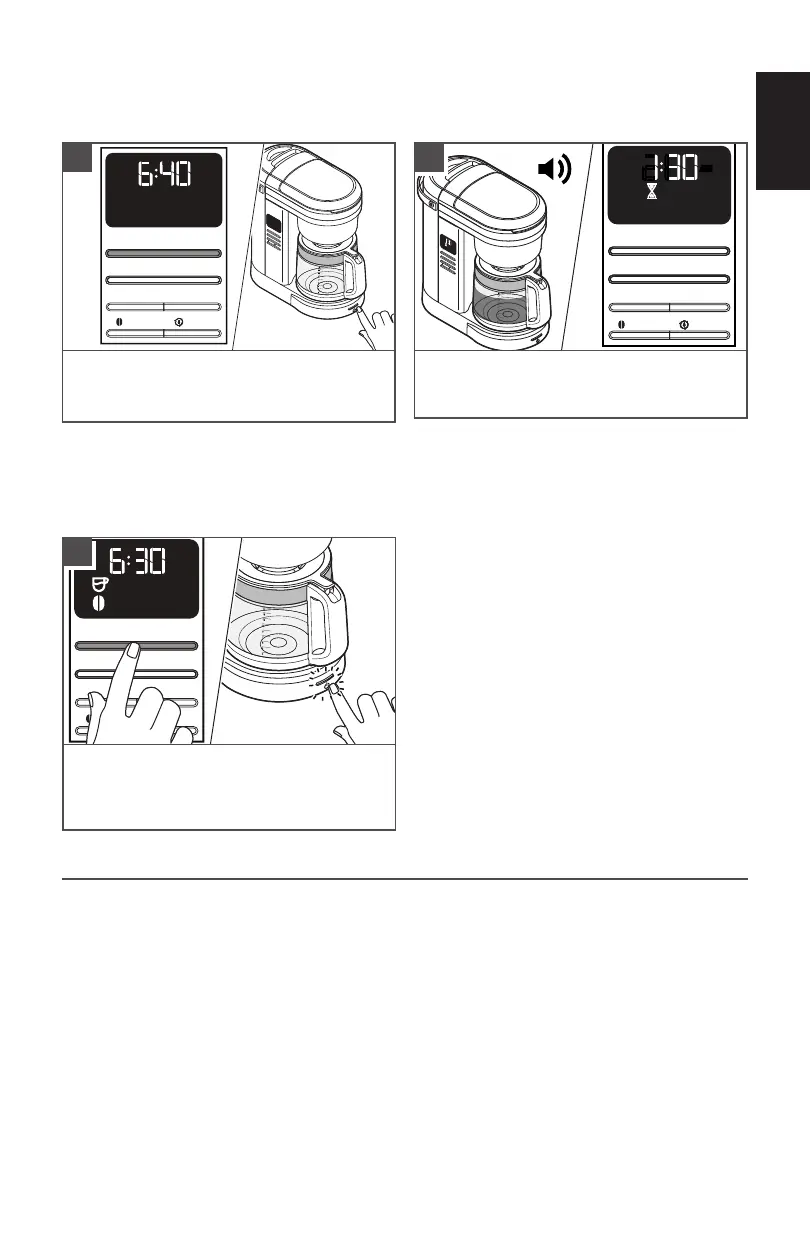
Press any of the Brew/Cancel buttons
provided on side or on front to begin
brewing coffee.
Auto 12
AM
x
Auto Set
Brew/Cancel
Hour
Bold
Clean
Minute
AM
PM
x
Hour
Bold
Clean
Minute
Auto Set
Brew/Cancel
The Coffee Maker will beep 3 times when
the Brew cycle is complete.
Then, 2-hour Warm mode will start.
2
1
TIP: Opening the Brew Basket while
coffee is brewing will interrupt the brew
process and impair the flavor.
Auto 12
AM
PM
x
Hour
Bold
Clean
Minute
Auto Set
Brew/Cancel
After Warm mode end, the Coffee Maker
will automatically turn off.
To Cancel Brew cycle or Warm mode, press
the Brew/Cancel button once.
3
PAUSE AND POUR FEATURE
The “Pause and pour” feature enables you to remove the Carafe and pour a cup of coffee
before brewing is nished. When the Carafe is removed, a special valve stops the ow of
coffee from the Brew Basket. However, brewing does not stop.
Make sure to place the Carafe back in the place within 25 seconds to avoid the overow of
the water and coffee grounds from the Brew Basket.
TIP: Brew 2 pots of fresh, cool water and discard before brewing the first pot of coffee.
NOTE: Default Standard Brewing cycle time for a full pot (12 cups) is approximately
10-minutes.
IMPORTANT: Allow the Coffee Maker to cool for 5 minutes before starting next brew
cycle.









 To Next Page