ENGLISH
9
USING THE MEAT PROBE FUNCTIONS
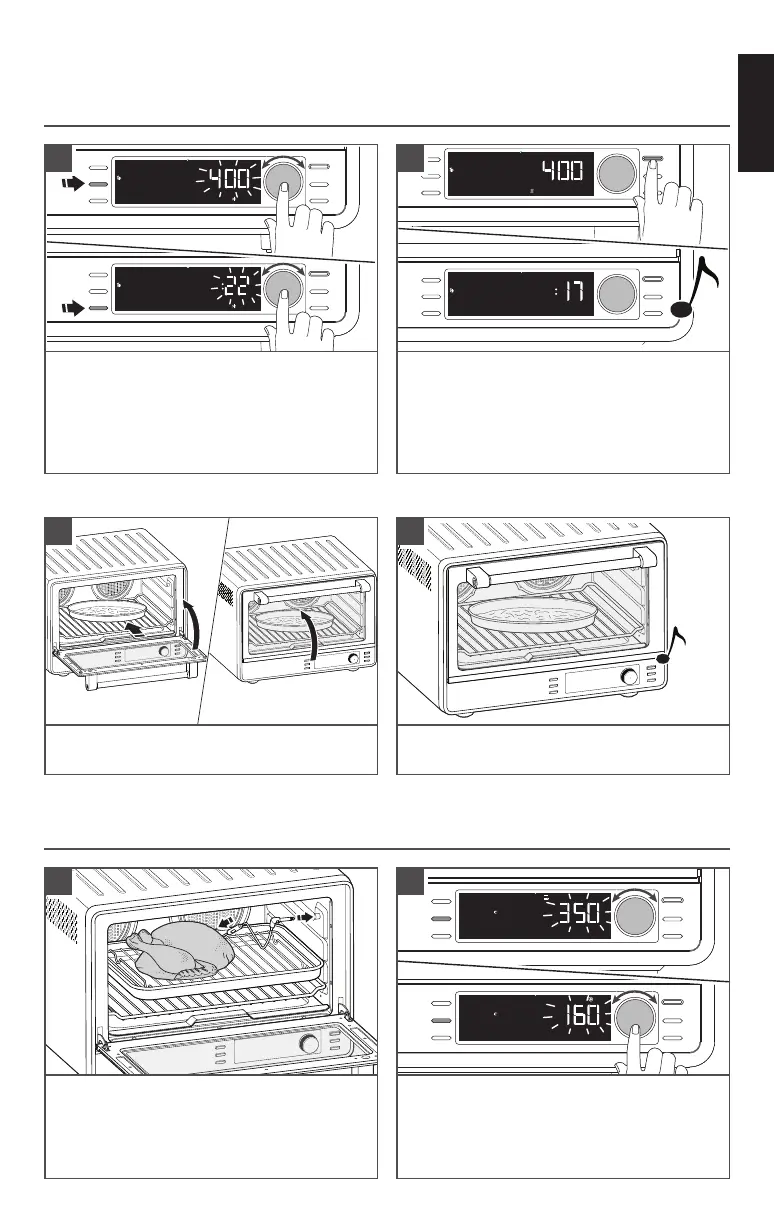
Insert the probe into the food item. Place
food in the oven. Lift probe cover and
connect the temperature probe to the jack.
NOTE: Keep probe as far away from the
heating elements as possible.
3
°F
Meat Probe
Oven
Function
Temp/Shade
Time/Slices
Start
Cancel
Frozen
°F
Meat Probe
Target
Function
Temp/Shade
Time/Slices
Start
Cancel
Frozen
Rotate the Knob to adjust the preset
oven temperature. Press Knob or
press temperature button to set target
temperature for food. Press Start button
to begin.
4
°F
Preheating
Pizza
Function
Temp/Shade
Time/Slices
Start
Cancel
Frozen
Min
Pizza
Function
Temp/Shade
Time/Slices
Start
Cancel
Frozen
Press Start to preheat the Oven. To skip
preheat and start the timer directly, press
Start button again.
A chime sounds when preheat is complete.
The display will change to show the time
counting down.
4
PRODUCT USAGE
Hrs
Frozen
Pizza
Function
Temp/Shade
Time/Slices
Start
Cancel
Frozen
°F
Frozen
Pizza
Function
Temp/Shade
Time/Slices
Start
Cancel
Frozen
Press Temp/Slices button or Knob to select
preset temperature. If desired, rotate
Knob to adjust. Press Time/Slices button
or Knob to show preset time. If desired,
rotate Knob to adjust the cooking time.
3
USING THE COOKING FUNCTIONS
When the cycle is complete, a chime will
sound. Enjoy!
6
Open and place the food on the rack.
Close the door.
5
IMPORTANT: Always use oven mitts when removing pans or racks.
(See “Cooking Functions”chart for temperature ranges.)



 To Next Page