EasyManua.ls Logo

KitchenAid KEBS207D - Page 16

KitchenAid KEBS207D
50 pages
Print Icon
To Next Page IconTo Next Page
To Previous Page IconTo Previous Page
Loading...
181‘7Zsing
Your
Oven
Adjusting
oven
temperature
Although
your
new
oven
is
properly
adjusted
to
provide
accurate
temperatures,
it
may
cook
faster
or
slower
than
your
old
oven.
If,
after
using
the
oven
for
a
period
of
time,
you
are
not
satisfied
with
the
baking/roasting
results,
you
can
change
the
temperature
calibration
by
following
the
steps
below.
The
control
will
“remember”
the
selected
offset
even
after
the
power
has
been
interrupted
or
lost.
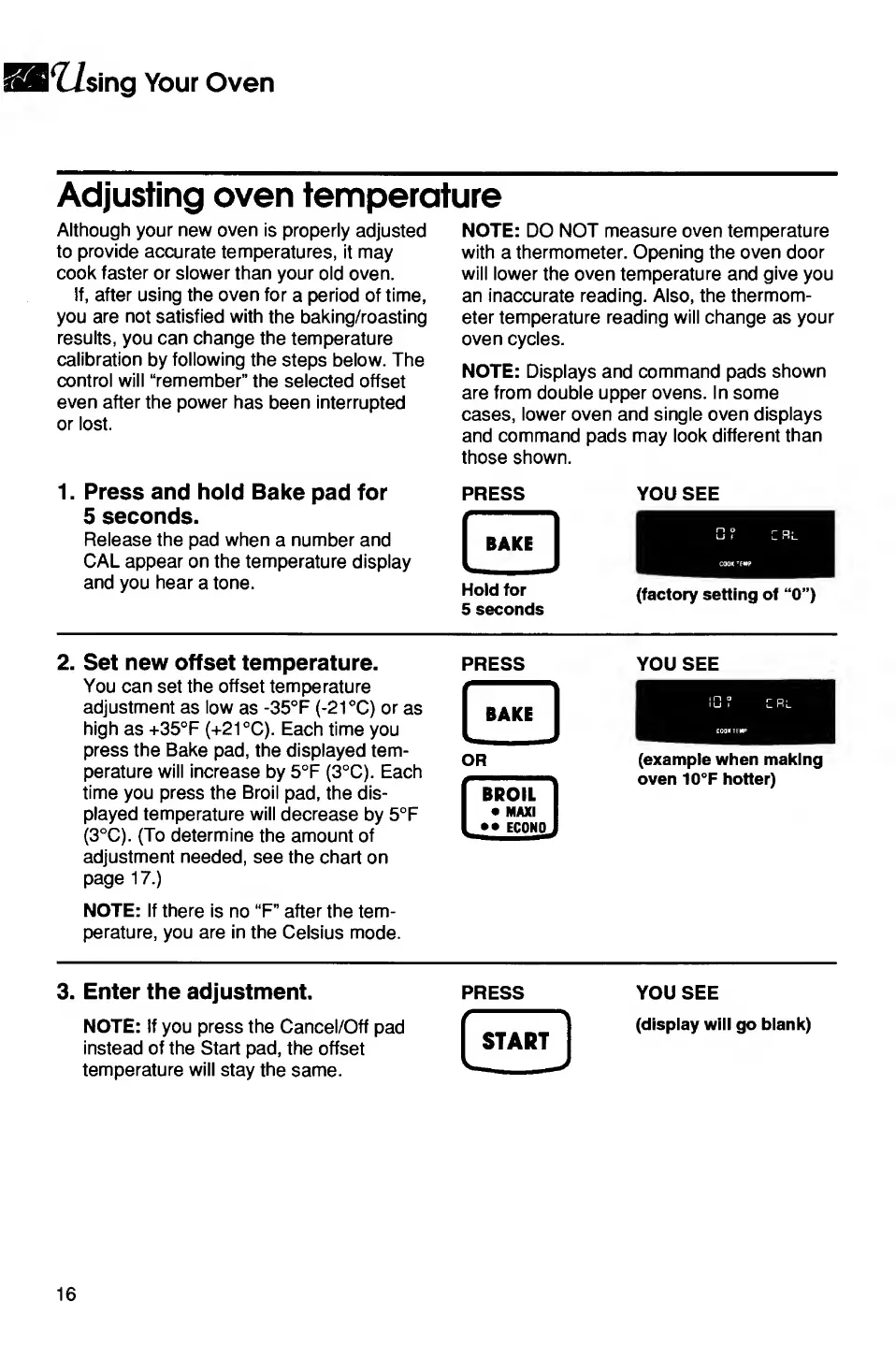
1.
Press
and
hold
Bake
pad
for
5
seconds.
Release
the
pad
when
a
number
and
CAL
appear
on
the
temperature
display
and
you
hear
a
tone.
NOTE:
DO
NOT
measure
oven
temperature
with
a
thermometer.
Opening
the
oven
door
will
lower
the
oven
temperature
and
give
you
an
inaccurate
reading.
Also,
the
thermom¬
eter
temperature
reading
will
change
as
your
oven
cycles.
NOTE:
Displays
and
command
pads
shown
are
from
double
upper
ovens.
In
some
cases,
lower
oven
and
single
oven
displays
and
command
pads
may
look
different
than
those
shown.
PRESS
YOU
SEE
hold
for
(factory
setting
of
“0”)
5
seconds
2.
Set
new
offset
temperature.
You
can
set
the
offset
temperature
adjustment
as
low
as
-35°F
(-21
°C)
or
as
high
as
+35°F
(+21
°C).
Each
time
you
press
the
Bake
pad,
the
displayed
tem¬
perature
will
increase
by
5°F
(3°C).
Each
time
you
press
the
Broil
pad,
the
dis¬
played
temperature
will
decrease
by
5°F
(3°C).
(To
determine
the
amount
of
adjustment
needed,
see
the
chart
on
page
17.)
NOTE:
If
there
is
no
“F”
after
the
tem¬
perature,
you
are
in
the
Celsius
mode.
PRESS
[
BAKi
I
OR
BROIL
MAXI
_
••
ECONO,
YOU
SEE
(example
when
making
oven
10°F
hotter)
3.
Enter
the
adjustment.
NOTE:
If
you
press
the
Cancel/Off
pad
instead
of
the
Start
pad,
the
offset
temperature
will
stay
the
same.
PRESS
f
>
START
*_-
YOU
SEE
(display
will
go
blank)
16

Related product manuals