EasyManua.ls Logo

KitchenAid KEBS207D - Page 22

KitchenAid KEBS207D
50 pages
Print Icon
To Next Page IconTo Next Page
To Previous Page IconTo Previous Page
Loading...
musing
Your
Oven
Using
EASY
CONVECT
Conversion
(upper
oven/single
oven/both
ovens
on
Models
KEBS208D
and
KEBS278D)
EASY
CONVECT
Conversion
lets
you
convection
cook
without
entering
convection
cook
temperatures
and
times.
Simply
enter
the
standard
cook
temperature
and
time
for
the
food
to
be
cooked.
The
oven
will
reduce
the
temperature,
or
the
temperature
and
time,
for
convection
cooking.
(Convection
temperatures
and
times
are
not
as
long
because
the
heated
air
is
circulated
in
the
oven
cavity
for
quicker
cooking.)
NOTE:
Displays
and
command
pads
shown
are
from
double
upper
ovens.
In
some
cases,
lower
oven
and
single
oven
displays
and
command
pads
may
look
different
than
those
shown.
NOTE:
The
converted
temperatures
and
times
are
not
precise
because
the
food
categories
you
choose
from
are
general.
(See
“EASY
CONVECT
Conversion
setting
chart”
on
page
23
for
which
foods
you
can
cook
in
each
setting.)
To
ensure
proper
cooking,
the
oven
will
prompt
you
to
check
food
at
the
end
of
cook
time.
If
food
needs
more
cooking,
the
oven
will
continue
to
cook.
If
food
does
not
need
more
cooking,
press
CANCEL/OFF.
1.
Place
food
in
oven.
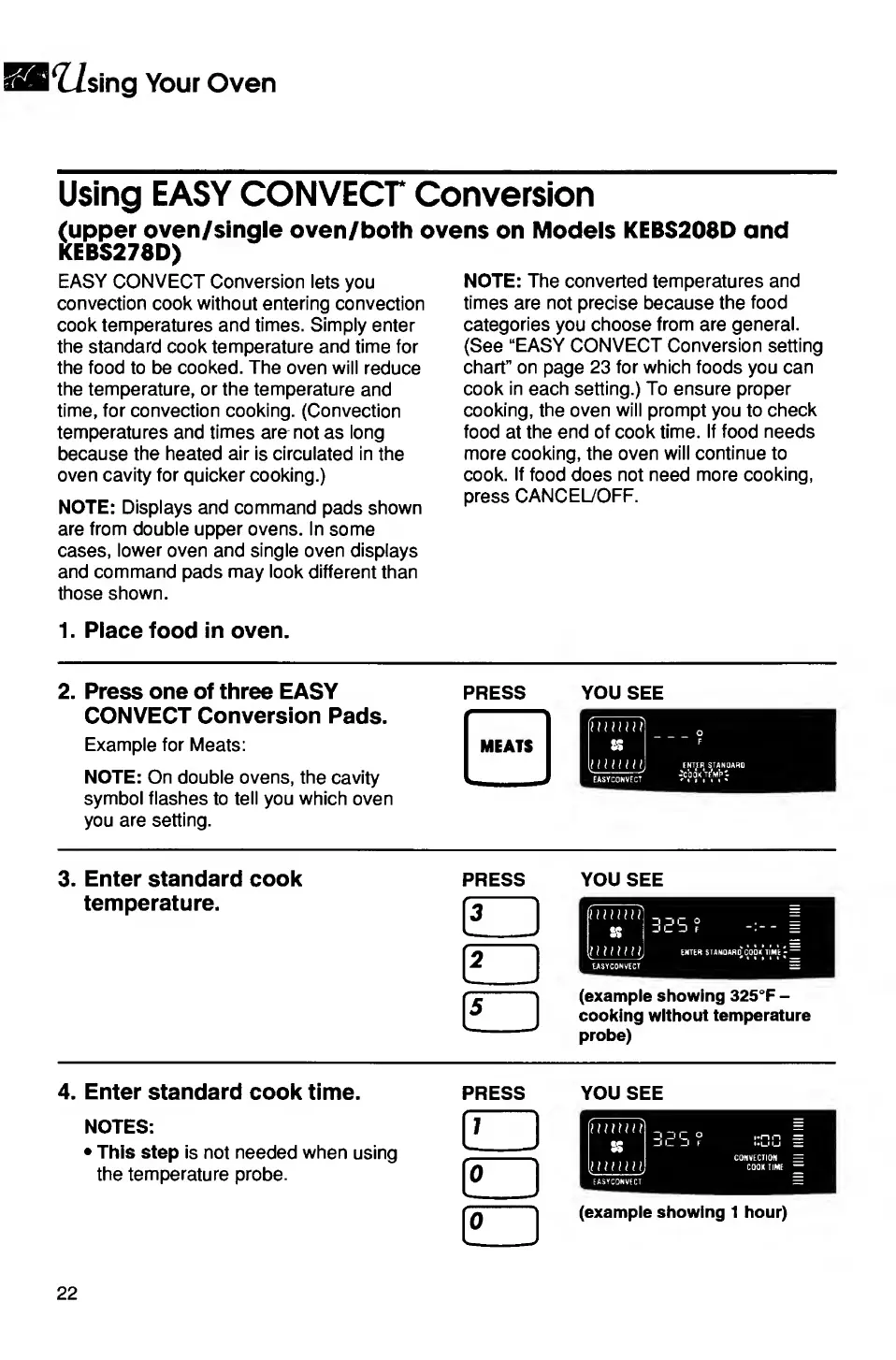
2.
Press
one
of
three
EASY
CONVECT
Conversion
Pads.
Example
for
Meats:
NOTE:
On
double
ovens,
the
cavity
symbol
flashes
to
tell
you
which
oven
you
are
setting.
PRESS
YOU
SEE
o
ENTEFJ
STANDARD
•COOK
TEMP
3.
Enter
standard
cook
temperature.
PRESS
YOU
SEE
(example
showing
325°F
-
cooking
without
temperature
probe)
V._
4.
Enter
standard
cook
time.
NOTES:
This
step
is
not
needed
when
using
the
temperature
probe.
PRESS
HD
YOU
SEE
(example
showing
1
hour)
22

Related product manuals